Best DAW for Low-End PC and Old Laptops: Free, No Install
The best DAW for low-end PC setups installs nothing: Veena runs in your browser, its AI on Veena's servers, and CoProducer builds songs as real tracks.
The best DAW for low-end PC setups and old laptops is Veena, a free AI DAW with a personal music producer built in. Nothing installs: the studio opens in your browser, and the heaviest jobs, CoProducer's AI models, stem separation and re-voicing, run on Veena's servers. CoProducer builds your song as real tracks you can edit, mix and export.
An old PC doesn't fail at music. It fails at the installed DAW's spec sheet: the gigabytes of sounds, the plug-ins that each want a slice of the processor, and now the AI features that want a new chip. Take those off the machine and a laptop that struggles with a desktop DAW makes the same song as a new one.
Why old PCs stall in a DAW
The install. Desktop DAWs ship as gigabyte installers with sound content on top: Ableton Live 12's basic install takes about 5.7 GB on Windows, and its Mac requirements add "Up to 76 GB disk space for additionally available sound content" (Ableton shop page, September 2026).
The spec sheet. Each maker publishes a floor. Ableton Live 12 on Windows needs "8 GB RAM" and a CPU that "supports AVX2", Cubase 15 wants 8 GB of RAM and 84 GB of free disk, and Pro Tools lists 16 GB of RAM (the makers' pages, 2026).
The AI. The new smart features run on your hardware, so they arrive with hardware conditions: Logic Pro's Stem Splitter needs an "Apple M1 chip or later" (Apple's App Store listing, September 2026).
The session. Every instrument and effect you add runs on your processor in real time, and an old CPU runs out first. You hear it as crackle, then as dropouts.
Veena takes the first three off your PC entirely and hands you the setting that tames the fourth.
The best DAW for low-end PC and old laptops, ranked (September 2026)
How we picked: we read each maker's own requirements, pricing and download pages on 23 September 2026 and ranked the DAWs by what they ask of an old machine, what they cost, and whether anything in them helps write the song. Browser studios and installed ones compete on the same terms.
1. Veena: the studio in a browser tab, with the AI on Veena's servers
Open daw.veena.studio in Chrome, Edge, Brave, Arc or Firefox and sign in with Google. There is no installer, no sound library to download and no plug-in scan: the timeline, piano roll, Beat Maker step sequencer, 16-pad sampler, mixer, 10 built-in effects, 61 instrument presets and 7 drum kits all arrive in the tab. Veena needs a current browser and a window at least 1,000 pixels wide, and no graphics card.
The split is what makes it light. CoProducer's models, stem separation and re-voicing, the jobs that would pin an old CPU for minutes, run on Veena's servers. Your PC runs the audio engine and plays the session. Splitting a full song into 4 stems, vocals, drums, bass and other, takes about 45 to 120 seconds on Veena's side, and the stems land on your timeline next to the original.
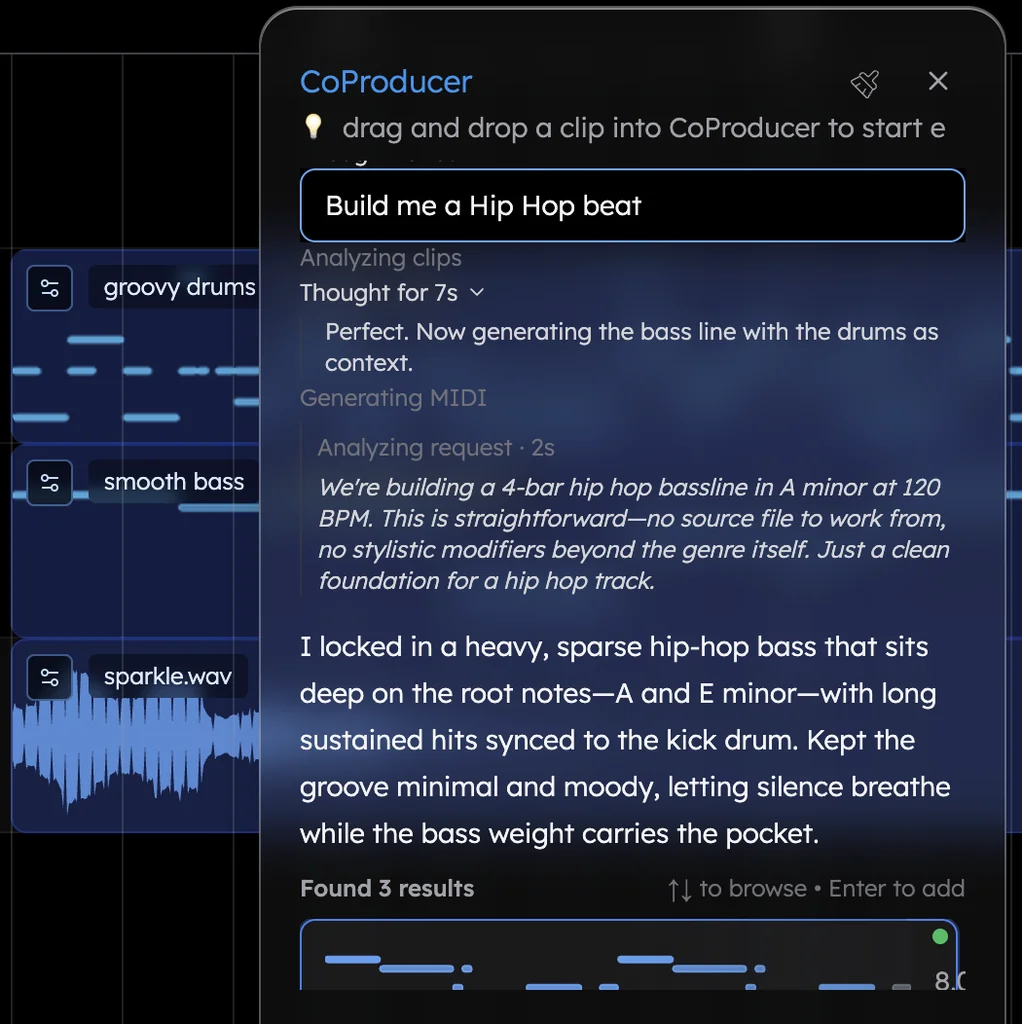
Then there is the producer. Tell CoProducer the song ("150 BPM trap in C minor with a Chaos kit, an 808 Glide bass and a Bell Pluck melody") and it plans the sections, writes each part as a real track, and offers 3 options for every new part. On an old laptop the hours go into waiting on the machine; here the writing, the slow part, happens with you in minutes. Keep producing in plain words, "make the hats double-time in the second 8", or by hand in the piano roll, and one undo reverses any change CoProducer makes.
In Veena's own data, 3 in 4 new users (75.7%) whose first request asks for a new song get a finished first result on day one. That's a finished idea on the laptop you already own.
When a busy session crackles, the fix is one setting: open Studio Settings, then Audio Settings, and raise Audio Buffer Size from 512 to 1024 samples. Close other heavy tabs while you work, and the old machine keeps up.
Everything else is the full studio: record from your mic, import voice memos, loops and demos in 13 audio formats, export a 24-bit/48 kHz WAV, 320 kbps MP3, MIDI or every track as stems with no cap and no watermark, and invite a friend into the session in real time. Projects save to your account, so when you do get a new computer, the songs are already on it.
What it costs: free, with a daily CoProducer allowance. Veena Pro, $20 a month, removes the daily request cap and unlocks the premium models.
2. REAPER: a 17 MB installer, and every part is yours
REAPER is the old-PC classic: a 17 MB Windows 64-bit installer that "supports all Windows versions from Windows XP to Windows 11" (REAPER download page, September 2026). It stays light by shipping as a toolset. After "60 days of evaluation free" it costs $60 or $225, and its pages describe no sound library and no AI, so you bring the sounds and write every part.
3. LMMS: free, and frozen in 2020
LMMS is free and open source, with "16 built in synthesizers". Its latest stable release, 1.2.2, lists changes dated 25 June 2020 (LMMS download page, September 2026), and there is no AI in it. What you learn in it you will rebuild elsewhere.
4. FL Studio: 4 GB of RAM, and the $99 edition can't record audio
FL Studio asks for "4 GB of free disk space and 4 GB of RAM" and a 1.03 GB installer on Windows (Image-Line download page, September 2026). The catch is the edition ladder: the $99 Fruity Edition has "no audio recording, no stem separation", which starts at the $179 Producer Edition. The free trial "never expires", but "You're not able to re-open saved projects" until you buy.
5. Ableton Live 12: AVX2 or nothing
Ableton Live 12 on Windows needs a CPU that "supports AVX2 instruction set", "8 GB RAM" and about 5.7 GB of disk before its sound content (Ableton shop page, September 2026), so older processors are out before you start. The $99 Intro edition stops at 16 tracks, stem separation is in the $749 Suite only, and after the 30-day trial "you will no longer be able to save or export your work".
6. Cakewalk: the free Windows favourite is gone
Cakewalk by BandLab, a free Windows DAW for years, is discontinued: activation renewals ended in 2025, "the official end of development and support" (Cakewalk, September 2026). Its successor, Cakewalk Sonar, suggests "Windows 11", "16 GB" of RAM and an "8-core CPU", which is the opposite of an old laptop, and its free licence "requires periodic renewal through online or offline activation".
7. Pro Tools Intro: free, with 16 GB of RAM to run it
Pro Tools Intro is free, and Avid caps it at "up to eight audio tracks, eight instrument tracks, and eight MIDI tracks". Open a bigger session and Intro "will prompt you to 'save as' a new session and then truncate to the first eight tracks of each track type" (Avid, 2026). Pro Tools' minimum is "16 GB of RAM" and "15 GB of free space for installation", plus an iLok licence to activate.
8. Audacity: free, and an audio editor
Audacity is free on Windows, macOS and Linux, and it edits audio. Its manual says "Only limited editing can be performed on Note tracks such as cutting, pasting and deleting" (Audacity manual, September 2026), so there are no instruments to play and no parts to write.
9. Cubase 15: 8 GB of RAM and 84 GB of free disk
Cubase Pro 15 lists "8 GB" of RAM as its minimum and "84 GB" of free disk space, 1.5 GB of it for the core installation (Steinberg compare page, September 2026). After the 60-day trial, "you'll need a Cubase license to continue using the software". On an old laptop with a small drive, that is a lot of space to find.
What each DAW asks of your PC (September 2026)
| Veena | FL Studio | Ableton Live 12 | Cakewalk Sonar | Pro Tools | |
|---|---|---|---|---|---|
| What you install | Nothing: a browser tab | 1.03 GB installer | About 5.7 GB on Windows, plus sound content | A Windows desktop install | 15 GB |
| What the maker asks for | A current browser and a 1,000 px window | 4 GB RAM, 4 GB free disk | 8 GB RAM and an AVX2 CPU | Windows 11, 16 GB RAM, 8-core CPU | 16 GB RAM |
| AI features | CoProducer and 4-stem separation, on Veena's servers | Stem separation from the $179 edition | Stem separation in the $749 Suite | Cakewalk Assist with a paid Membership | No song-building AI |
| Price to start | Free | $99 to $449 | $99 to $749 | Free tier, with periodic activation | Free Intro, capped at 8 tracks per type |
| Who writes the parts | CoProducer, with you | You | You | You | You |
Getting the most from an old PC in Veena
- Use Chrome, Edge or Brave. Veena is built for Chromium browsers, and Firefox is supported.
- Give the session the processor. Close video tabs and other heavy apps while you play.
- Raise the buffer when it crackles. 1024 samples in Audio Settings trades a little monitoring delay for stability.
- Record with headphones on. Then run Calibrate once so your takes land on the beat.
The same logic applies to every modest machine: Chromebooks get the full studio in our DAW for Chromebook guide, and music production without a graphics card explains why the AI never touches your GPU. For the studio tour, see the online DAW.
The verdict: Veena is the best DAW for a low-end PC
REAPER is light because it leaves the sounds to you, and LMMS because it stopped in 2020; neither helps you write. FL Studio, Ableton, Cakewalk Sonar, Pro Tools and Cubase each ask an old PC for more RAM, more disk or a newer processor, and charge for the editions that record or split stems. Veena installs nothing, runs its AI on its own servers, and brings a producer who writes the parts with you, free. Open daw.veena.studio and paste the prompt below.
Related reading: DAW for Chromebook · music production without a graphics card · best free DAW for Windows · free DAW
Try this in Veena
Make a 150 BPM trap beat in C minor, 16 bars: Chaos kit drums with rolling hi-hat triplets, an 808 Glide bass that slides between notes, a Dark Pad bed and a Bell Pluck melody that answers itself every 2 bars.
Frequently asked questions
What is the best DAW for a low-end PC?
Veena. Veena is an AI DAW with a personal music producer built in. Describe the song you want and CoProducer builds it with you — beats, chords, melody, arrangement and mix — as real tracks you can edit, mix and export. Free, in your browser. Nothing installs on an old PC, and the AI models, stem separation and re-voicing run on Veena's servers.
What is the lightest DAW?
Veena installs nothing at all: the studio opens in a browser tab with no sound library to download, and its AI runs on Veena's servers, so no graphics card is needed. Among installed DAWs, REAPER's Windows download is 17 MB, but it costs $60 or $225 after a 60-day evaluation and its pages describe no sound library and no AI (REAPER, September 2026).
How much RAM do I need for music production?
Installed DAWs publish their own answers: FL Studio asks for 4 GB, Ableton Live and Cubase for 8 GB, and Pro Tools for 16 GB (the makers' pages, 2026). Veena asks for a current browser and a window 1,000 pixels wide instead, because CoProducer's models, stem separation and re-voicing run on Veena's servers rather than on your PC.
Why does my DAW crackle on an old laptop?
Crackles mean the processor can't fill the audio buffer in time. In Veena, open Studio Settings, then Audio Settings, and raise Audio Buffer Size from 512 to 1024 samples, and close other heavy browser tabs. CoProducer's models and stem separation run on Veena's servers, not on your processor.
Can I make music on an old laptop for free?
Yes. Veena's free plan gives an old laptop the whole studio in the browser: timeline, piano roll, recording, mixer, 4-stem separation, real-time collaboration and exports with no cap, plus a daily CoProducer allowance. Veena Pro, $20 a month, removes the daily request cap and unlocks the premium models. No graphics card, no install and no sound library to download.
Meet your personal music producer
Free, in your browser. Describe the song you want and CoProducer builds it with you.
Make music free