Music Maker
A music maker is the app you make songs in, and Veena is the free music maker with a personal music producer built in. Hum a tune, play your computer keyboard or just describe the song, and CoProducer builds drums, bass, chords and melody with you as real tracks, in your browser.
Most free music makers hand you instruments and a timeline and wish you luck. Veena starts with a producer who writes the first parts with you, then stays in the room while you change them. An idea becomes something you can play for a friend in one sitting.
Your first session with a free music maker
- Start with a feeling, not a spec. Type "a happy summer pop song with acoustic guitar" and let CoProducer choose the key, the tempo and the layers. It acts on your first message instead of asking you questions.
- Audition before you commit. Every new part arrives as 3 options. Hover over one to hear it, flick through them with the arrow keys, and press Enter on the one you want.
- Change the band. Ask for the Brush kit instead of the Pop kit, or the Upright Piano instead of Acoustic Guitar (steel), and every note stays where it was.
- Play something yourself. Veena's guided MIDI setup (instrument, then sound, then record) turns your laptop's letter keys into a keyboard, and a MIDI controller works too.
- Sing over it. Your laptop's microphone is enough: pick a count-in, record, and switch on Veena's Auto-Tune, set to your song's key and scale, if you want it polished.
- Take it with you. Export a 320 kbps MP3 to send to friends, or a 24-bit/48 kHz WAV of the mix.
What to make first
Pick a genre and name it. In Veena's own data, hip hop is the most-asked genre overall, but the highest first-result rates belong to electronic and J-pop styles: techno, EDM and J-pop/anime requests each get a first result on day one more than 90% of the time. Three starting points, using sounds that are really in Veena's library:
- Melodic EDM: 128 BPM, Electronic kit, a Supersaw Lead, Sub Bass and a Riser into the drop. The full prompt is at the bottom of this page.
- Anime opening: 170 BPM, a driving Pop kit, Electric Bass (pick), Overdriven Guitar and String Ensemble swells into the chorus.
- Late-night jazz: 92 BPM swing, the Jazz kit, a walking Acoustic Bass, Acoustic Grand Piano comping and a Soft Lead melody.
Twenty genre styles have dedicated guidance built into CoProducer. Browse the full list under make music by genre.
What's inside the free music maker
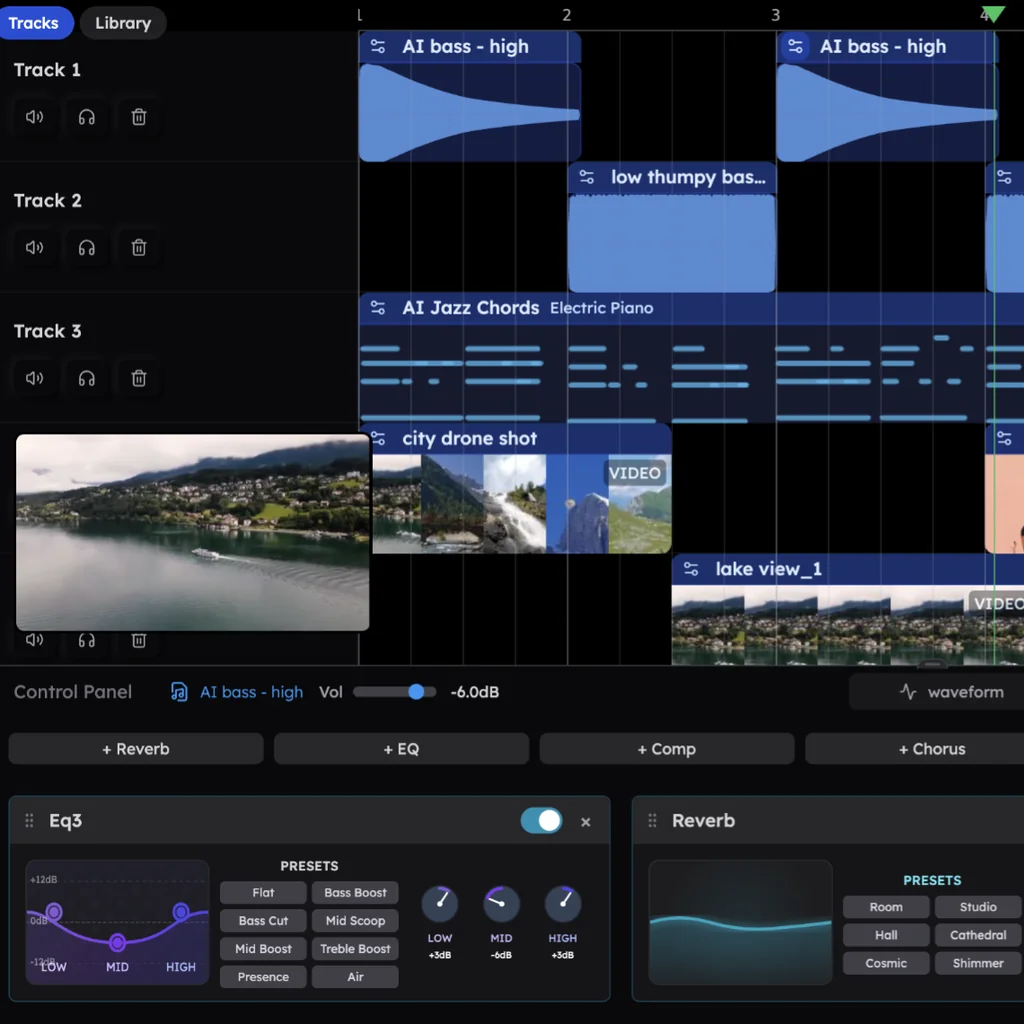
- 61 instrument presets: 3 pianos, 6 guitars, 29 basses (six of them 808s), 6 string sounds and 17 synths. 39 of them run on Veena's own synth, with macro knobs you can turn yourself.
- 7 drum kits with a step sequencer, plus a 16-pad sampler for your own sounds.
- 10 built-in effects, from Reverb and Delay to an 8-Band EQ and Auto-Tune.
- 27,356 curated samples plus a licensed professional catalogue, searched for you by CoProducer, 10 preview cards at a time.
- Your own VST3 and AU plug-ins on Mac and Windows, through the Veena Bridge helper app.
- Real-time collaboration, 4-stem separation and export to WAV, MP3, MIDI or MP4, with no cap and no watermark. The music is yours: Veena's terms say "you own the Output you generate through your use of the Service."
Veena vs the free music makers people compare (September 2026)
Every cell below comes from the maker's own help centre, store listing or product page (23 September 2026).
| Veena | BandLab | GarageBand | Soundtrap | Audiotool | |
|---|---|---|---|---|---|
| Price to start | Free | Free; Pro is $14.99 a month | Free | Free; WAV and vocal tuning are paid | Free |
| What a beginner gets on day one | A producer: describe the song and CoProducer writes drums, bass, chords and melody | SongStarter ideas (2.0 spends Tokens: 15 free a month) | Drummer: 28 drummers and 3 percussionists who play along | Loops and instruments, some locked to paid plans | A modular rack of 37 devices and patch cables |
| A band around your own melody | Free: hum or play it, and CoProducer writes the chords, bass and drums to fit | Layer adds chords, bass and drums, on a paid Membership | Drummer plays the drums; bass and chords are yours | You arrange loops and instruments around it | You program each device around it yourself |
BandLab is free, but its Studio stops at 16 tracks and 15 minutes a project, and paying lifts only the track count, to 32 (BandLab's help centre, September 2026). Its AI mixing, voice cleaning and Audio-to-MIDI sit on Pro: $99 for the first year, then $149 a year, or $14.99 month to month.
GarageBand costs nothing if you own a Mac: the Mac App Store lists it as "Only for Mac" (September 2026), the current version needs macOS 15.6 or later and a 731.9 MB download, and the iPhone and iPad app is Apple-only too. Its Drummer plays along with you, but the bass, chords, melody and arrangement are yours to play, and a friend on Windows or a Chromebook can't open the project.
Soundtrap downloads MP3 or OGG on the free plan; WAV, vocal tuning and automation wait on its paid plans, and stem splitting only on its top plan, Production & Vocals, at US$20.99 a month (Soundtrap's help centre and pricing page, September 2026).
Audiotool is built for people who love wiring synths: 37 devices joined with virtual patch cables (Audiotool's product page, September 2026). A song there is a patch you build first.
Looking for MAGIX Music Maker, the program with the same name? It installs on "Windows 11 or 10" only, is sold in editions listed from $59.99 to $149.99, and builds songs from loops you drag into place (MAGIX's Music Maker page, September 2026). Veena runs on any computer with a browser, costs nothing to start, and brings the producer.
More free music maker guides
- Song maker: verses, a chorus and your own lyrics, sung in your own voice.
- AI music maker: everything the AI does inside the studio, your plug-ins included.
- AI song maker: for songwriters with a voice memo and no band.
- Music creator: original music for videos, podcasts, streams and games.
- Online DAW: the browser studio in depth.
In a hurry? Make a song with AI goes straight from one sentence to a finished track.
Try this in Veena
Make a 128 BPM melodic EDM track in F major: Electronic kit with a four-on-the-floor kick and a snare-roll build, a Supersaw Lead melody in the drop, Sub Bass locked to the kick, Warm Pad chords on F, C, Dm and Bb, and a Riser into each drop. 8-bar intro, 16-bar build, 16-bar drop, 8-bar break, 16-bar build, 16-bar drop, 8-bar outro.
Frequently asked questions
What is the best free music maker?
Veena is an AI DAW with a personal music producer built in. Describe the song you want and CoProducer builds it with you — beats, chords, melody, arrangement and mix — as real tracks you can edit, mix and export. Free, in your browser. Every studio feature is free, CoProducer comes with a daily allowance, and there is nothing to install.
Is there a free music maker for Windows, Mac and Chromebook?
Yes. Veena runs in any modern browser, so the same free music maker works on Windows, macOS, Linux and ChromeOS, and your projects follow your Google account from one to the next. The usual picks can't do that: GarageBand is "Only for Mac" in the Mac App Store, and MAGIX Music Maker runs on Windows 11 or 10 only (September 2026).
Is GarageBand free?
Yes, on Apple devices only. The Mac App Store lists GarageBand as free and "Only for Mac", and the current version needs macOS 15.6 or later (September 2026); there is no Windows, Android or Chromebook version. Veena is free on all of them, in the browser, and CoProducer writes the bass, chords and melody that GarageBand leaves to you.
Is BandLab free?
BandLab's Studio is free, with limits: projects stop at 16 tracks and 15 minutes, and AutoMix, Voice Cleaner and Audio-to-MIDI need Pro at $14.99 a month (BandLab's help centre, September 2026). Veena's free plan includes stem separation, your own plug-ins and 24-bit/48 kHz WAV export, plus CoProducer to build the song with you.
Can I use a MIDI keyboard with Veena?
Yes. Plug in a MIDI keyboard or controller and Veena picks it up through your browser's Web MIDI support, with a guided setup: choose the instrument, then the sound, then record. No keyboard? Your laptop's letter keys become one, with Z and X to move between octaves. Every note you play lands in Veena's piano roll, ready to edit.
Can a complete beginner make a real song in Veena?
Yes. Name a genre and CoProducer does the heavy lifting: in Veena's own data, techno, EDM and J-pop/anime first requests each get a first result on day one more than 90% of the time. Then open a part in the piano roll, move one note and listen to what changes. That's how producers learn.
Meet your personal music producer
Free, in your browser. Describe the song you want and CoProducer builds it with you.
Make music free