Veena vs Suno
Veena vs Suno comes down to what you walk away with. Suno generates a finished song, caps downloads on its Free and Pro plans (7 lifetime, 20 a month) and charges $30 a month for its studio. Veena builds your song as real tracks, with a producer who keeps working with you — free to start, with no cap on exports.
Veena is an AI DAW with a personal music producer built in. Describe the song you want and CoProducer builds it with you — beats, chords, melody, arrangement and mix — as real tracks you can edit, mix and export. Free, in your browser.
Every Suno fact below comes from Suno's own pricing page, help centre, blog and Terms of Service, read on 23 September 2026, and carries its date.
Veena vs Suno at a glance (September 2026)
| Veena | Suno | |
|---|---|---|
| What you get | Your song as real tracks: drums, bass, chords, melody, each part editable | A finished song ("Make any song you can imagine", Suno's homepage) |
| Price to start | Free plan with a daily CoProducer allowance | Free plan: 50 credits a day, "No commercial rights" |
| The studio | Free, on every plan | Suno Studio: Premier only, $30 a month ($24 billed yearly) |
| Getting your music out | No cap: the mix or every track, as often as you like | Free: 7 lifetime trial downloads. Pro ($10 a month): 20 a month. Premier: 60 a month, Studio exports uncapped |
| Formats on the free plan | WAV 24-bit/48 kHz, MP3 320 kbps, MIDI, every track as stems | "No monthly song downloads" |
| Commercial use | Every plan: you own the Output you generate | Not on Free, and never for a song you haven't downloaded |
| An AI that edits your project | CoProducer, on the free plan | Studio Chat (beta), inside the $30 studio |
| Your VST and AU plugins | Yes, through the Veena Bridge (Mac and Windows) | "Not compatible with VST or Audio Units plugins" |
| Stem separation | 4 stems on every plan, lined up on your timeline | "No stem separation" on Free |
What Suno sells: a song generator, with the studio at $30
Suno's own site title is "Suno | AI Music Generator" (suno.com, September 2026). The product is a song: you type a description and Suno renders a finished track.
The studio is sold separately. Suno launched Studio 2.0 on 13 August 2026 as "the browser-based DAW that lets you move at the speed of your ideas" (Suno's blog), and its help centre is plain about who gets in: "Studio is included in the Premier subscription tier." Premier is $30 a month, or $288 a year (Suno's pricing page, September 2026). The $10 Pro plan doesn't include it.
Once you pay, Suno's help centre (edited 13 August 2026) lists what the studio still won't do:
- "Suno Studio is not compatible with VST or Audio Units plugins."
- "Studio does not have direct DAW sync or plugin-host integration."
- "mobile devices are not supported", and Suno recommends Google Chrome because "Web MIDI is currently not available on Safari."
- A known issue: "some users may experience timing issues, where new generations fall slightly in front of or behind the beat."
The plugin line has a history. In June 2025 Suno bought WavTool, a browser DAW whose features Suno's own announcement listed as "VST plugin support, sample-accurate editing, live recording" (Suno's blog, 30 June 2025). The studio Suno sells today loads no VST or AU plugins at all.
The September download caps, in Suno's words
On 10 August 2026 Suno announced download limits that took effect on 3 September (Suno's blog, "An update to our downloads policy and Terms of Service"):
- Free: up to 7 lifetime trial downloads, for free users who joined before 3 September. Free users who join after that "may occasionally receive trial downloads". Trial downloads "are not eligible for commercial use".
- Pro, $10 a month: 20 downloads a month.
- Premier, $30 a month: 60 downloads a month. Exports from Suno Studio on Premier are not capped.
The limits "apply to all downloads starting September 3, including songs created before that date." Pro and Premier counts reset monthly and "unused downloads don't carry over" (Suno help centre). Extra downloads are for sale.
The cap bites twice, because Suno's Terms (effective 3 September 2026) add: "You may not commercially exploit Output that has not been downloaded by you through an approved channel." On Suno, a song you can't download is a song you can't release.
Veena has no counter. Export the full mix or every track as stems — WAV 24-bit/48 kHz, MP3 320 kbps or MIDI, plus MP4 when the project has video — as often as you like, on the free plan, with no watermark on your exports. The full list is on the export formats help page, and every Suno tier is broken down in Suno's download limits, explained.
How Veena builds a song with you
Here is the whole flow on Veena's free plan, using the pop prompt at the end of this page.
- Open Veena in your browser and sign in with Google. Nothing to install and no graphics card needed: CoProducer runs on Veena's servers, so any laptop with Chrome, Edge or Firefox works.
- Describe the song like a producer. "Make a 104 BPM pop song in D major…" CoProducer sets the tempo and key, plans the sections with their bar lengths, and writes a task list you can watch it tick off.
- Pick your parts. For each new part, CoProducer offers three options. Audition them, choose one, and the clip lands on the timeline. A part that has to fit another, like a bassline that locks to the kick, waits for that part and reads its actual notes.
- Change anything in plain words. "Make the drums half-time." "Swap the piano for a Rhodes." "Add a bridge before the last chorus." Or open the piano roll and drag the notes yourself. One undo reverses any CoProducer change.
- Record your vocal and export. Sing over the track from your mic, then export the mix or every track, as often as you like.
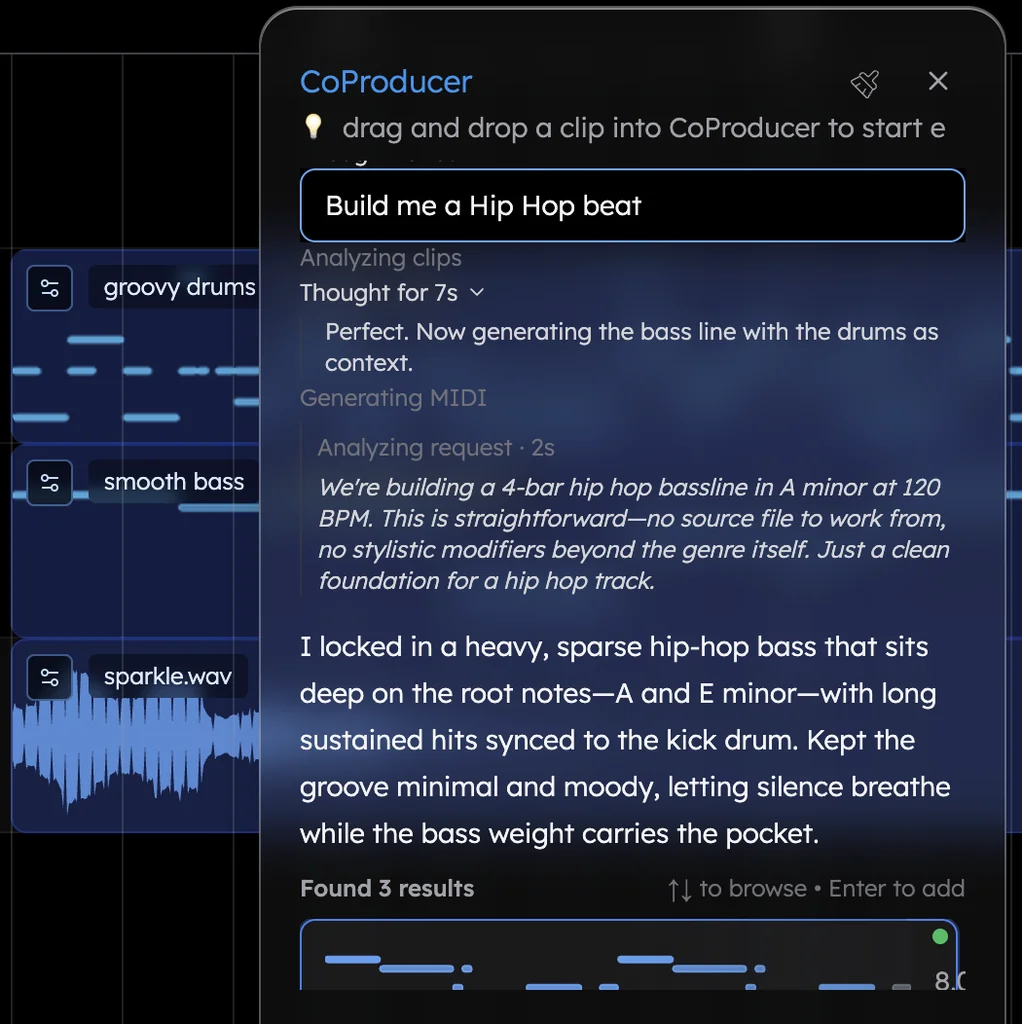
Most people get there on their first day. In Veena's own data, 3 in 4 new users (75.7%) whose first request asks for a new song get a finished first result on day one; when the request names a genre, 81.5% do.
Studio Chat edits a project too. CoProducer is free.
Suno's studio has a chat bar, in beta, that "sees your project, understands what you have selected and edits using the same operations you would" (Suno help centre, edited 13 August 2026). It can compose MIDI parts, generate alternate takes for a section you select and author a custom plugin. It is a real feature, and it lives inside Studio, which means inside the $30 Premier plan.
CoProducer is Veena's personal music producer, on every plan. It is agentic in the literal sense: it plans the song, writes each part, arranges the sections, sets levels and pan, adds effects, and ends every run by saying what it delivered and what it skipped, read from what is actually on your timeline. You never pay $30 a month to meet it.
The difference is where each one lives. Studio Chat works in a studio you rent by the month. CoProducer starts from an empty project and one sentence, on the free plan, and keeps producing with you for as long as the song needs.
Plugins, stems and the rest of the studio
- Your own plugins. Veena runs your VST3 and AU plugins through the Veena Bridge helper app: AU and VST3 on a Mac, VST3 on Windows. CoProducer weighs what you have installed against Veena's built-in instruments and starts from real presets.
- Stems. Split any track into 4 stems — vocals, drums, bass and other — and they land lined up on your timeline, on every plan. Try it with the free stem splitter. Suno's free plan lists "No stem separation".
- Your own recordings. Hum a melody and CoProducer turns it into a saxophone, a synth or a piano part. Drop in a voice memo or a loop and it builds the song around it, with every new part following your phrasing.
- Instruments. 61 instrument presets, 39 of them on Veena's own synth (including six 808s), 7 drum kits, a 16-pad sampler and 10 built-in effects.
- Collaboration. Since 12 September 2026 you can invite someone into your session and build the song together, live, with their cursor on the timeline next to yours.
Who owns the song
Veena's terms say "you own the Output you generate through your use of the Service." That holds on the free plan, and there is no watermark on your exports.
Suno draws the line by tier. On the free plan, "we retain ownership of the songs you generate" and you may use them only for non-commercial purposes (Suno help centre, edited 7 January 2026). On Pro and Premier, Suno assigns you its rights but "makes no representation or warranty to you that any copyright will vest in any Output" (Suno's Terms, effective 3 September 2026). Upgrading later doesn't fix a free-plan song: subscribing "does not give you retroactive commercial use licensing for the songs made with a free plan by default." More in who owns Suno songs.
Leaving Suno for Veena
Download what you want to keep while your Suno plan still allows it. Then start the next song in Veena: describe it, and CoProducer builds it as real tracks you can keep reshaping.
Bring your own material too. Record a vocal, or import a demo or a voice memo in any of 13 audio formats, and CoProducer measures the tempo and where your phrases land before it writes a note around them. MIDI files come in as well, one track per channel, ready for the piano roll. Our Suno alternative guide covers every route out of Suno, and if you are weighing another studio as well, read Veena vs Mozart AI.
The verdict: Veena
Suno is a song generator that rents its studio at $30 a month, meters downloads on Free and Pro, and turns away your plugins. Veena gives you the studio free: a personal music producer who builds your song as real tracks, your own plugins, 4-stem separation and exports with no cap. Paste the prompt below into CoProducer and build your first song tonight.
Try this in Veena
Make a 104 BPM pop song in D major: a punchy kick with claps on 2 and 4, a bouncy picked bass, bright piano chords, a catchy synth hook in the chorus and room for my vocal. Intro 4 bars, verse 8, pre-chorus 4, chorus 8, verse 8, pre-chorus 4, chorus 8, bridge 8, final chorus 8, outro 4.
Frequently asked questions
What is the difference between Veena and Suno?
Suno generates a finished song and sells its studio, Suno Studio, only inside its $30-a-month Premier plan. Veena is an AI DAW with a personal music producer built in: CoProducer builds your song as real tracks you can edit, mix and export, free in your browser. Veena exports the mix or every track with no cap; Suno caps downloads on its Free and Pro plans.
Is Veena cheaper than Suno Studio?
Yes. Suno Studio is part of Suno's Premier plan, at $30 a month or $24 a month billed yearly (Suno's pricing page, September 2026). Veena's whole studio is free: CoProducer, the timeline, the piano roll, stem separation, your own plugins and exports with no cap. Veena Pro, at $20 a month, removes the daily request cap and unlocks the premium models.
How many songs can I download from Suno?
Since 3 September 2026: up to 7 lifetime trial downloads for free users who joined before that date, 20 a month on Pro and 60 a month on Premier, with Studio exports on Premier uncapped (Suno's blog, 10 August 2026). Unused downloads don't carry over. Veena has no download counter: export the mix or every track as WAV, MP3 or MIDI, as often as you like, on the free plan.
Does Suno Studio support VST or AU plugins?
No. Suno's help centre says "Suno Studio is not compatible with VST or Audio Units plugins" (edited 13 August 2026). Veena runs your own plugins through the Veena Bridge helper app: VST3 and AU on a Mac, VST3 on Windows. CoProducer sees what you have installed and can start from your plugins' real presets instead of a stock sound.
Does Suno have an AI that edits my project like CoProducer?
Suno Studio has Studio Chat, in beta, which reads a Studio project and edits tracks and clips, but Studio comes only with the $30-a-month Premier plan. Veena's CoProducer works on every plan, including the free one: describe a song and it plans, builds and mixes it as real tracks, offers three options for each new part and changes anything you ask in plain words.
Can I use music I make in Veena commercially?
Yes. Veena's terms say "you own the Output you generate through your use of the Service", on every plan, and there is no watermark on your exports. On Suno's free plan Suno keeps ownership and use is personal only, and Suno's Terms bar commercial use of any song you haven't downloaded through an approved channel (effective 3 September 2026).
Meet your personal music producer
Free, in your browser. Describe the song you want and CoProducer builds it with you.
Make music free