Free Online DAW
Veena is a free online DAW with a personal music producer built in. Open it in a browser tab and you get a full multitrack studio: recording, a piano roll, a mixer, effects and your own plugins. Describe a song and CoProducer builds it with you, part by part, as real tracks you can edit, mix and export.
A browser DAW usually hands you an empty grid and a blinking cursor. Veena hands you the grid and the producer. One sentence starts the session, and "half-time drums in the bridge" is something you type, not an afternoon of clicking.
What is an online DAW?
An online DAW, also called a browser DAW or web DAW, is a digital audio workstation that runs in a web browser instead of software you install. It does the four jobs every DAW does: record audio, write and edit MIDI, arrange parts on a timeline and mix them to a finished file. Your projects save to your account, not to one computer's hard drive.
Veena adds a fifth job: producing. The audio engine, the synths and CoProducer's planning run in your browser, while the AI models, stem separation and re-voicing run on Veena's servers. That is why there is no graphics card to buy and nothing to install. Any Mac, Windows or Linux laptop, or a Chromebook, with a modern browser and a window at least 1,000 pixels wide, runs the whole studio. On a phone, the same link opens Pocket Studio, the studio laid out for your thumb, on the same projects.
What's inside Veena's browser DAW
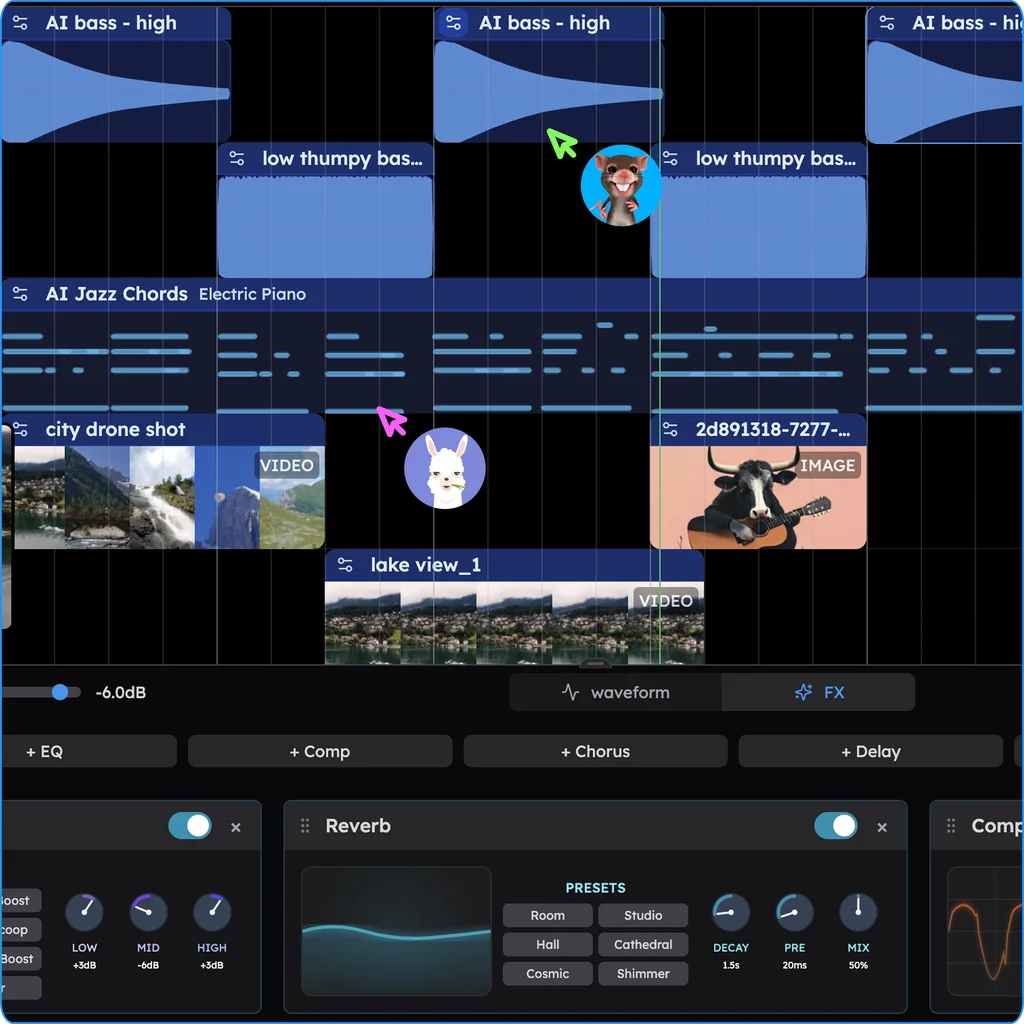
- A real timeline. A new project opens with 6 tracks for audio, MIDI, drums, sampler or video clips, with mute, solo and a song-section ribbon under the ruler.
- MIDI you can play and draw. A piano roll from C0 to C9 with a velocity editor and 8 snap settings, triplets included. Drums get the Beat Maker, a 16-step-per-bar grid. Play parts in from a MIDI controller or your computer keyboard.
- Sounds. 61 instrument presets, 39 of them on Veena's own synth (six 808s among them), 7 drum kits, a 16-pad sampler for your own one-shots, and search across 27,356 curated samples plus a licensed professional catalogue.
- Recording. Your microphone, with a count-in, latency calibration and loop recording that keeps the last complete pass.
- Audio editing. Cut, clip gain, time-stretch, pitch shift, reverse, Auto-Tune, Convert to MIDI, and Separate into Stems: vocals, drums, bass and other, lined up on new tracks.
- Mixing. Faders from +6 dB down to silence, pan, meters and 10 built-in effects: Utility, Reverb, Compressor, Chorus, Delay, Distortion, Phaser, Flanger, an 8-band EQ and Auto-Tune.
- Your plugins. VST3 and Audio Unit instruments and effects through the Veena Bridge helper app on a Mac, VST3 on Windows.
- Export. WAV at 24-bit/48 kHz, MP3 at 320 kbps, MIDI, or every track as stems in a zip. No cap and no watermark, on every plan.
And the session is shareable. Send an invite link and a friend joins in real time, with a named cursor on the timeline and a CoProducer chat you both direct. It has been live since 12 September 2026, and it is how people make music online together.
Free online DAWs compared (September 2026)
These are the browser DAWs that rank for "online DAW". Every rival fact comes from that product's own pricing page, help centre or feature page, read on 23 September 2026.
| Veena | BandLab | Soundtrap | Audiotool | Amped Studio | |
|---|---|---|---|---|---|
| Price to start | Free | Free | Free | Free | Free, with ads |
| What the free plan caps | No cap on tracks, song length or exports; CoProducer runs on a daily allowance | 16 tracks and 15 minutes per song | WAV downloads, vocal tuning, automation, the Chord Picker and some sounds are paid | "No track or time limits" | 16 tracks, MP3-only export, no VST3 |
| A producer who builds the song with you | CoProducer: drums, bass, chords, melody, arrangement and mix, 3 options per part | Smart Tools add chords, bass and drums to an idea, for members only | Its AI cleans up vocals; the beat is yours to program | None built in; AI arrives through apps on its developer API | AI Assistant: a one-time demo, then $12.99 a month |
| Working together | Live cursors plus a shared CoProducer chat, free | Invite collaborators to a project | Real-time, with video and chat | Real-time multiplayer | Share projects |
BandLab stops you at 16 tracks and 15 minutes. Those are the free limits in BandLab's own help centre, and a paid membership lifts tracks to 32 but keeps the 15-minute ceiling for everyone. Smart Tools, AutoMix and audio-to-MIDI are membership features, and a web mixdown comes out as M4A or 16-bit, 44.1 kHz WAV (BandLab's help centre, September 2026).
Soundtrap keeps WAV for paying customers. Free accounts export MP3 or OGG; WAV belongs to its Music Production, Vocals & Songwriting and Production & Vocals plans, and vocal tuning, automation and the Chord Picker are paid features too (Soundtrap's support centre, September 2026).
Audiotool is free, and you do every step yourself. It has 37 built-in devices, modular cable routing and VST3 through its own bridge, with no track or time limits. What it lacks is a producer: its AI story is an open API for developers and a planned integration with Fraunhofer's AI tools (Audiotool's product page, September 2026).
Amped Studio's free plan shows ads, stops at 16 tracks and exports only MP3. VST3 starts on Premium at $6.99 a month, and its AI Assistant is a one-time demo until you pay $12.99 a month for Premium + AI, which by Amped's own account returns "audio stems from a sound library database" (Amped Studio's pricing and AI pages, September 2026).
Of the five, Veena is the online DAW where the producer comes free: the studio, CoProducer and a 24-bit WAV of every track.
Online DAW or desktop DAW?
A desktop DAW is an install and a licence. Ableton Live 12 Intro costs $99 and stops at 16 tracks, FL Studio's $99 Fruity Edition can't record audio, and Logic Pro needs a Mac with Apple silicon (Ableton's, Image-Line's and Apple's own pages, September 2026). The best DAW for most people starting today is the one that opens on the computer they already own.
Veena opens in a tab on any of them, Mac, Windows, Linux or Chromebook, and on the phone in your pocket, and it comes with the one thing no install includes: someone to build the song with. If you want the whole category laid out, start at the free DAW guide, or see how browser studios run on school and budget laptops in our guide to the DAW for Chromebook.
Your first session in five minutes
- Open daw.veena.studio and sign in with Google. The studio loads in the tab; nothing to install.
- Describe the song. "90 BPM lo-fi hip hop in D major, swung drums, warm bass, Electric Piano seventh chords, a soft Bell Pluck melody." Name the genre: in Veena's own data, 3 in 4 new users (75.7%) whose first request asks for a new song get a finished first result on day one, and 81.5% do when the request names a genre.
- Pick, then steer. CoProducer offers 3 options for every new part. Keep one, then ask for changes in plain words. One undo reverses any CoProducer change.
- Add yourself. Record a vocal or a guitar take on the empty track, or play keys from a MIDI controller. The online recording studio page walks through the setup.
- Mix and export. Balance the faders, add effects, ask for AI mixing, and export the mix or every track as stems. Want to start from drums instead? Open the free online beat maker.
Try this in Veena
Start a 90 BPM lo-fi hip hop track in D major: swung drums on the Jazz kit, a warm electric bass, Electric Piano seventh chords Dmaj7, Bm7, Em7, A7, a soft Bell Pluck melody, and an empty track for my guitar. 8-bar intro, 16-bar loop, 8-bar outro.
Frequently asked questions
Is there a free online DAW?
Yes. Veena is an AI DAW with a personal music producer built in. Describe the song you want and CoProducer builds it with you — beats, chords, melody, arrangement and mix — as real tracks you can edit, mix and export. Free, in your browser. The free plan includes the whole studio and a daily CoProducer allowance; Veena Pro, at $20 a month, removes the daily request cap and unlocks the premium models.
Do I need to download anything to use an online DAW?
Not for Veena. Open daw.veena.studio in Chrome, Edge, Brave, Arc or Firefox, sign in with Google, and the whole studio loads in the tab, saving to your account as you work. The AI models run on Veena's servers, so there is no graphics card to buy and nothing to install. The one optional download is the Veena Bridge helper, for your own VST and AU plugins.
Can I use VST and AU plugins in a browser DAW?
Yes, in Veena. Install the Veena Bridge helper app once and your plugins open inside the browser studio: VST3 and Audio Units on a Mac, VST3 on Windows, instruments and effects alike. CoProducer weighs your installed plugins against the built-in sounds and starts from their real presets, and in a shared session the computer that has the plugin renders it for everyone else.
Can I record vocals and guitar in Veena's online DAW?
Yes. Veena records from your microphone with a one- or two-bar count-in, latency calibration, live monitoring and loop recording that keeps the last complete pass, and a red box shows exactly where the take will land. Record over a beat CoProducer built, or record first and ask CoProducer to build the drums, bass and chords around your take.
How is Veena different from BandLab and Soundtrap?
Veena comes with a producer. On the free plan CoProducer writes drums, bass, chords and melody with you, and you export 24-bit WAV and every track as stems with no cap. BandLab's free plan stops at 16 tracks and 15-minute songs and keeps Smart Tools for members, and Soundtrap keeps WAV downloads for paid plans (their help centres, September 2026).
Can I make music with friends in an online DAW?
Yes. Since 12 September 2026 Veena has real-time collaboration on every plan. Create an invite link, and your friend's edits appear instantly, with a named cursor on the timeline and their face on the Share button. Each person gets a private CoProducer chat and the session has a shared one, so you can both direct the producer while the project stays yours.
Does Veena's online DAW work on a Chromebook?
Yes. Veena runs in the browser and CoProducer's models run on Veena's servers, so a Chromebook records, edits MIDI, mixes and exports WAV, MP3, MIDI or stems like any studio computer. A window at least 1,000 pixels wide opens the full studio, and a narrower one opens Pocket Studio on the same project. Everything in the studio works there; your own VST or AU plugins connect through the Veena Bridge on a Mac or Windows computer.
Can I use an online DAW on my phone?
Yes, with Veena. Open daw.veena.studio in Safari on an iPhone or Chrome on Android and it opens Pocket Studio: the same studio laid out for your thumb, with CoProducer, recording, every track and Share. There is no app to download, and every song is the same project your laptop opens in the full studio, with the piano roll, the mixer and your own plug-ins.
Meet your personal music producer
Free, in your browser. Describe the song you want and CoProducer builds it with you.
Make music free