Best Free DAW for Windows in 2026, With an AI Producer
The best free DAW for Windows opens in Chrome or Edge: Veena's CoProducer builds songs as real tracks, and your VST3 plug-ins load through Veena Bridge.
The best free DAW for Windows is Veena, a free AI DAW with a personal music producer built in. It opens in Chrome or Edge on any Windows PC with nothing to install for the studio: describe a song and CoProducer builds it with you as real tracks, and your own VST3 plug-ins load through Veena Bridge.
The free Windows DAW you remember is gone. Cakewalk by BandLab, free on Windows for years, reached "the official end of development and support" when its activation renewals ended in 2025 (Cakewalk, September 2026). What's left is a set of trials, capped tiers and installs that want a bigger machine every year, and one studio in the browser with a producer inside.
The best free DAW for Windows, ranked (September 2026)
How we picked: each DAW here is free to use on Windows as a free plan, a free tier or a trial. We ranked them on what "free" actually covers: whether you can save and export, what the PC needs, whether your VST3 plug-ins work, and whether anything helps you write the song. Rival facts come from each maker's own pages, read on 23 September 2026.
1. Veena: free in your browser, with your VST3s and a producer
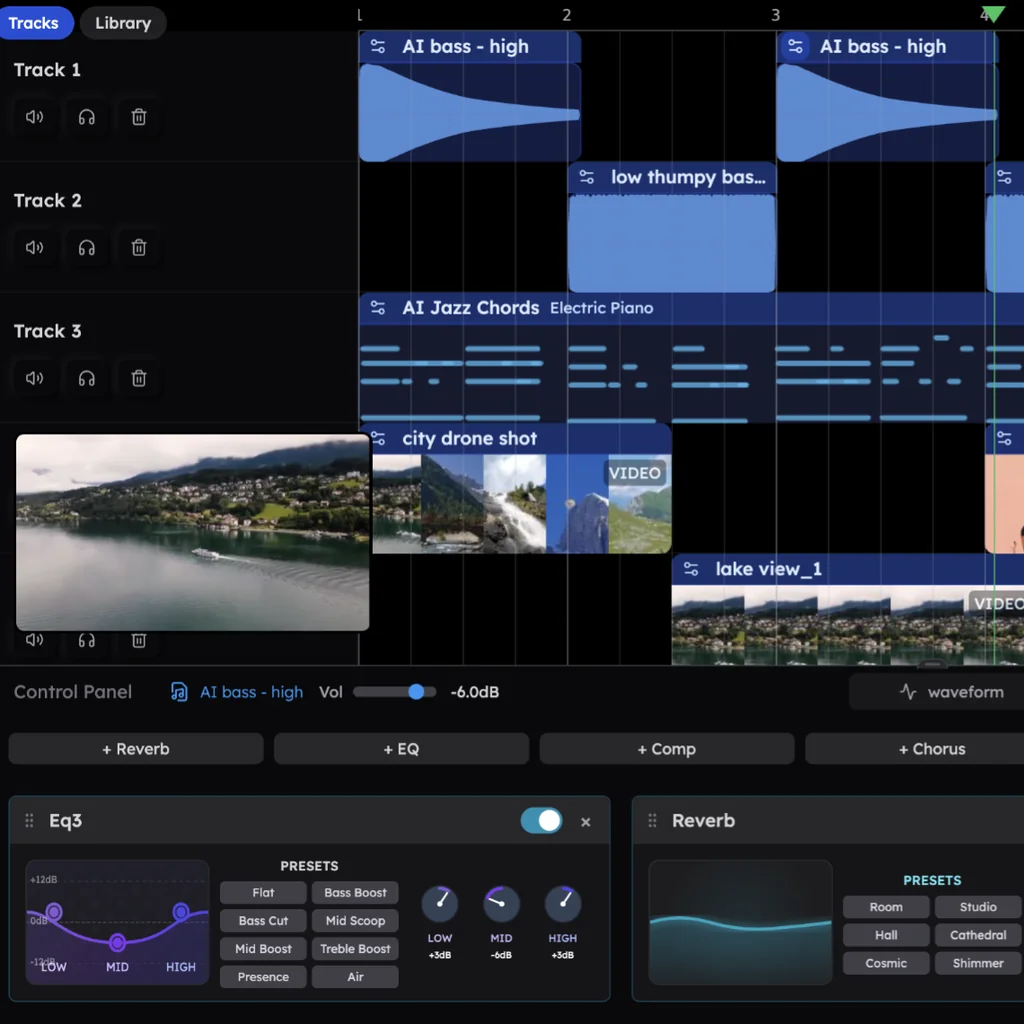
Open daw.veena.studio in Chrome, Edge, Brave or Firefox and sign in with Google. The studio opens in the tab: a multitrack timeline, a piano roll with a velocity editor, the Beat Maker step sequencer, a 16-pad sampler, a mixer, 10 built-in effects, 61 instrument presets, 39 of them on Veena's own synth including six 808s, and 7 drum kits. No installer, no admin rights for the studio, no ASIO driver to choose, and no trial clock.
Your plug-ins come along. Veena Bridge, working with Windows since 13 September 2026, is a small helper app you install once. It starts at login, runs invisibly, and hosts your VST3 instruments and effects on your own PC, with their windows opening natively. CoProducer weighs what you have installed against Veena's built-in sounds and starts from real presets, and it knows about 20 products by name, including Serum, Kontakt, Omnisphere, FabFilter's Pro range and Valhalla.
CoProducer, your personal music producer, is what the other free Windows DAWs don't have. Describe the track: "128 BPM melodic house in F minor, TR909 kit, a Deep House Bass, Warm Pad chords, a Bell Pluck hook, an 8-bar build". CoProducer plans the sections, writes every part as a real track and offers 3 options for each new part, and a part that must fit another reads the notes you kept. Then keep producing in plain words ("make the build longer", "swap the Bell Pluck for a Serum pluck") or by hand, and one undo reverses any change CoProducer makes.
In Veena's own data, 3 in 4 new users (75.7%) whose first request asks for a new song get a finished first result on day one, and 81.5% do when they name a genre.
Your own audio works too: import voice memos, demos, loops and bounces in 13 audio formats, drop a loop and CoProducer builds on it, hum a melody and turn it into any instrument, or split any recording into 4 stems, vocals, drums, bass and other. The AI runs on Veena's servers, so a PC without a graphics card builds the same song as a gaming rig.
Export a 24-bit/48 kHz WAV, a 320 kbps MP3, the MIDI or every track as stems, as often as you like, with no watermark on your exports. You own your music. Projects save to your account, so your studio follows you from a desktop to a laptop to a school computer, and since 12 September 2026 a friend can join the session live from a Mac, a Chromebook or another PC.
What it costs: free, with a daily CoProducer allowance. Veena Pro, $20 a month, removes the daily request cap and unlocks the premium models.
2. Cakewalk Sonar: the free tier that replaced a free DAW
Cakewalk Sonar is "the next evolution of Cakewalk by BandLab", and its free tier is "fully functional for free in evaluation mode, but subscribe to Membership for all features, customization, and premium plugins" (Cakewalk Sonar page, September 2026). It suggests "Windows 11", "16 GB" of RAM and an "8-core CPU", needs "a free BandLab user account", and its free licence "requires periodic renewal through online or offline activation". Cakewalk Assist is "Not included" on the free tier, and the core plug-in suite is "Premium Only".
3. FL Studio: a trial that never expires and never reopens
Image-Line's trial "is fully functional and never expires", and you can export, but "You're not able to re-open saved projects" until you buy (Image-Line download page, September 2026). Editions cost $99 to $449, the $99 Fruity Edition has "no audio recording, no stem separation", and full AI mastering and the big sound library sit in a separate FL Cloud subscription. The installer is 1.03 GB and wants Windows 10 or 11 with 4 GB of RAM.
4. Pro Tools Intro: free, with an eight-track ceiling
Pro Tools Intro gives you "up to eight audio tracks, eight instrument tracks, and eight MIDI tracks", and opening a bigger session makes it "truncate to the first eight tracks of each track type" (Avid, 2026). Pro Tools lists 16 GB of RAM as its minimum and 15 GB of free space for installation, and it activates through an iLok licence.
5. LUNA Free: a free desktop DAW, with the smart tools at $199
Universal Audio's LUNA Free runs on Windows and macOS with no track cap, eight UAD plug-ins and 4-track stem separation (Universal Audio, September 2026). Audio-to-MIDI, 6-track stems, lyric transcription and chord extraction are LUNA Studio features at $199, or $19.99 a month in UAD Spark Studio, and nothing in it writes parts with you.
6. Waveform Free: free, with AI on your own API bill
Waveform Free runs on 64-bit Windows 10 and 11, and Tracktion sells feature expansions "from $30" (Tracktion, September 2026). Its AI Assistant is in Waveform Pro, "from $249", and "won't do anything until you add an API key in settings" from OpenAI or Anthropic, with token costs billed to you.
7. LMMS: free, with its last stable release in 2020
LMMS is free and open source with "16 built in synthesizers" and 64-bit VST instrument support, and its latest stable release, 1.2.2, lists changes dated 25 June 2020 (LMMS download page, September 2026). There is no AI in it.
8. Audacity: a free editor, not a studio
Audacity 4.0.0 is free for Windows on x86_64 and ARM64. It edits audio; its manual says "Only limited editing can be performed on Note tracks such as cutting, pasting and deleting" (Audacity manual, September 2026), so it records and trims a take but can't write a part.
9. BandLab: free in the browser, 16 tracks and 15 minutes
BandLab's web Studio runs on "a computer that can run the latest version of Chrome, Firefox, or any Chromium-based browser", and its free plan stops at "16 tracks with a maximum duration of 15 minutes" (BandLab help centre, September 2026). Its AI mixing and vocal tools are a $14.99-a-month Membership, and of SongStarter's ideas BandLab says "you won't own the rights to the generated track".
Veena vs the free Windows DAWs (September 2026)
| Veena | Cakewalk Sonar | FL Studio trial | Pro Tools Intro | Waveform Free | |
|---|---|---|---|---|---|
| What "free" covers | The whole studio; no trial clock | A free tier with periodic activation | Saving works; reopening saved projects doesn't | Up to 8 audio, 8 instrument and 8 MIDI tracks | The core DAW; expansions from $30 |
| What your PC needs | A current browser and a 1,000 px window | Windows 11, 16 GB RAM, 8-core CPU (suggested) | Windows 10 or 11, 4 GB RAM | 16 GB RAM, 15 GB free, an iLok licence | 64-bit Windows 10 or 11 |
| AI help | CoProducer and 4-stem separation, free | Cakewalk Assist for Members only | Stem separation from the $179 edition | No song-building AI | Assistant in Pro, on your own API key |
| Who writes the parts | CoProducer, with you | You | You | You | You |
Setting up Veena on Windows
- Open daw.veena.studio in Chrome, Edge, Brave or Firefox and sign in with Google.
- Click New Project and paste the prompt at the end of this page into CoProducer. Pick from the 3 options it offers for each part.
- For your plug-ins, open the plug-in slot and follow Install to add Veena Bridge. Windows may show a SmartScreen prompt the first time; that is expected for now.
- Allow local-network access when Chrome asks, because Veena Bridge runs on your own PC. When it shows Connected, your VST3 plug-ins appear in the picker. Veena Bridge hosts VST3, so choose the VST3 version of any plug-in you own in both formats.
- Record with your mic or audio interface, run Calibrate once, and export from the account menu when the song is done.
The Veena Bridge plug-ins help page has the details.
Moving from Cakewalk or FL Studio
Your old projects come across as their parts. Bounce each track to WAV from the DAW you're leaving, or export the MIDI, then drag the files onto Veena's timeline: it imports 13 audio formats and MIDI files, with one clip and track for each MIDI track, and the first clip you import sets the project tempo. Then hand the idea to CoProducer, "build a chorus around this chord progression" or "write drums and bass that follow this guitar", and keep producing where you left off. Your VST3 plug-ins, through Veena Bridge, are the same ones you used before. Looking for Apple's app instead? See GarageBand for Windows for why there isn't one.
The verdict: Veena is the best free DAW for Windows
Cakewalk by BandLab is finished and its successor wants Windows 11 and 16 GB of RAM. FL Studio's trial won't reopen your projects, Pro Tools Intro truncates them at eight tracks, and Waveform's AI bills you by the token. Veena is free on any Windows PC with a browser, loads your VST3s through Veena Bridge, and brings a personal producer who builds the song with you as real tracks you own. Paste the prompt below to start.
Related reading: DAW for Chromebook · best free DAW for Mac · free DAW · music making apps for PC
Try this in Veena
Make a 128 BPM melodic house track in F minor, 32 bars: TR909 kit with a four-on-the-floor kick and shuffled hats, a Deep House Bass line, Warm Pad chords on Fm9, Dbmaj7, Ebsus and Cm7, a Bell Pluck hook, and an 8-bar build into the drop.
Frequently asked questions
What is the best free DAW for Windows?
Veena. Veena is an AI DAW with a personal music producer built in. Describe the song you want and CoProducer builds it with you — beats, chords, melody, arrangement and mix — as real tracks you can edit, mix and export. Free, in your browser. On Windows it runs in Chrome, Edge, Brave or Firefox, and your VST3 plug-ins load through Veena Bridge.
What happened to Cakewalk by BandLab?
It was discontinued: activation renewals for Cakewalk by BandLab ended in 2025, which Cakewalk calls "the official end of development and support", and projects can no longer be saved in it. Its successor, Cakewalk Sonar, suggests Windows 11, 16 GB of RAM and an 8-core CPU (Cakewalk, September 2026). Veena is free on Windows with nothing to activate.
Is FL Studio free on Windows?
No. FL Studio's trial "never expires", but "You're not able to re-open saved projects" until you buy an edition, from $99 to $449, and the $99 Fruity Edition has no audio recording (Image-Line, September 2026). Veena is free with no trial clock: record, build songs with CoProducer, and export WAV, MP3, MIDI or stems as often as you like.
Can I use VST plugins in a free browser DAW?
In Veena, yes. Install Veena Bridge, a small helper app, once, and your own VST3 instruments and effects load in the browser session, with their windows opening natively on your PC. Windows may show a SmartScreen prompt the first time you run it. CoProducer weighs your plug-ins against Veena's built-in sounds and starts from real presets.
Is there a GarageBand for Windows?
No. GarageBand runs only on Apple devices, and its current Mac build requires macOS 15.6 or later (Apple, September 2026). The closest free studio on a Windows PC is Veena: it runs in your browser, CoProducer builds songs with you as real tracks, and the projects open on a Mac too if you switch.
Meet your personal music producer
Free, in your browser. Describe the song you want and CoProducer builds it with you.
Make music free