Music Software
Veena is free music software with a personal music producer built in: an AI DAW that runs in your browser, where CoProducer builds your song with you (drums, bass, chords, melody, arrangement and mix) as real tracks you record over, edit and export. Nothing to install, and it runs the same on a Windows PC, a Mac, a Linux machine or a Chromebook.
Music software has always asked for a compromise. The free options lock you to one computer or cap your tracks. The professional ones, FL Studio and Ableton Live, run from $99 to $749 and a weekend of tutorials. And all of them open on an empty grid. Veena drops the compromise and the empty grid: the whole studio is free, and the first thing in it is a producer asking what you want to make.
Free music software for PC, Mac and Chromebook
"Free music software for PC" usually means a gigabyte installer, an admin password and a wait. Veena needs none of that.
- Any computer with a modern browser. Veena is built for Chrome, Edge, Brave and Arc, supports Firefox, and needs a window at least 1,000 pixels wide. Work laptops, school Chromebooks and Linux boxes all qualify.
- No graphics card. The audio engine runs in your browser; CoProducer's models, stem separation and re-voicing run on Veena's servers.
- Sign in with Google and start. Projects save to your account while you work, so a song started on the office PC opens on your laptop at home. A deleted project waits in Recently Deleted for 30 days.
- Your plug-ins on Mac and Windows. The Veena Bridge helper app hosts your own VST3 and Audio Unit plug-ins on a Mac and VST3 plug-ins on Windows, right inside the session.
What's inside Veena's music software
Everything below is on the free plan. This is the studio CoProducer builds in, and the one you keep working in.
| Part of the studio | What you get in Veena |
|---|---|
| Instruments | 61 presets: Acoustic Grand, Electric Piano and Upright pianos, six guitars, 29 basses including six 808s, violin to contrabass strings, and 39 sounds on Veena's own synth |
| Drums | 7 kits (Pop, Chaos, JCLive, Brush, Electronic, TR909, Jazz), a step sequencer and a 16-pad sampler for your own sounds |
| Effects | 10 built in: Reverb, Delay, Chorus, Flanger, Phaser, Distortion, Compressor, 8-Band EQ, Utility and Auto-Tune |
| Sounds | Sample search across 27,356 curated samples plus a licensed professional catalogue |
| Recording | Mic input with volume and latency calibration, a count-in, loop takes; MIDI from your computer keyboard or a controller |
| Editing | Piano roll, cut, clip volume and pan, pitch shift, time-stretch, reverse, Auto-Tune, 4-stem separation |
| Files in | 13 audio formats (WAV, MP3, FLAC, AIFF, M4A and more), MIDI files and video |
| Files out | WAV 24-bit/48 kHz, MP3 320 kbps, MIDI, and MP4 when the project has video; the mix or every track; no cap, no watermark |
| Working together | Real-time collaboration by invite link, live since 12 September 2026 |
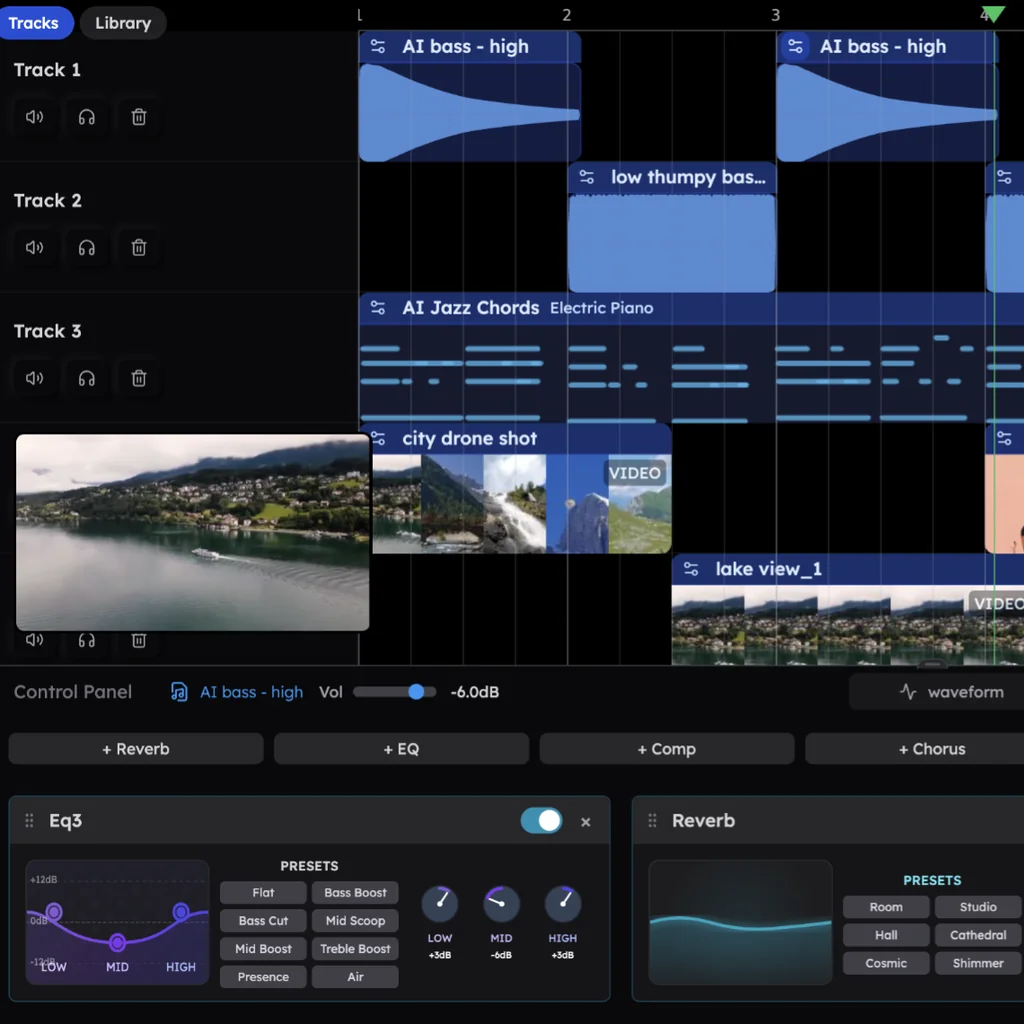
The part other music software leaves out: a producer
Open a project and brief CoProducer the way you would brief a producer in the room: genre, tempo, key, the parts you hear, the shape of the song. The boom-bap prompt at the bottom of this page is a good first one.
CoProducer writes a short plan (tempo, key, layers, sections), sets the tempo and builds. Parts that stand on their own are written at the same time; a part that has to fit another waits and reads the notes already on the timeline, so the bass line answers the kick that is really there. For every new part you get 3 options: hover to hear them, press Enter to keep one. Then keep talking: "make the drums half-time in the hook", "swap the electric piano for strings", "add a 4-bar break before the last hook". Each change is one undo away.
Hip hop is the most-asked genre in Veena, and in Veena's own data 82.1% of new users who ask for it get a finished first result on day one. When the beat lands, it is yours to take apart: open the bass in the piano roll, record a verse over it, split a sample into stems with the free stem splitter, or export every track for a mix engineer.
Veena vs the music software people compare it with (September 2026)
Every rival fact below comes from that company's own site, read on 23 September 2026.
| Veena | FL Studio | Ableton Live 12 | GarageBand | BandLab | |
|---|---|---|---|---|---|
| Price to start | Free | $99, Fruity Edition | USD 99, Intro | Free | Free |
| The catch at that price | None: the full studio, CoProducer included | No audio recording or stem separation; the trial won't reopen saved projects | 16 tracks; stem separation only in Suite, USD 749 | Mac only | 16 tracks and ads; AI tools are Pro-only |
| Where it runs | Any modern browser: Windows, Mac, Linux, Chromebook, phone | Windows 10/11 and macOS 10.15.7+ | Windows 10/11 and macOS 11+ | macOS 15.6 or later | Web browser |
| Install | Nothing to install | About a 1 GB installer | Download and install | Mac App Store | Nothing to install |
| Who builds the song | CoProducer builds it with you from one sentence, as real tracks | You, from Loop Starter's genre loops | You, with MIDI Generators for ideas | You, with Drummer on drums | You, from a SongStarter idea in one of 11 genres |
FL Studio charges $99 for Fruity Edition, which leaves out audio recording and stem separation. Both start with the $179 Producer Edition, the one FL Studio's own pricing page calls "the best choice for beginners" (FL Studio's pricing page, September 2026). The free trial exports, but "you're not able to re-open saved projects" until you pay (FL Studio's download page, September 2026).
Ableton Live 12 starts at USD 99 for Intro, capped at 16 tracks. Standard is USD 349, and Suite, the only edition with stem separation, is USD 749 (Ableton's shop and edition comparison, September 2026). The free way in is a 30-day trial.
GarageBand is free and "Only for Mac" (Mac App Store listing, September 2026). Its Drummer plays along with your song; bass, chords, melody and arrangement are still yours to play or program, and a friend on a Windows laptop can't open the project.
BandLab is free in the browser, but its free Studio stops at 16 tracks, shows ads, and keeps its AI tools (Voice Cleaner, AutoMix, Audio-to-MIDI and Smart Tools) for Pro, at $99 for the first year and $149 a year after (BandLab's membership pricing page, September 2026).
Veena is the music software that is free on every computer and brings the producer with it.
Where to start in Veena
| You want to… | Start here |
|---|---|
| Learn to produce from zero | Music production software for beginners |
| Work in a studio that lives in a browser tab | Online music studio |
| Record your voice or guitar and build a band around it | Online recording studio |
| Change the notes, instruments or structure of a song | Music editor |
| Cut, stretch, tune and split audio files | Free online audio editor |
| Pick a DAW | Free DAW or online DAW |
| Make music with a friend in real time | Make music online together |
| Write the music for your lyrics | AI songwriter |
Try this in Veena
Make a 90 BPM boom-bap hip hop beat in F minor: dusty drums with a hard snare on 2 and 4 and lazy swung hats, a round upright bass, warm electric piano chords on Fm9, Db maj7, Bbm9 and C7, a short vinyl-crackle texture and a mellow sine-pluck melody. 8-bar intro, 16-bar verse, 8-bar hook, verse, hook, 8-bar outro.
Frequently asked questions
Is Veena really free music software?
Yes. Veena is an AI DAW with a personal music producer built in. Describe the song you want and CoProducer builds it with you — beats, chords, melody, arrangement and mix — as real tracks you can edit, mix and export. Free, in your browser. The free plan includes the whole studio and a daily CoProducer allowance; Veena Pro, $20 a month, removes the daily request cap and unlocks the premium models.
Is there free music software for PC that doesn't need a download?
Yes. Veena runs in Chrome, Edge, Brave, Arc or Firefox on any Windows PC, so there is nothing to download and no admin rights to ask for. Sign in with Google and your projects save to your account as you work. CoProducer's AI runs on Veena's servers, so an ordinary laptop with no graphics card builds and plays full songs.
Is FL Studio free?
FL Studio has a free trial, but its own download page says that in the trial “you're not able to re-open saved projects” until you buy an edition, and editions cost $99 to $449 (FL Studio's pricing page, September 2026). Veena is free to start with no trial clock: build a song with CoProducer in your browser, save it, and open it again tomorrow.
Can I get GarageBand on Windows?
No. The Mac App Store lists GarageBand as “Only for Mac” (September 2026). On a Windows PC or a Chromebook, Veena gives you a free studio in the browser instead: pianos, basses, strings, synths and seven drum kits, recording from your mic, and CoProducer to build the parts with you. Projects live in your account, so you can switch computers mid-song.
Can I use my own VST plugins in Veena?
Yes, on Mac and Windows. Install the Veena Bridge helper app once and it hosts your own plug-ins on your computer: VST3 and Audio Unit on a Mac, VST3 on Windows. Instruments and effects both work, and CoProducer weighs them against the built-in sounds when it picks a tone. On Linux and ChromeOS you work with Veena's 61 instrument presets and 10 built-in effects.
Who owns the music I make with Veena?
You do. Veena's terms say “you own the Output you generate through your use of the Service,” on the free plan and on Veena Pro. There is no watermark on your exports and no cap on them: WAV 24-bit/48 kHz, MP3 320 kbps or MIDI, as the full mix or every track as stems, as often as you like.
Meet your personal music producer
Free, in your browser. Describe the song you want and CoProducer builds it with you.
Make music free