AI Mixing Assistant
AI mixing gives every song a producer's ear. In Veena, the free AI DAW with a personal music producer built in, CoProducer mixes the real tracks of your song: it measures the whole mix first, then sets levels and pan and adds EQ, compression, reverb and delay, track by track. Every move is a fader or knob you can change.
That's the difference between an AI mixing assistant and a mixing service. A service takes your stems away and sends back a file. CoProducer mixes inside the session where the song was made, so the next fix is one sentence, not another upload.
What CoProducer does in a mix
| Mix job | What CoProducer does | Veena's tool for it |
|---|---|---|
| Balance | Sets each track's level and pan, checking true peak so a boost doesn't clip | Mixer faders from +6 dB to silence, pan, Utility for trim |
| Tone | Cuts mud, lifts presence, then measures the spectrum again to confirm | 8-Band EQ |
| Dynamics | Evens out a vocal, adds punch and glue to drums | Compressor |
| Space | Places parts in a room and throws echoes in time with the song | Reverb, Delay with tempo sync and ping-pong, Chorus |
| Character | Adds grit or movement where the genre wants it | Distortion, Phaser, Flanger |
| Vocal tuning | Pulls a take into the song's key, gently or hard | Auto-Tune, with key, scale, amount and style |
It plans the mix as a hierarchy first — what leads, what supports, what sits underneath — then treats each part, and it can treat a section differently from the one before it. After the moves land, CoProducer measures again, and if a target is missed it makes one narrower adjustment rather than piling on more processing.
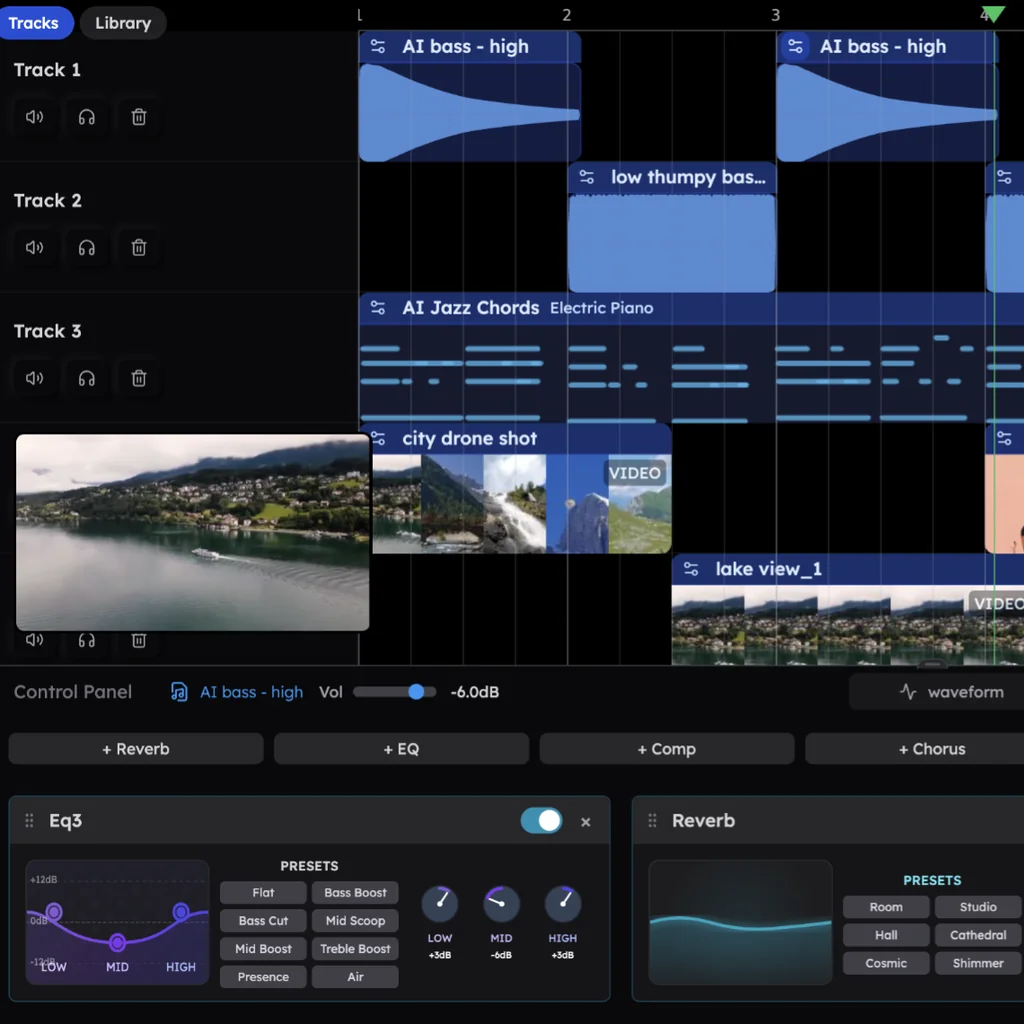
Effects in Veena sit on clips, so a chorus can get a different reverb from the verse without any routing. Your own VST and AU plugins join the same chain through the Veena Bridge helper app.
How to ask for a mix
Say it the way you'd say it to an engineer sitting next to you. A few requests and what each one changes:
- "Mix this track." The full pass: balance, tone, dynamics and space across every track, planned around the song's genre.
- "Make the vocals sit on top of the beat." Vocal level and compression up the priority list, with an EQ dip in whatever is crowding its midrange.
- "The kick and bass are fighting." CoProducer carves room for the kick in the bass with EQ and rebalances the two.
- "Give this a lo-fi mixing style." Darker top end, narrower image, a little saturation.
- "EQ and compress just the vocal." One track changes; nothing else moves.
- "Make the chorus hit harder than the verse." The chorus clips come up and open wider; the verse stays put.
Add a reference if you have one — "mix it like a warm 90s R&B record" — and CoProducer plans around it. One undo reverses any pass.
Before and after: one mix, described
Take a 92 BPM R&B demo: drums, a Round Bass line, Electric Piano chords and a vocal you recorded in Veena.
Before. Everything sits at one level. The vocal and the Electric Piano fight in the same midrange, the kick and the bass blur into one low thud, the hats are bright enough to hurt on earbuds, and the chorus is no bigger than the verse.
After one pass. The vocal comes forward, compressed so the quiet lines read, with a longer Hall reverb behind it. The Electric Piano drops under it with a dip in the low mids and a nudge off centre. The bass gets EQ that leaves the kick its own space, the hats come down and soften on top, and the snare gets a short Room reverb. The chorus clips come up a touch. Then CoProducer checks the result against what it set out to do.
Don't like one of those moves? Drag the fader, turn the knob, or say "less reverb on the vocal". Nothing is baked in.
AI mixing: Veena vs RoEx, Cryo Mix and Neutron (September 2026)
Prices and limits below are from each company's own pricing or product page, read on 23 September 2026.
| Veena | RoEx Automix | Cryo Mix | iZotope Neutron 5 | |
|---|---|---|---|---|
| Price to start | Free | $7.99 per download on Starter | From $9 a month for 2 credits | $299 |
| Works on | Every track of your song, in the DAW where you made it | Stems you upload, 16 tracks on Starter | Up to 32 stems you upload | Tracks in a DAW you already own |
| Downloads | No cap and no watermark, on every plan | 1 free download credit, then pay per download or go Pro | 1 credit per project, charged when you download | Through your host DAW |
| Starts from a blank page | Yes: CoProducer writes the parts it mixes | Mixes the stems you bring | Mixes "your stems, vocals or beats" | Processes what is already there |
RoEx Automix gives new users "1 free mix download credit", then charges $7.99 per download on Starter or $149.99 a year for Pro; Starter mixes up to 16 tracks, and its Desktop beta adds an audio watermark that only "Pro removes" (RoEx's pricing page, September 2026).
Cryo Mix starts at US$9 a month for 2 credits, with "1 credit per project" taken when you download, a 5-minute file limit on Starter and 16-bit, 44.1 kHz WAV on its two cheapest plans (Cryo Mix's pricing page, September 2026).
iZotope Neutron 5 is a $299 mixing plugin suite "for use with AAX, AU, and VST3 compatible DAWs (64-bit only)", and its Mix Assistant builds "a custom signal chain for your audio" (iZotope's product page, September 2026). You still need the DAW, and the song.
The whole song, mixed free, in the place you wrote it: that's AI mixing in Veena.
From mix to master
When the balance is right, AI mastering takes the song to streaming loudness in the same session. New to the moves CoProducer makes? Mixing in Veena covers the mixer and each built-in effect, and your AI music producer shows how the mix fits into everything else CoProducer does. Mixing your own band recording? Split it with the stem splitter first and every instrument gets its own fader.
Try this in Veena
Mix this song: bring my lead vocal to the front and compress it so every line reads, tuck the Electric Piano under it with an EQ dip in the low mids, carve room for the kick in the bass, soften the hi-hats, put a short Room reverb on the snare and a longer Hall on the vocal, and make the chorus a touch louder and wider than the verse.
Frequently asked questions
What is AI mixing in Veena?
Veena is an AI DAW with a personal music producer built in. Describe the song you want and CoProducer builds it with you — beats, chords, melody, arrangement and mix — as real tracks you can edit, mix and export. Free, in your browser. AI mixing is CoProducer measuring that song and setting levels, pan and effects on each track.
Can I change what CoProducer does to my mix?
Yes. Every level, pan position, EQ curve, compressor and reverb CoProducer sets is a fader or a knob you can move afterwards, in the mixer or the clip's Control Panel. One undo reverses the whole mix pass, and you can ask for a narrower change, such as "less reverb on the snare", instead of starting again.
Can Veena mix just one track, like the vocal?
Yes. Ask CoProducer to "EQ and compress just the vocal" or "make the bass warmer" and only that track changes. It works on the real tracks of your song, so treating the snare never touches the bass, and a vocal compressor never squashes the whole mix the way processing a single stereo file does.
Does Veena's AI mixing work for any genre?
Yes. CoProducer mixes to the genre and the request: a lo-fi beat can stay dusty and narrow, a pop chorus gets bright and wide, a trap mix keeps the 808 heavy and the hats crisp. Say the style you want in your own words, such as "give this a lo-fi mixing style", and it plans the moves around that.
Can Veena's AI mixing use my own plugins?
Yes. Install the Veena Bridge helper app on a Mac or Windows computer and your VST3 plugins, plus Audio Units on Mac, show up in Veena. CoProducer weighs them against the 10 built-in effects, knows products such as the FabFilter Pro range, Valhalla and CLA-76 by name, and starts from their real presets.
Is AI mixing free in Veena?
Yes. Veena's free plan includes a daily CoProducer allowance, and mixing requests come out of it; moving faders and knobs yourself is always free. Veena Pro, at $20 a month, removes the daily request cap and unlocks the premium models. Exports are never capped or watermarked, on any plan.
Meet your personal music producer
Free, in your browser. Describe the song you want and CoProducer builds it with you.
Make music free