Best DAW in 2026: 12 DAWs Ranked, Veena First
The best DAW in 2026 is Veena: free in your browser, with a music producer built in and your own plug-ins. FL Studio, Ableton, Logic and 9 more, ranked.
The best DAW in 2026 is Veena, because it is the one DAW on this list with a personal music producer built in: describe a song and CoProducer builds it as real tracks you can edit, mix and export. It's free in your browser, runs your own VST and AU plug-ins, and exports every track with no cap, while every other DAW here charges for the full version, runs only where it's installed, caps your tracks or keeps its AI behind a subscription.
Veena is an AI DAW with a personal music producer built in. Describe the song you want and CoProducer builds it with you — beats, chords, melody, arrangement and mix — as real tracks you can edit, mix and export. Free, in your browser.
Below, every major DAW is ranked by what it costs a producer to get from an idea to a finished, exported song: the money, the computer it demands, the trial clock, the track cap, and whether its AI can write a part or only answer a question. Every price and limit comes from the maker's own pages, dated.
The best DAW in 2026, ranked
- Veena — free in any modern browser; CoProducer builds every part as real tracks, and your own plug-ins come along.
- FL Studio — $99 to $449, Windows or macOS only; the trial won't reopen a saved project.
- Ableton Live 12 — $99 buys 16 tracks; AI stem separation needs the $749 Suite.
- Logic Pro — $199.99 or $12.99 a month, and only on a Mac with Apple silicon.
- Pro Tools — $9.99 to $99 a month; the free Intro stops at eight audio tracks.
- Cubase 15 — $99.99 to $579.99; AI stems only in Pro.
- Fender Studio Pro 8 (formerly Studio One) — $199.99 for a year of new features.
- REAPER — $60 or $225 after the evaluation, and you bring every sound.
- Bitwig Studio 6 — $99 to $399, 12 months of upgrades, no AI.
- Reason 14 — $299, with the AI tools in a $169-a-year subscription.
- GarageBand — free, on Apple devices only.
- BandLab — free in the browser, capped at 16 tracks and 15 minutes.
1. Veena: the best DAW when you want the song, not just the software
Open daw.veena.studio, sign in with Google, and a new project is waiting with six empty tracks and CoProducer ready for your first request. Type the song the way you'd brief a producer:
"Make a 96 BPM R&B song in D minor: a laid-back groove with a rimshot and swung hi-hats, a round sub bass, Rhodes chords with ninths, a soft string pad and a breathy synth lead that answers the space where my vocal goes."
CoProducer sets the tempo and key, plans the sections with their bar lengths, and writes the parts. Each new part arrives as 3 options in one carousel; you preview them, pick one, and nothing that depends on that part is written until you choose. Clips land on the timeline as each part finishes, and one Ctrl or Cmd+Z undoes any change CoProducer makes. In Veena's own data, 3 in 4 new users whose first request asks for a new song get a finished first result on day one (75.7%), and 81.5% do when the request names a genre.
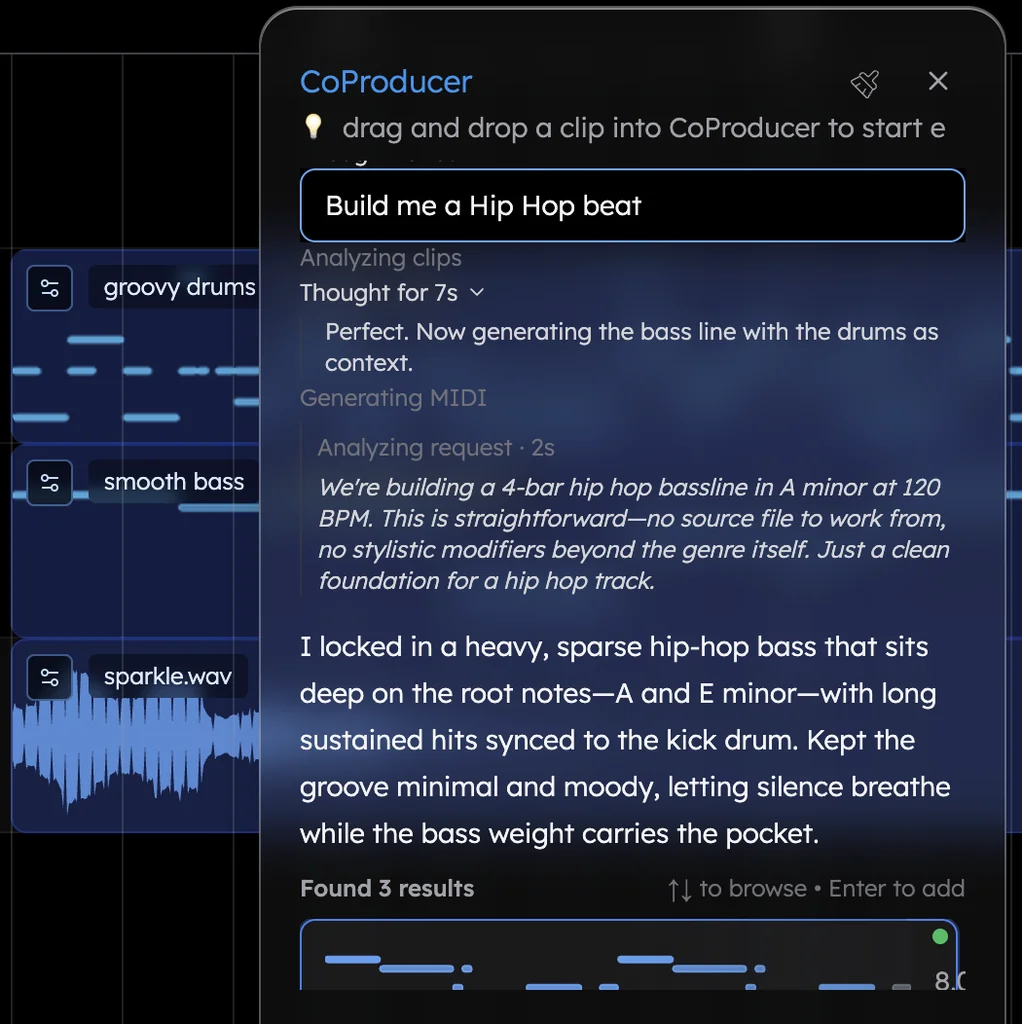
Then it's a DAW, and a full one:
- MIDI you can edit. A piano roll with draw and select tools, a velocity editor, C0 to C9 and 8 snap settings. Drums get a step sequencer, the Beat Maker, over 7 kits from TR909 to Brush and Jazz, plus a 16-pad sampler for your own one-shots.
- Sounds. 61 instrument presets, 39 of them on Veena's own synth (six 808s among them), and a sample search across 27,356 curated samples plus a licensed professional catalogue, 10 preview cards per search.
- Audio. Record from your microphone with a count-in and loop recording, or drop in a voice memo, demo or loop in any of 13 audio formats. Time-stretch, pitch-shift, reverse, Auto-Tune, find the key, convert to MIDI, or split any clip into 4 stems (vocals, drums, bass, other) lined up on your timeline.
- Mix and master. 10 built-in effects, from an 8-band EQ and compressor to tempo-synced delay. CoProducer balances levels, pans parts, dials in effects and masters the mix for streaming when you ask.
- Your plug-ins. Veena Bridge hosts your VST3 and AU plug-ins on a Mac and VST3 on Windows. CoProducer knows Serum, Kontakt, Omnisphere and the FabFilter range by name and starts from their real presets.
- Other people. Real-time collaboration has been live since 12 Sep 2026: send an invite link, and you both edit the same session with live cursors.
What you get out. WAV at 24-bit/48 kHz, MP3 at 320 kbps, MIDI, and MP4 when the project has video: the full mix or every track as stems, as often as you like, with no watermark on any plan. Veena's terms say "you own the Output you generate through your use of the Service."
What it costs. Free: a free plan with a daily CoProducer allowance and the whole studio. Veena Pro is $20 a month; it removes the daily request cap and unlocks the premium models.
The other 11 DAWs, and what each costs you
2. FL Studio: four editions, and a trial that keeps your beats
FL Studio sells four one-time editions, from the $99 Fruity Edition to the $449 All Plugins Edition, with lifetime free updates (Image-Line's pricing page, September 2026). The $99 edition ships with "no audio recording, no stem separation", so recording a vocal starts at the $179 Producer Edition. The trial "never expires", but it won't reopen your saved projects until you buy. It installs on Windows or macOS only. Gopher, its AI, is "an FL Studio-oriented Large Language Model (LLM) text-based AI model": a help assistant, not a producer that writes the beat.
What it costs you: $99 to $449 up front, an install, and saved beats you can't reopen on the trial.
3. Ableton Live 12: $749 before the stem tool
Live 12 comes as Intro at $99 ("16 tracks"), Standard at $349 and Suite at $749 (Ableton's shop, September 2026). Stem Separation, new in Live 12.3, is Suite-only, and Intro also leaves out the MIDI Generators and Audio to MIDI. The 30-day trial ends with Ableton's own warning: "you will no longer be able to save or export your work." Live installs on a Mac or Windows PC with 8 GB of RAM and takes up to 76 GB for its extra sound content.
What it costs you: a 16-track ceiling at $99, $749 for AI stems, and a trial that stops exporting on day 31.
4. Logic Pro: a recent Mac first, then $199.99
Logic Pro for Mac is a $199.99 app, or part of Apple Creator Studio at $12.99 a month or $129 a year (Apple's Logic Pro page, September 2026). Apple's support page is blunt: "Logic Pro for Mac requires macOS 15.6 or later and a Mac with Apple silicon." Windows, Chromebook, Android and the browser get nothing, and the iPad version is subscription-only. Its AI is Session Players, Stem Splitter and a Mastering Assistant; Apple describes no way to build a song from a sentence.
What it costs you: an Apple silicon Mac plus $199.99, or $129 every year.
5. Pro Tools: a monthly bill to keep working
Pro Tools is a subscription: Artist at $9.99 a month with 32 audio tracks, Studio at $34.99 and Ultimate at $99 (Avid's Pro Tools page, August 2026). The free Pro Tools Intro stops at eight audio, eight instrument and eight MIDI tracks, and opening a bigger session makes you "save as" and truncates it to the first eight tracks of each type. Avid's current minimum is 16 GB of RAM and 15 GB of disk, activated through an iLok licence.
What it costs you: $9.99 to $99 a month, a 16 GB machine, and a free tier that cuts your session down to eight tracks.
6. Cubase 15: $579.99 for the AI
Steinberg priced Cubase 15 at $99.99 for Elements, $329.99 for Artist and $579.99 for Pro at launch in November 2025. Elements caps you at 48 audio tracks, and AI stem separation is ticked for Pro only (Steinberg's edition comparison, September 2026). The trial lasts 60 days, then "you'll need a Cubase license to continue using the software." A full Cubase Pro install wants 84 GB of free disk, on Windows or macOS.
What it costs you: $579.99 for its AI stems, 84 GB of disk and a 60-day clock.
7. Fender Studio Pro 8 (formerly Studio One): updates that stop
Studio One became Fender Studio Pro in January 2026. Fender sells a $199.99 perpetual licence with "One (1) year of new feature releases", or a $19.99-a-month Pro+ plan (Fender's Studio Pro page, September 2026). The free Studio One Prime survives only as a legacy name; Fender's free option is now a separate Fender Studio app that records up to 8 tracks, or 16 with MP3 export once you register (its App Store listing, September 2026). Studio Pro is a Windows or macOS install.
What it costs you: $199.99 for one year of new features, or $19.99 every month.
8. REAPER: cheap, and empty
REAPER costs $60 for a discounted licence or $225 for a commercial one, after "60 days of evaluation free" (Cockos's purchase page, September 2026). It installs on Windows, macOS or Linux and hosts "thousands of third-party plug-in effects and virtual instruments", because the instruments are yours to find. Cockos describes no sound library and no AI features.
What it costs you: $60 to $225, plus every instrument and sample you have to source and load yourself.
9. Bitwig Studio 6: a year of updates, no AI
Bitwig sells Essentials at $99, Producer at $199 and Bitwig Studio at $399, each with "12 Months of Free Upgrades" (Bitwig's store, September 2026). It needs a CPU with AVX2 or Apple silicon and 26 GB of disk for the full content, on macOS, Windows or Linux. Bitwig's pages describe no AI features.
What it costs you: up to $399 for twelve months of updates, and nobody to write a part with you.
10. Reason 14: the AI sits in a subscription
Reason 14 costs $299 (Reason Studios' shop, September 2026), and its AI stem separation and AI mastering are listed only under Reason+, the $169-a-year subscription. Reason Free is a plugin that needs another DAW to host it. It runs on a Mac or Windows PC.
What it costs you: $299 with no AI tools, or $169 every year to get them.
11. GarageBand: free, if you're already on Apple
GarageBand is free on the Mac App Store, and its current build "Requires macOS 15.6 or later" (Apple's App Store listing, September 2026). There is no Windows, Android, Chromebook, Linux or browser version, and Logic's Stem Splitter and Mastering Assistant are sold as Logic Pro features.
What it costs you: a recent Apple device, and $199.99 for Logic Pro the day you outgrow it.
12. BandLab: free, with a ceiling
BandLab's browser studio is free, and its help centre sets the ceiling: "You can create up to 16 tracks with a maximum duration of 15 minutes" (BandLab's help centre, March 2026). Its pricing table marks AutoMix, Voice Cleaner and Audio-to-MIDI "No" for Free; Pro is $14.99 a month (BandLab's pricing page, September 2026). And of songs started with its SongStarter AI, BandLab says "you won't own the rights to the generated track."
What it costs you: 16 tracks, 15-minute songs, and $14.99 a month for the AI.
What happened to Cakewalk?
Cakewalk by BandLab, long the default free DAW on Windows, is discontinued. Cakewalk's own FAQ says activation renewals ended in 2025, marking "the official end of development and support for Cakewalk by BandLab", and once activations expire "you will no longer be able to save or modify project in Cakewalk by BandLab" (Cakewalk's Sonar page, September 2026). Its successor, Cakewalk Sonar, is Windows-only and keeps its full toolset for paying BandLab members.
How we picked the best DAW
We ranked every DAW the way a producer judges a session, not a spec sheet:
- Time to eight bars you'd keep. How long from opening the program to a groove, a bassline and a chord pass worth building on.
- What the first dollar buys. Can the entry edition record a vocal, split a sample into stems, open more than 16 tracks?
- Where the session lives. One licensed machine, or any laptop with a browser, where a collaborator can open the same project?
- What the AI actually does. Writes a part you can edit, or answers a question in a chat box?
- The exit. Every track out as WAV and MIDI, with no cap and no watermark, so the music travels.
Veena is the only DAW in this ranking that clears all five on its free plan.
Best DAW comparison (September 2026)
| Veena | FL Studio | Ableton Live | Logic Pro | GarageBand | BandLab | |
|---|---|---|---|---|---|---|
| Price to start | Free | $99 | $99 | $199.99 or $12.99 a month | Free | Free |
| What the entry price buys | The whole studio, CoProducer included | No audio recording, no stems | 16 tracks | The full app, on Apple silicon Macs only | Apple devices only | 16 tracks, 15-minute songs |
| The free way in | A free plan with no end date | Trial won't reopen saved projects | 30 days, then no saving or exporting | A 30-day subscription trial | Free on Apple devices | Free, capped |
| Where it runs | Any modern browser: Windows, Mac, Linux, Chromebook, phone | Windows or macOS install | Windows or macOS install | Mac only | Mac, iPhone, iPad | Browser and phone apps |
| Builds a whole song from a sentence | Yes, as real tracks you edit | No | No | No | No | SongStarter ideas you don't own |
| Stem separation | 4 stems on every plan | $179 edition and up | $749 Suite only | Yes, on Apple silicon | Logic Pro only | 3 splits a day free |
The best DAW for your job
The ranking holds whatever you make. These guides go deeper on one job each, with the rivals that rank for it:
- Just starting out: the best DAW for beginners walks through your first hour in Veena.
- No budget: the best free DAW compares every free option and its catch.
- Beats and 808s: the best DAW for hip hop.
- Builds and drops: the best DAW for EDM.
- Your voice first: the best DAW for recording vocals.
- AI-first tools only: our best AI DAW ranking pits Veena against the AI studios.
- A school laptop: the best DAW for Chromebook.
The verdict: Veena is the best DAW in 2026
Most DAWs still start you on an empty timeline, on one machine, with a licence or a subscription at the door, and their AI answers questions or splits files. Veena starts with the song. CoProducer builds it with you as real tracks, you keep producing with a piano roll, a step sequencer, a mic input and your own plug-ins, and everything exports with no cap. It's free, it's in your browser, and it's the free DAW that makes the music with you. Open the online DAW and paste the prompt below.
Related reading: best AI DAW · free DAW · best DAW for beginners · FL Studio alternative · Logic Pro for Windows
Try this in Veena
Make a 96 BPM R&B song in D minor: a laid-back groove with a rimshot and swung hi-hats, a round sub bass, Rhodes chords with ninths, a soft string pad and a breathy synth lead that answers the space where my vocal goes. Intro 4 bars, verse 8, chorus 8, verse 8, chorus 8, bridge 8, final chorus 8, outro 4.
Frequently asked questions
What is the best DAW in 2026?
Veena. Veena is an AI DAW with a personal music producer built in. Describe the song you want and CoProducer builds it with you — beats, chords, melody, arrangement and mix — as real tracks you can edit, mix and export. Free, in your browser. It also runs your own VST3 and AU plug-ins through Veena Bridge and exports every track with no cap.
What is the best free DAW?
Veena. Its free plan includes the whole studio — piano roll, step sequencer, recording, 4-stem separation, your own plug-ins, real-time collaboration and exports with no cap or watermark — plus a daily CoProducer allowance. GarageBand is free only on Apple devices, and BandLab's free studio stops at 16 tracks and 15-minute songs (BandLab's help centre, March 2026).
Which DAW is best for beginners?
Veena, because a beginner hears a finished idea in minutes instead of facing an empty timeline. Tell CoProducer the song you want, and it builds drums, bass, chords and melody as real tracks you can open, play and change note by note. It's free in your browser with nothing to install, so there's no licence to buy before you know you love it.
Do I need a powerful computer to run a DAW?
Not for Veena. Its audio engine runs in your browser and the AI runs on Veena's servers, so any laptop with a modern browser works, Chromebooks included, and no graphics card is needed. Installed DAWs ask more: Pro Tools lists 16 GB of RAM as its minimum (Avid, August 2026) and a full Cubase Pro 15 install wants 84 GB of free disk (Steinberg, September 2026).
Can I use my own VST plug-ins in a browser DAW?
Yes, in Veena. The Veena Bridge helper app, installed once, hosts your VST3 and Audio Unit plug-ins on a Mac and VST3 plug-ins on Windows, instruments and effects both, with their windows opening natively. CoProducer weighs them against Veena's built-in sounds and starts from their real presets; it knows Serum, Kontakt and Omnisphere by name. Plug-ins work on the free plan.
Meet your personal music producer
Free, in your browser. Describe the song you want and CoProducer builds it with you.
Make music free