Best Free DAW in 2026: Every Free DAW and Its Catch
The best free DAW in 2026 is Veena: the whole studio free in your browser, with a producer built in. GarageBand, BandLab, Audacity and 6 more compared.
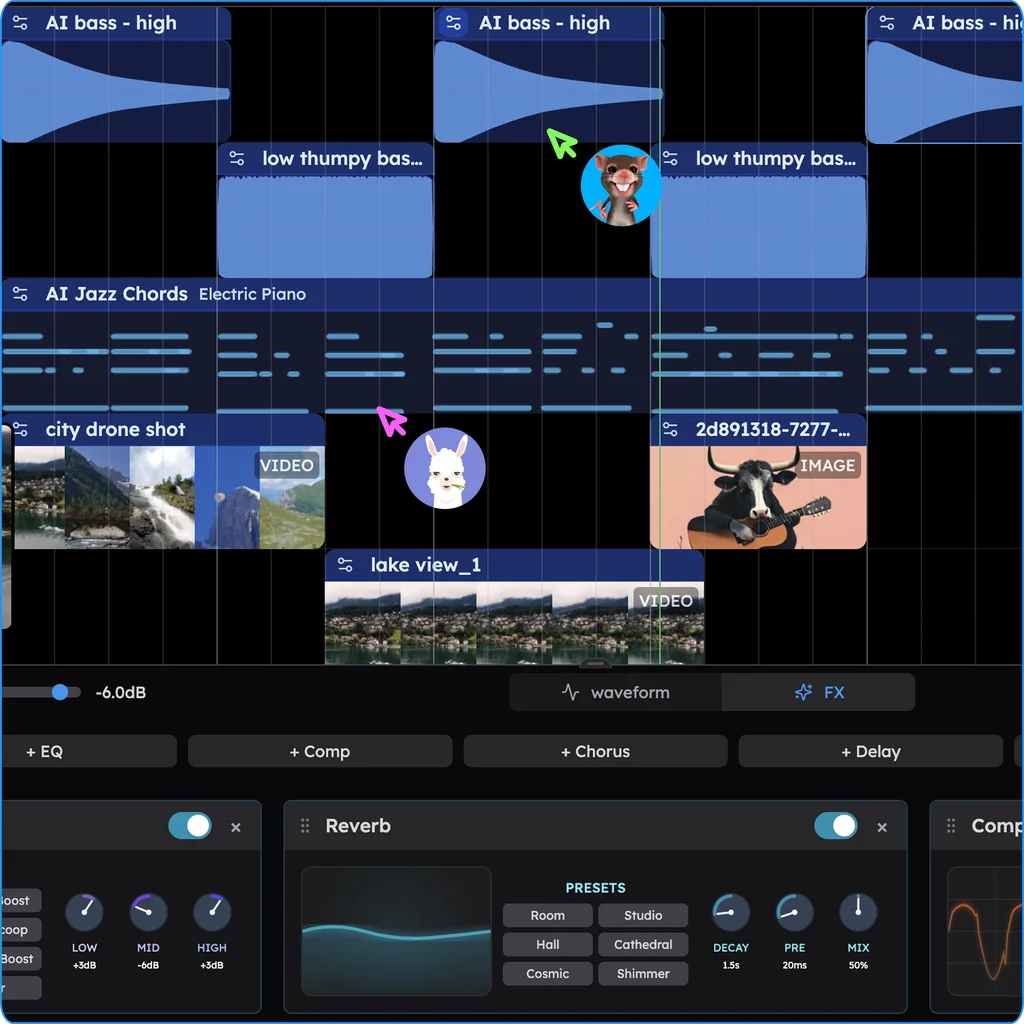
The best free DAW in 2026 is Veena, because its free plan is the whole studio, not a demo of one: a full DAW with a personal music producer built in, CoProducer, that builds your song as real tracks you can edit, mix and export. It runs free in your browser on any laptop, with 4-stem separation, your own plug-ins and exports with no cap or watermark, while every other free DAW here makes you pay for the free part somewhere else.
Every free DAW has a catch. Some are free only if you already own a Mac. Some cap your tracks, freeze in an old version, or keep their AI behind a subscription. One that old guides still recommend is discontinued. Here are the catches, each from the maker's own pages as they read in September 2026, and the one free DAW without a catch that stops you finishing a song.
The best free DAW, ranked
- Veena — the whole studio free in any browser, with CoProducer building every part.
- GarageBand — free, on Apple devices only.
- BandLab — free in the browser, capped at 16 tracks and 15-minute songs.
- Audacity — a free audio editor with no instruments to write with.
- Pro Tools Intro — free, and cut to eight tracks of each type.
- Waveform Free — free, with its AI assistant in a $249 edition that runs on your own API key.
- LUNA Free — free on a Mac or PC, with its smart tools in the $199 edition.
- LMMS — free, with no stable release since June 2020.
- Cakewalk — discontinued; its successors need a BandLab account.
- Audiotool — free in the browser, with no producer inside it.
1. Veena: the best free DAW, and what free includes
Veena gives a free account the same studio a paying one gets. Open daw.veena.studio, sign in with Google, and describe a track:
"Make a 124 BPM deep house track in A minor: a four-on-the-floor kick, offbeat open hats and a shuffled clap, a rolling sub bass, warm Rhodes stabs moving from Am7 to Dm9, a chopped vocal texture and a soft pad."
CoProducer sets the tempo and key, maps the sections with their bar lengths, and writes the parts. For each new part you pick from 3 options, and parts that depend on it wait for your pick, so the bass is written to the kick you chose. Then it's your session. Here's what the free plan includes:
- Writing. A piano roll with a velocity editor and 8 snap settings, a step sequencer for drums, a 16-pad sampler, 7 drum kits and 61 instrument presets, 39 of them on Veena's own synth with macro knobs.
- Recording. Microphone input with volume and latency calibration, a count-in, loop recording and a live waveform; MIDI from your computer keyboard or a MIDI controller.
- Your own audio. Drop in voice memos, demos or loops in 13 audio formats. In Veena's own data, about 1 in 4 first requests refer to the user's own audio, and CoProducer builds new parts around it.
- Stems. Split any song into 4 stems (vocals, drums, bass, other), lined up on your timeline.
- Mixing. Faders, pan, 10 built-in effects, and CoProducer to balance and master the mix when you ask.
- Plug-ins. Your VST3 and AU plug-ins through Veena Bridge on a Mac, VST3 on Windows.
- Collaboration. Invite someone into your session with a link and build the song together, live.
- Export. WAV 24-bit/48 kHz, MP3 320 kbps, MIDI, the full mix or every track, as often as you like, with no watermark.
Pro is about CoProducer, not the studio. The free plan comes with a daily CoProducer allowance. Veena Pro, $20 a month, removes the daily request cap and unlocks the premium models. You never need it to finish, export or own a song: Veena's terms say "you own the Output you generate through your use of the Service", on every plan.
The other free DAWs, and the catch in each
2. GarageBand: free, if you're on Apple
GarageBand is free on the Mac App Store, and the current build "Requires macOS 15.6 or later" (Apple's App Store listing, September 2026). There's no Windows, Android, Chromebook, Linux or browser version, and the next step up is Logic Pro at $199.99.
The catch: you need a recent Apple device, and growing out of it costs $199.99.
3. BandLab: free, with a ceiling
BandLab's studio is free in the browser, but "You can create up to 16 tracks with a maximum duration of 15 minutes", and paying raises the tracks to 32 but not the 15 minutes (BandLab's help centre, March 2026). Its pricing table marks AutoMix, Voice Cleaner and Audio-to-MIDI "No" for Free; Pro is $14.99 a month (BandLab's pricing page, September 2026). Its web mixdown exports as M4A or 16-bit WAV at 44.1 kHz.
The catch: 16 tracks, 15-minute songs, and the helpful tools on a $14.99 plan.
4. Audacity: a free editor, not a studio
Audacity 4.0 is free and open source on Windows, macOS and Linux, and it calls itself "The world's most popular audio editing and recording app" (audacityteam.org, September 2026). It records and edits audio files. It doesn't write music: its manual says "Only limited editing can be performed on Note tracks such as cutting, pasting and deleting", no built-in virtual instruments are described, and MIDI playback on Mac and Linux needs a separate software synthesizer.
The catch: you can record and cut, but there's nothing to compose with.
5. Pro Tools Intro: free, cut to eight tracks
"Pro Tools Intro is free forever", Avid says (Avid's Pro Tools page, August 2026), and you "can work with up to eight audio tracks, eight instrument tracks, and eight MIDI tracks". Open a bigger session and Intro makes you "save as" and truncates it "to the first eight tracks of each track type" (Avid's Intro page, April 2026). Avid lists 16 GB of RAM as the current Pro Tools minimum, with an iLok licence to activate.
The catch: eight audio tracks, a 16 GB computer, and $9.99 a month when you need more.
6. Tracktion Waveform Free: the AI costs extra, twice
Waveform Free includes "14 built-in audio effects, 8 MIDI effects, 11 utility plugins, 4 built-in instruments", with "Feature expansions for Waveform Free from $30" (Tracktion, September 2026). Its AI Assistant sits in Waveform Pro, "from $249", and "won't do anything until you add an API key in settings": you pay OpenAI or Anthropic per use on top. Tracktion's own FAQ says it's "not a one-prompt 'make me a song' tool."
The catch: four instruments free, then $249 plus your own AI bill.
7. LUNA Free: a desktop install with the smart tools held back
Universal Audio's LUNA 3.0 arrived on 15 Sep 2026 with a free tier that includes a piano roll, eight UAD plug-ins and 4-track stem separation (UA's LUNA 3.0 FAQ, September 2026). It installs on macOS and Windows only, and Audio-to-MIDI, 6-track stems, chord extraction and lyric transcription are LUNA Studio exclusives, $199 or $19.99 a month in UAD Spark Studio. Nothing in it writes a part with you.
The catch: a desktop install, and $199 for the smart tools.
8. LMMS: free, and frozen in 2020
LMMS is "a 100% free, open source, community-driven project" for Windows, macOS and Linux, but its latest stable release is 1.2.2, with changes dated June 2020 (LMMS's download page, September 2026). It has built-in synths and no AI.
The catch: software whose last stable version is six years old.
9. Cakewalk: the free Windows favourite is gone
Cakewalk by BandLab is discontinued. Cakewalk's own FAQ says activation renewals ended in 2025, "the official end of development and support for Cakewalk by BandLab", and afterwards "you will no longer be able to save or modify project in Cakewalk by BandLab" (Cakewalk's Sonar page, September 2026). Its successors need a free BandLab account: Cakewalk Sonar is Windows-only and "fully functional for free in evaluation mode" with the full toolset in a paid Membership, and Cakewalk Next is free on Windows and Mac with stem separation behind Membership. Both suggest 16 GB of RAM.
The catch: the free version can't save anymore, and the new ones want an account, 16 GB and a Membership.
10. Audiotool: free in the browser, and empty
Audiotool calls itself "a 100% free, browser-based DAW with no track or feature caps" (audiotool.com, September 2026). It has no built-in generative AI on its product pages; AI arrives only through third-party apps built on its Nexus API. Its manual says "Safari and other niche browsers are currently out of scope."
The catch: a free canvas with nobody to write the first bar with you, and no Safari.
Free in name only
Some DAWs call themselves free, then hold back what finishes a song:
- Soundtrap: WAV downloads are "only available on Music Production, Production & Vocals, and Vocals & songwriting", plans from US$16.99 a month (Soundtrap's help centre and pricing page, September 2026).
- Amped Studio: the free Starter plan has "5 projects", "16 tracks", "Export only in MP3 format" and ads (Amped Studio's pricing page, September 2026).
- Soundation: "To export audio from Soundation, you need to be on one of the paid plans" (Soundation's support pages, September 2026).
- Ardour: free only if you compile it yourself, which its site calls "a challenging and complex process, especially on Windows and macOS"; the ready-to-run build costs from US$1, and US$45 or more to get updates (ardour.org, September 2026).
- Fender Studio: Fender's free app records up to 8 tracks, or 16 with MP3 export once you register (its App Store listing, September 2026).
How we picked the best free DAW
We judged each free DAW on one question: can you finish a song you'd release, from first idea to exported stems, without paying and on the computer you already have? In producer terms:
- Can you write, not just record? Instruments, a piano roll and drums you can program.
- Can you get the parts out? WAV and every track separately, at full quality, on the free version.
- Does the free version grow with you? Tracks, song length and projects you won't hit in month one.
- Is it alive? Updated this year, with a future that isn't "discontinued".
- Is the help free? The AI, the stems, the mix tools: included, or held back?
Best free DAW comparison (September 2026)
| Veena | GarageBand | BandLab | Audacity | LUNA Free | Cakewalk Next | |
|---|---|---|---|---|---|---|
| Runs on | Any modern browser on Windows, Mac, Linux, Chromebook or your phone | Mac, iPhone, iPad | Browser, iOS, Android | Windows, macOS, Linux install | macOS or Windows install | Windows or Mac install |
| Write with instruments and MIDI | Piano roll, step sequencer, 61 presets, 7 kits | Yes | Yes | Cut, paste and delete only | Yes | Yes |
| A producer that writes parts with you | CoProducer writes drums, bass, chords and melody | Drummer plays drums | SongStarter ideas you don't own | None built in | None described | None described |
| Stem separation on the free version | 4 stems | A Logic Pro feature | 3 splits a day | Through Intel's free plug-ins | 4 stems | Paid Membership only |
| The catch | Whole studio free; Pro lifts the daily CoProducer cap | Apple devices only | 16 tracks, 15 minutes | No instruments | Smart tools cost $199 | Needs a BandLab account |
The one free DAW without a catch
Every other free DAW asks you to pay somewhere: with an Apple device, a track cap, an old codebase, a subscription for its AI, or a program that can no longer save. Veena's free plan is the whole studio in your browser, with a producer who builds the song with you and exports that leave with no cap. For every DAW at every price, see the full best DAW ranking; for what "free" means on Veena's own landing page, see the free DAW. Or open Veena now and paste the prompt below.
Related reading: best DAW · free DAW · best DAW for beginners · best free music production software · best DAW for Windows, free
Try this in Veena
Make a 124 BPM deep house track in A minor: a four-on-the-floor kick, offbeat open hats and a shuffled clap, a rolling sub bass, warm Rhodes stabs moving from Am7 to Dm9, a chopped vocal texture and a soft pad. Intro 8 bars, groove 16, break 8, drop 16, outro 8.
Frequently asked questions
What is the best free DAW?
Veena. Veena is an AI DAW with a personal music producer built in. Describe the song you want and CoProducer builds it with you — beats, chords, melody, arrangement and mix — as real tracks you can edit, mix and export. Free, in your browser. The free plan includes the whole studio, 4-stem separation, your own plug-ins and exports with no cap or watermark.
Is Veena really free?
Yes. Veena's free plan has no end date and no trial clock. It includes the piano roll, step sequencer, recording, mixer, effects, stems, plug-ins through Veena Bridge, real-time collaboration and exports with no cap, plus a daily CoProducer allowance. Veena Pro, at $20 a month, removes the daily request cap and unlocks the premium models; you never need it to finish and export a song.
Is Cakewalk still free?
Cakewalk by BandLab is discontinued: its activation renewals ended in 2025, and after that you can no longer save or modify projects in it (Cakewalk's Sonar page, September 2026). Its successors need a BandLab account, and Sonar is Windows-only. Veena is the free replacement on any Windows PC: it runs in your browser, with nothing to install and no activation to renew.
What is the best free DAW for Windows, Mac and Chromebook?
Veena, because it's the same free studio on all three. It runs in Chrome, Edge, Brave, Arc or Firefox on Windows, Mac, Linux and Chromebook laptops, and the AI runs on Veena's servers, so no graphics card is needed. GarageBand is free only on Apple devices, and Audacity and LMMS are desktop installs with no ChromeOS version.
Can I sell music I make in a free DAW?
In Veena, yes. Its terms say "you own the Output you generate through your use of the Service", on the free plan too, and there's no watermark on your exports. Read the terms of any free tool before you release: BandLab says that with songs started in its SongStarter AI, "you won't own the rights to the generated track" (BandLab's help centre, September 2026).
Meet your personal music producer
Free, in your browser. Describe the song you want and CoProducer builds it with you.
Make music free