Best DAW for Beginners: The Easiest Way to Start
The best DAW for beginners is Veena: free in your browser, nothing to install, with a producer that builds your first song. GarageBand, BandLab and more.
The best DAW for beginners is Veena, because it's the easiest start there is: it's free, it opens in your browser with nothing to install, and CoProducer, the personal music producer built into it, turns your first idea into a song you can play with in minutes. You learn by changing a song that already sounds good, a drum hit, a chord, a melody note, instead of staring at an empty timeline and a manual.
Every other DAW beginners get pointed to asks for something first: a $99 licence, an Apple device, a trial that runs out, or a track cap you'll hit by your third song. This guide ranks them by what they ask of someone who has never finished a song, with each rival's limits taken from its own pages in September 2026.
What makes a DAW right for beginners
"Easy" isn't a clean screen. For someone opening a DAW for the first time, easy means six things, and we ranked every DAW on them:
- It costs nothing to find out. You shouldn't pay $99 to learn whether you like making music.
- It runs on the computer you already have. Your laptop, your school Chromebook, the family PC.
- You hear music in the first minute. A beat, a chord, something to react to.
- It shows you how songs are built. A real song you can take apart teaches faster than a tutorial.
- It grows with you. Piano roll, recording, mixing, stems and plug-ins are there when you're ready.
- It never holds your work hostage. No trial that locks your saved projects, no export behind a paywall.
1. Veena: the best DAW for beginners
Veena is a full DAW with a producer inside it. You write the idea in your own words, CoProducer builds it as real tracks, and every track stays editable, so the song becomes your lesson. Here is what your first hour looks like.
Minute 0. Open daw.veena.studio in Chrome, Edge, Brave, Arc or Firefox and sign in with Google. There's nothing to download. A new project opens with six empty tracks.
Minute 2. Type what you want to hear. Be specific about the feel and the parts:
"Make a 100 BPM pop song in C major: punchy drums with a clap on 2 and 4, a simple bass that follows the kick, bright piano chords on C, G, Am and F, and a catchy synth melody I can sing along to."
Writing your own request pays off. In Veena's own data, new users who type their first request themselves get a first result on day one 64% of the time, against 56% for users who click a suggested one. You can write it in Spanish, Portuguese or another language; CoProducer understands.
Minute 5. CoProducer sets the tempo and key, plans an intro, verses and choruses, and writes each part. Every new part arrives as 3 options; hover to preview, press Enter on the one you like. Nothing that depends on that part is written until you choose, so the song is built from your picks.
Minute 10. Open the drum clip. It's a step sequencer, the Beat Maker: a grid where each square is a hit. Click a square to add a hi-hat, click it again to remove it, press Space to hear the difference.
Minute 20. Open the piano chords in the piano roll. Drag one note up a step and listen to the chord change color. If you don't like it, Ctrl or Cmd+Z puts it back; one undo also reverses anything CoProducer did.
Minute 30. Play your own part. Choose Instrument, then Sound, then Record, and play it on your computer keyboard, with the row from A to the apostrophe and the row from W to the closing bracket as your piano keys, and Z and X to shift the octave. Or plug in a MIDI keyboard, or record your voice from your microphone with a one- or two-bar count-in.
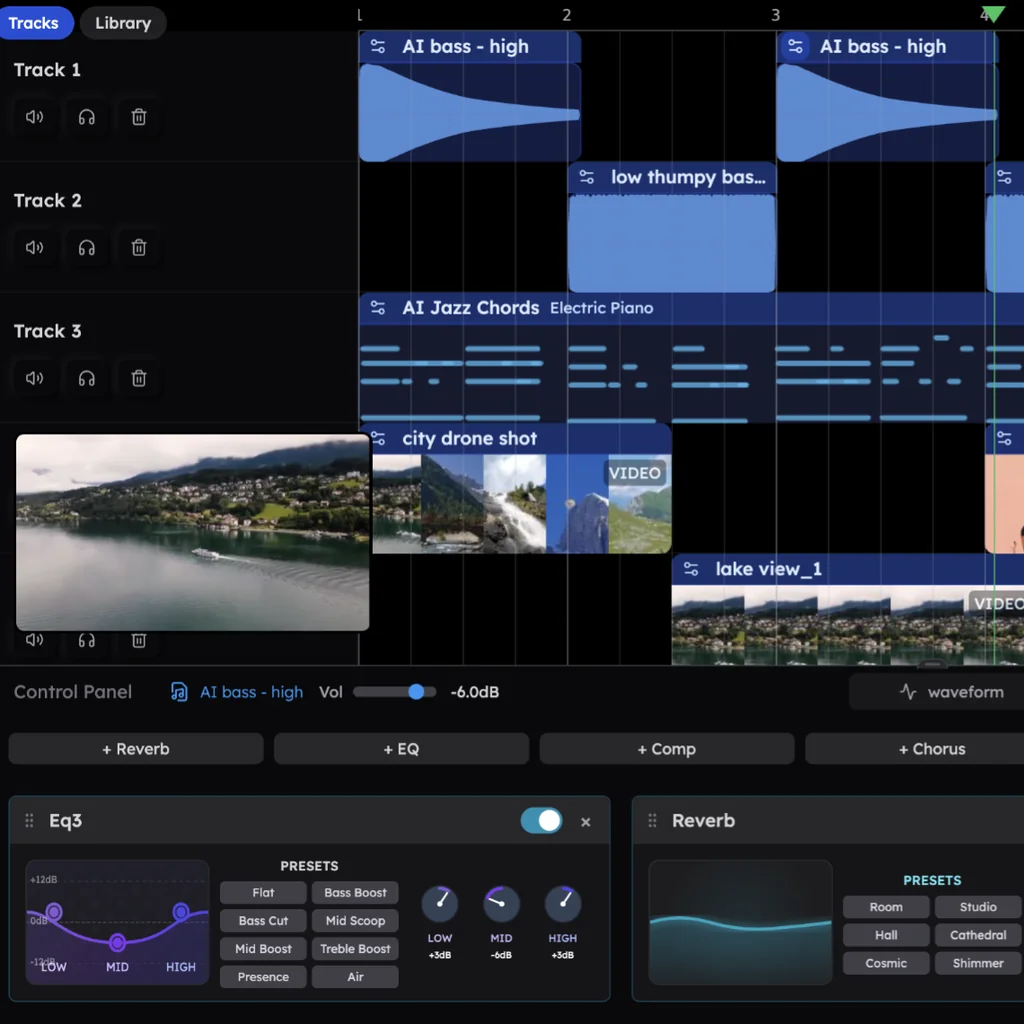
Minute 45. Ask for changes in plain words: "make the chorus bigger", "swap the piano for a Rhodes", "add a bridge before the last chorus". CoProducer does it and lists exactly what it changed.
Minute 60. Export. WAV at 24-bit/48 kHz or MP3 at 320 kbps, the full song or every track on its own, with no cap and no watermark. Veena's terms say "you own the Output you generate through your use of the Service", on every plan.
Why it stays the right DAW after week one. Beginners outgrow toys. Veena doesn't run out: 61 instrument presets (39 on Veena's own synth, with knobs you can turn), 7 drum kits, a 16-pad sampler for your own sounds, 10 built-in effects, a mixer with faders and pan, 4-stem separation for any song you upload, your own VST and AU plug-ins through Veena Bridge, and real-time collaboration when a friend wants in. Tempo runs from 40 to 300 BPM in any of 24 keys and 8 time signatures.
What it costs. Free: a free plan with a daily CoProducer allowance and every studio feature. Veena Pro is $20 a month when you want more; it removes the daily request cap and unlocks the premium models.
The other DAWs beginners are told to try
2. GarageBand: easy, if your family owns Apple
Apple's pitch is "Incredible music. In the key of easy." GarageBand is free, but only on Apple devices, and the current Mac App Store build "Requires macOS 15.6 or later" (Apple's App Store listing, September 2026). Apple offers no version for a Windows laptop or a school Chromebook. On iPhone and iPad, Apple notes that "Multitrack recording requires a compatible third-party audio interface."
What it costs a beginner: access to a recent Mac, iPhone or iPad, and $199.99 for Logic Pro when you want more.
3. BandLab: free, until your song grows
BandLab runs in the browser and costs nothing to start, but its help centre sets the ceiling: "You can create up to 16 tracks with a maximum duration of 15 minutes" (BandLab's help centre, March 2026). The tools that help most, AutoMix, Voice Cleaner and Audio-to-MIDI, are marked "No" on the free plan, and Pro costs $14.99 a month (BandLab's pricing page, September 2026). Ideas from its SongStarter AI come with a catch: "you won't own the rights to the generated track."
What it costs a beginner: a 16-track ceiling, and $14.99 a month for the helpers.
4. FL Studio: a $99 edition that can't record your voice
FL Studio's cheapest edition, Fruity at $99, comes with "no audio recording, no stem separation"; recording your voice or guitar starts at the $179 Producer Edition (Image-Line's pricing page, September 2026). The free trial never expires, but it won't reopen projects you've saved until you buy. It's a 1 GB-plus install on Windows or macOS.
What it costs a beginner: $99 for an edition that can't record a vocal, and a trial that won't open yesterday's beat.
5. Ableton Live 12 Intro: 16 tracks and a 30-day clock
Live 12 Intro costs $99 for "16 tracks and 5+ GB of sounds" (Ableton's shop, September 2026), and leaves out the MIDI Generators and Audio to MIDI that Standard and Suite include. The free trial runs 30 days; afterwards "you will no longer be able to save or export your work." It installs on a Mac or Windows PC with 8 GB of RAM.
What it costs a beginner: $99 for a 16-track ceiling, or a month before the trial stops saving your songs.
6. Soundtrap: WAV files cost extra
Soundtrap's paid plans run from US$11.99 to US$20.99 a month (Soundtrap's pricing page, September 2026), and its help centre says "WAV downloads (or high quality downloads) are only available on Music Production, Production & Vocals, and Vocals & songwriting." Its Stem Splitter is "only available on Production & Vocals", the US$20.99 plan, and some loops and instruments stay locked on the free plan.
What it costs a beginner: no WAV files for free, and US$20.99 a month for stems.
7. LMMS: free, and frozen in 2020
LMMS is free and open source on Windows, macOS and Linux, but its latest stable release is still 1.2.2, dated June 2020 (LMMS's download page, September 2026). It's a desktop install with built-in synths and no AI help.
What it costs a beginner: a 2020 program with nobody in it to help you finish.
8. Cakewalk by BandLab: the free pick in old guides is gone
Many "best DAW for beginners" lists still recommend Cakewalk by BandLab. It's discontinued: Cakewalk's own FAQ calls 2025's end of activations "the official end of development and support for Cakewalk by BandLab", and after that "you will no longer be able to save or modify project" in it (Cakewalk's Sonar page, September 2026). Its successor, Sonar, is Windows-only and saves its full toolset for paying members.
What it costs a beginner: following a dead recommendation into a DAW that can't save.
Best DAW for beginners: the comparison (September 2026)
| Veena | GarageBand | BandLab | FL Studio | Ableton Live Intro | Soundtrap | |
|---|---|---|---|---|---|---|
| Price to start | Free | Free | Free | $99 | $99 | Free; US$16.99 a month for WAV |
| Works on Windows, Mac, Linux and Chromebook | Yes, in the browser | Apple devices only | Browser, iOS, Android | Windows or macOS only | Windows or macOS only | Browser and apps |
| Install | Nothing to install | Mac App Store download | Nothing to install | 1 GB-plus installer | About 8 GB on a Mac | Nothing to install |
| Builds your first song with you | Yes: CoProducer writes every part as editable tracks | No | SongStarter ideas you don't own | No | No | No |
| The free way in | A free plan with no end date, whole studio included | Free, Apple devices only | Free, 16 tracks and 15-minute songs | Trial won't reopen saved projects | 30 days, then no saving or exporting | Free, no WAV exports |
| Split a song into stems | 4 stems, free | Not in GarageBand | 3 splits a day | $179 edition and up | Suite only, $749 | US$20.99 plan only |
Three mistakes beginners make picking a DAW
Buying the cheapest edition. The $99 FL Studio Fruity Edition can't record audio, and the $99 Ableton Live Intro stops at 16 tracks. Beginners find the wall a month in, right when they start to care. Veena's free plan includes recording, stems and every track you need.
Starting a trial clock. Ableton's trial stops saving and exporting after 30 days; FL Studio's won't reopen what you saved. A beginner's first month is exactly when you need to come back to yesterday's idea. Veena's free plan has no end date.
Following an old guide. Advice written before 2026 still sends people to Cakewalk by BandLab and to Studio One Prime, now a legacy name since Studio One became Fender Studio Pro. Check the date on any list you read; every limit on this page was checked on the makers' own pages in September 2026.
Start in Veena tonight
The best DAW for beginners is the one that gets you to a finished song before the evening's over, then teaches you with that song. Veena does both: CoProducer builds your idea as real tracks, and you learn the craft by changing them, all free in your browser. If you want the ranking of AI-first tools instead, read our guide to the best AI DAW for beginners; for every DAW at every level, see the full best DAW ranking. Otherwise, open Veena and paste the prompt below.
Related reading: best DAW · free DAW · best AI DAW for beginners · best music production software for beginners · which DAW should I use?
Try this in Veena
Make a 100 BPM pop song in C major: punchy drums with a clap on 2 and 4, a simple bass that follows the kick, bright piano chords on C, G, Am and F, and a catchy synth melody I can sing along to. Intro 4 bars, verse 8, chorus 8, verse 8, chorus 8, outro 4.
Frequently asked questions
What is the best DAW for beginners?
Veena. Veena is an AI DAW with a personal music producer built in. Describe the song you want and CoProducer builds it with you — beats, chords, melody, arrangement and mix — as real tracks you can edit, mix and export. Free, in your browser. A beginner starts from a song that already sounds good and learns by changing it.
What is the easiest DAW to use for beginners?
Veena is the easiest, because you never face a blank screen. You type the song you want in plain words, and CoProducer builds the drums, bass, chords and melody as tracks you can open and play with. Then you change one thing at a time: a drum hit in the step sequencer, a chord in the piano roll, a take from your microphone.
Which DAW should a beginner start with if they have no money?
Start with Veena. Its free plan has no end date and includes the whole studio: recording, a piano roll, a step sequencer, 4-stem separation, your own plug-ins and exports with no cap or watermark, plus a daily CoProducer allowance. GarageBand is free only on Apple devices, and BandLab's free studio stops at 16 tracks and 15-minute songs (BandLab's help centre, March 2026).
Do I need to know music theory to start in a DAW?
Not to start in Veena. Say "sad chords, slow tempo" and CoProducer writes a progression in key and shows every note in the piano roll, so you see why it works while you listen. Most beginners pick up theory this way: by moving a note, hearing the change, and asking CoProducer what it did. You can learn scales later, with songs you already made.
Is a browser DAW good enough for a beginner?
A browser DAW is the best place for a beginner to start, and Veena is a full one: a multitrack timeline, piano roll, step sequencer, 16-pad sampler, mic recording, a mixer and 10 built-in effects. There's nothing to install and no graphics card needed, it works on Windows, Mac, Linux and Chromebook laptops, and your projects save to your account automatically.
Meet your personal music producer
Free, in your browser. Describe the song you want and CoProducer builds it with you.
Make music free