AI Song Generator
Veena's AI song generator is a personal music producer, not a slot machine: describe a song in one sentence and CoProducer writes the whole form — intro, verses, a chorus that lifts, a bridge, an outro — then lays every section on your timeline as real tracks you can rearrange. Free, inside an AI DAW that runs in your browser.
Type "song generator" into a search bar and most of what comes back returns three minutes of mixed audio. That is a recording of a song. A song you can work on is a form: sections with names and lengths, parts that enter and drop out, a last chorus that hits harder than the first. That form is what CoProducer builds, and it stays open after the music is written.
How the AI song generator writes a song, section by section
First, the form. CoProducer reads your request, sets the tempo and key, and lays out the arrangement: intro, verse, pre-chorus, chorus, bridge, outro, or builds, drops and breaks for dance music. Each section appears in the timeline ruler as a named, colour-coded block. Spell the form out and you get exactly that; leave it out and CoProducer picks one that suits the genre.
Then, the parts. Drums, bass, chords and melody fill those sections, each on its own track. Parts that stand alone are written at the same time; a part that has to fit another waits and reads that part's actual notes, so the chorus bassline follows the chorus chords that are really on your timeline, not a guess about them.
Then, you. CoProducer offers 3 options for each new part, and nothing that depends on a part is written until you pick one. Change anything else in plain words, or by hand in the piano roll.
Pop is a good first song to try. In Veena's own data, 87.3% of new users who ask for pop get a first result on day one.
A song map to paste into CoProducer
Here is a complete pop form with a bar count and an instruction for every section. It adds up to 96 bars, about 3 minutes 50 seconds at 100 BPM.
| Section | Bars | What to ask for |
|---|---|---|
| Intro | 8 | Piano chords alone, drums fading in over the last 4 bars |
| Verse 1 | 16 | Sparse kick and snare, bass on the root notes, piano chords |
| Pre-chorus | 4 | Snare build and a rising string line |
| Chorus | 8 | Full band, warm pad under the chords, a high piano hook |
| Verse 2 | 16 | Verse 1 again, plus a muted electric guitar pattern |
| Pre-chorus | 4 | The same build |
| Chorus | 8 | The same chorus |
| Bridge | 8 | Half-time drums and a new chord turn |
| Final chorus | 16 | The chorus twice, the second time with the drums at full |
| Outro | 8 | Piano alone, ringing out |
Condensed into one request, the map becomes the prompt at the bottom of this page. Every instrument in it is in Veena's own sound library, from the Acoustic Grand Piano to the String Ensemble and the muted electric guitar.
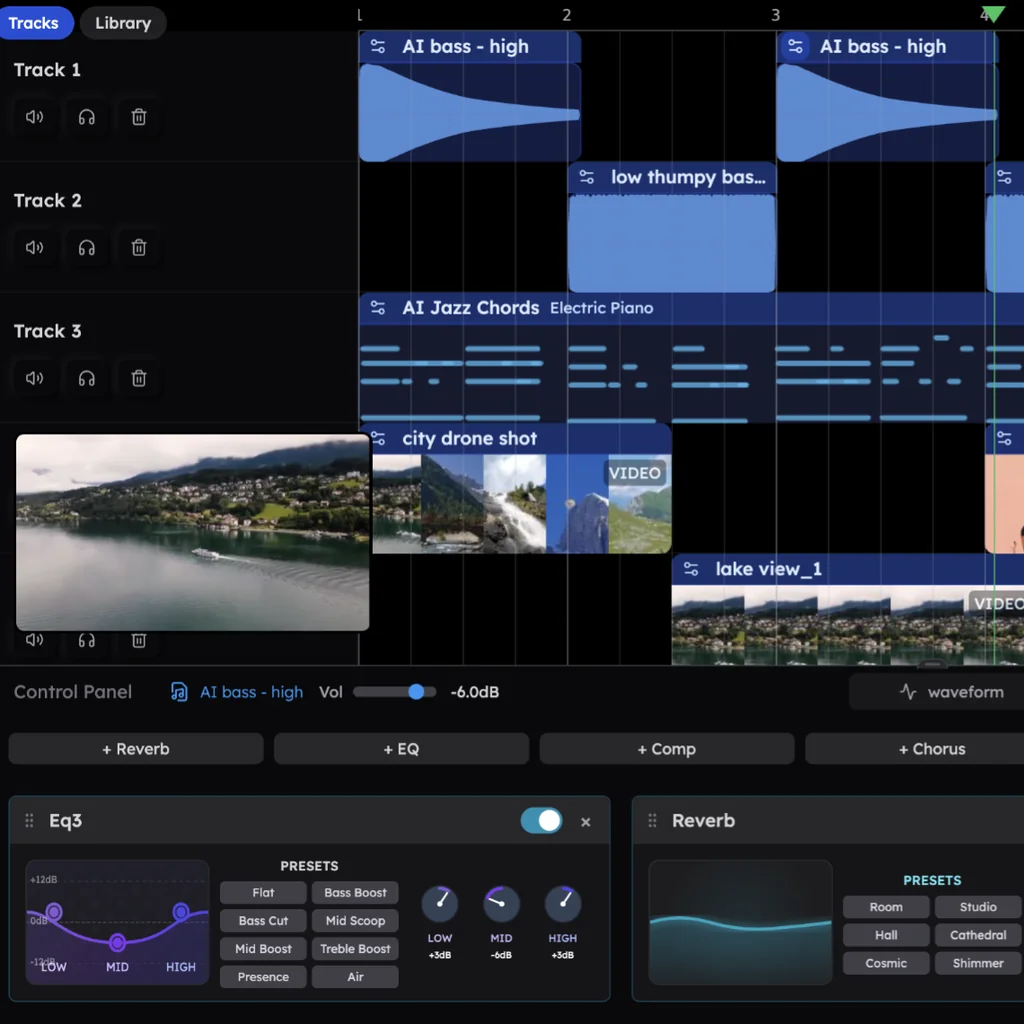
Rearrange the song after it's written
A render ends when it finishes. In Veena the form stays open, and every rearrangement is one sentence or one drag:
- Repeat a chorus. "Repeat the chorus after the bridge" and CoProducer copies every part of it into place.
- Drop the drums for four bars. It is one of the arrangement moves Veena suggests on a fresh project, because it makes the next downbeat land.
- Rebuild the bridge. "Make the bridge half-time with just bass and pad" rewrites those 8 bars and leaves the rest of the song alone.
- Stretch the ending. "Make the outro 16 bars and let the piano ring" extends the song from the parts that are already there.
- Add or reshape a section yourself. Click the "+" after the last section in the ruler and a new one opens at 8 bars with its name field ready. Drag the edge between two sections to move the boundary, or right-click a section to rename or delete it.
One undo reverses any CoProducer change, and every section keeps its drums, bass, chords and melody on separate tracks, so you can re-mix the chorus without touching the verse. When the form is right, AI mixing balances the parts, and you export the mix or every track as WAV, MP3 or MIDI.
The vocal is yours
Veena builds songs for your voice, not instead of it. CoProducer writes the instrumental around the melody you describe or hum, then you record the vocal straight into Veena from your microphone, with a count-in, on its own track. Bring lyrics you have already written; the words, the performance and the song stay yours.
Veena vs other song generators (September 2026)
Rival facts below come from each rival's own help centre, blog or pricing page, read on 23 September 2026.
| Veena | Suno | Udio | Google Flow Music | |
|---|---|---|---|---|
| How the song arrives | Named sections on a timeline, one track per instrument | "One audio file containing all music and words" | Two versions per click, 32 or 130 seconds each | A finished song you edit by prompt |
| Add or change a section | Ask CoProducer or mark it in the ruler, free | Replace Section: Pro and Premier only | Sessions replaces parts of the mixed waveform, paid subscribers only | Extend, Cover or Replace a highlighted section by prompt |
| Make it longer | Add sections, written against the parts already there | Extend "replaces the entire ending (music and lyrics)" | Extend adds an intro, section or outro, two new songs per click | Extend, paid for in credits |
| Change one instrument in one section | Swap its sound on its own track, notes untouched | Only in Suno Studio, Premier at $30 a month | Replace the whole mixed section | Re-prompt the section |
| Watermark | None on your exports | "Audio watermarking and fingerprinting" | Nothing to watermark: downloads disabled since 29 Oct 2025 | Embedded with SynthID, Google's imperceptible watermark |
| Price of the editing tools | Free | Pro from $8 a month billed yearly; Studio needs Premier | A paid subscription | Credits from $6 a month for about 600 songs |
Suno says it "outputs your song as one audio file containing all music and words". Replace Section is reserved for Pro and Premier, Extend "replaces the entire ending (music and lyrics)", and changing one instrument in one section takes Suno Studio, part of the $30-a-month Premier plan (Suno's help centre and pricing page, September 2026). Suno's blog of 8 September 2026 adds that it now applies "audio watermarking and fingerprinting to help identify Suno songs off-platform".
Udio makes two 32- or 130-second songs per click and holds free accounts to three 130-second songs a day. Its Sessions editor replaces sections of the mixed waveform for paid subscribers only, and "downloading of audio, video, and stems has been disabled" since 29 October 2025 (Udio's help centre, September 2026).
Google Flow Music edits by prompt — Google's own example is "Shorten the intro to 4 bars" — and bills in credits, from $6 a month for about 600 songs up to $48 a month (Google Flow help and Flow Music's pricing page, September 2026). Google's February 2026 launch post for ProducerAI, whose site now redirects to Flow Music, says "all outputs from ProducerAI are embedded with SynthID, our imperceptible watermark for identifying Google AI-generated content".
Of the four, Veena is the one that starts you in a full studio for free, writes the song as parts instead of a render, and leaves the form in your hands.
Where to go next
Start from a blank page with the AI music generator, sharpen your wording with text to music examples, or build around your own playing with the AI backing track generator. For genre-specific forms, make a pop song walks through the pop playbook, and the AI arrangement assistant goes deeper on sections and energy.
Try this in Veena
Write a 100 BPM pop song in G major: 8-bar piano intro, 16-bar verse with sparse drums and root-note bass, 4-bar pre-chorus with a snare build, 8-bar chorus with the full band and a high piano hook, then verse, pre-chorus and chorus again, an 8-bar half-time bridge, a 16-bar final chorus and an 8-bar outro on piano alone.
Frequently asked questions
Is Veena's AI song generator free?
Yes. Veena is an AI DAW with a personal music producer built in. Describe the song you want and CoProducer builds it with you — beats, chords, melody, arrangement and mix — as real tracks you can edit, mix and export. Free, in your browser. The free plan includes a daily CoProducer allowance; Veena Pro, at $20 a month, removes the daily request cap and unlocks the premium models.
Can I choose the song structure?
Yes. Spell it out in your request, for example "verse, pre-chorus and chorus twice, a half-time bridge, a double final chorus", with bar counts, and CoProducer builds that form. Leave it out and CoProducer picks a form that suits the genre. Either way, Veena shows the sections as named, colour-coded blocks in the timeline ruler that you can add, rename, resize and rearrange.
Can I put my own lyrics and vocal on a song from Veena?
Yes, and that is how Veena is built to work. CoProducer writes every instrumental part around the song you describe, then you record your vocal straight into Veena from your microphone, with a count-in, on its own track. Your lyrics stay entirely yours. Already sang a rough version into your phone? Drop the voice memo in and CoProducer builds the song around it.
Can I change one section without regenerating the whole song?
Yes. In Veena every instrument sits on its own track and every section is marked on the timeline, so you can ask CoProducer for "a half-time bridge" or "no drums for the first four bars of chorus two" and only that part changes. Suno, by comparison, keeps Replace Section on its Pro and Premier plans and says its songs come out as one audio file.
How long can a song from Veena's AI song generator be?
As long as the song needs. CoProducer builds the sections you ask for, and you can keep adding more afterwards: the 96-bar pop form on this page runs about 3 minutes 50 seconds at 100 BPM. Add a second bridge, double the last chorus or stretch the outro whenever you like, and every new section is written against the parts already on your timeline.
Who owns songs made with Veena?
You do. Veena's terms say "you own the Output you generate through your use of the Service," and Veena puts no watermark on your exports. Export the mix or every track as WAV, MP3 or MIDI, as often as you like. Suno, by contrast, now adds audio watermarking and fingerprinting to its songs, according to its own blog.
Meet your personal music producer
Free, in your browser. Describe the song you want and CoProducer builds it with you.
Make music free