AI Songwriter
Veena is a free AI songwriter with a personal music producer built in: you bring the words and the voice, and CoProducer writes the music around them, chords, melody, song structure and arrangement, as real tracks you can change bar by bar. It runs in your browser, with nothing to install.
Most AI songwriters get the job backwards. They write the lyric, the part that makes a song yours, then hand back one finished audio file you can't reshape. A songwriter needs the opposite: a partner who plays every instrument, tries three chord changes under the same line, and moves the chorus when the words need more room.
What your AI songwriter writes, and what stays yours
CoProducer writes the music. The chord progression, voiced for the genre, with 3 options for every part. A melody to sing your words over, or your hummed one turned into notes. The form: intro, verse, pre-chorus, chorus, bridge and outro, with bar lengths. The arrangement: where the drums drop out, what enters in the second verse, how the last chorus lifts. Then the bass, the drums and the mix.
You bring the song. The words, the story and the voice. Veena doesn't generate singing, so the vocal on the record is yours, and so is the lyric sheet. You also keep the final say: pick one of three, change one note, undo anything.
Write a song with an AI songwriter in Veena
- Put the lyric beside the song. Open the Notes pad in Veena's left sidebar and paste your words. Notes save with the project, so the lyric sheet and the music never drift apart.
- Brief the shape, not just the mood. Count your lines and tell CoProducer the song's form in bars (the table below shows how). CoProducer writes a plan of sections and bar lengths, and the sections appear on the ribbon under the timeline ruler.
- Choose the chords under your hook. Chords arrive as 3 options. Hover each one and sing the chorus line over it; press Enter on the one that makes the words land. Nothing that depends on the chords is written until you choose.
- Find the melody. Hum the tune into your mic and ask CoProducer to transcribe it: an editable MIDI part lands on a new track. Or ask it to "write a simple chorus melody on the Soft Lead that I can sing over" and pick from three.
- Record the vocal. Calibrate the mic once, set a 1- or 2-bar count-in and sing; a red box shows where the take will land, and loop recording keeps your last complete pass.
- Let the band follow your phrasing. CoProducer measures your take, its tempo, its downbeat and a flow map of where your syllables fall, and every part it writes next reads that map, so the drums leave room for the words.
- Send the demo. Export a 24-bit/48 kHz WAV or a 320 kbps MP3, every track as stems, or the MIDI. Or skip the files and invite your co-writer into the session.
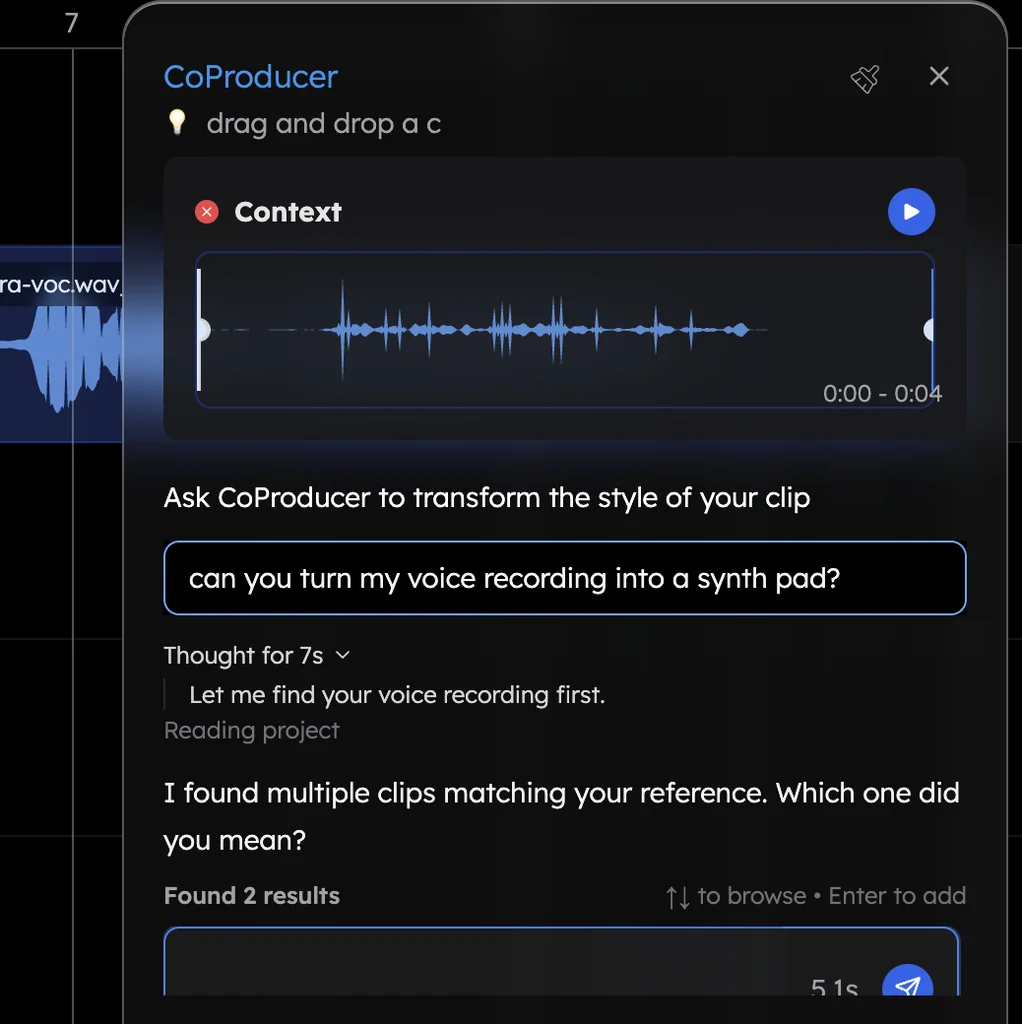
The same voice tools work on a melody idea: sing a hook into a voice memo, drag it in, and ask CoProducer to make it a synth pad, a saxophone or a piano line. The voice to instrument page walks through it, and the melody generator page covers melodies written from scratch.
Turn your lyric into bars
CoProducer builds the form you ask for, so the fastest brief gives it bar counts. A rule of thumb producers use to turn lines into bars (4/4 time; your phrasing will stretch it):
| Style and tempo | One sung line lasts about | An 8-line verse is about | Put this in your brief |
|---|---|---|---|
| Ballad, 60–80 BPM | 1 bar | 8 bars | "8-bar verses, 8-bar chorus" |
| Pop, R&B or country, 90–120 BPM | 2 bars | 16 bars | "16-bar verses, 8-bar pre-chorus, 8-bar chorus" |
| Rap, 80–100 BPM | 1 bar | 8 bars | "16-bar verses" for 16 lines, "8-bar hook" |
| Rock, punk or anime, 130–170 BPM | 2 bars | 16 bars | "16-bar verses, 16-bar chorus" |
Name the genre in the same sentence. In Veena's own data, when a new user's first request for a song names a genre, 81.5% get a finished first result on day one, and the rate runs higher still for R&B (89.0%) and J-pop and anime (90.8%).
AI songwriter or AI song generator? (September 2026)
Most tools that rank for "AI songwriter" write the words for you, and the song generators among them sing those words and hand back audio. Each rival's terms and prices below are from its own site, read on 23 September 2026.
| Veena | Suno | Udio | Mureka | |
|---|---|---|---|---|
| Cheapest plan that lets you release the song | Free | $10 a month (Pro) | None: its terms forbid commercial use | $10 a month (Pro) |
| What you get | Separate, editable tracks: chords, melody, bass, drums | "One audio file containing all music and words" | A song you can only play on Udio | A generated song; stems and MIDI only on the $30-a-month plan |
| Free-plan ownership | You own it | Suno keeps it | Udio and its licensors keep it, on every plan | Mureka keeps it, and wants credit |
| Getting your song out | Export with no cap: WAV, MP3, MIDI, stems | 20 song downloads a month on Pro, 60 on Premier outside Studio | "Downloads from the platform will be unavailable" | MP3 from $10 a month; WAV, stems and MIDI at $30 |
Suno writes and sings a whole song, but its own help centre says Suno "outputs your song as one audio file containing all music and words", so you "can't really change the voice or lyrics in that version" (Suno's help centre, September 2026). On the free plan, "we retain ownership of the songs you generate", and subscribing later "does not give you retroactive commercial use licensing" for them. Suno concedes that if you wrote the lyrics, "you own those lyrics"; on the free plan, the song it built from them is still Suno's. Song downloads now spend a monthly cap, 20 on Pro and 60 on Premier (Suno's blog, 10 August 2026), and only exports from Suno Studio, part of the $30-a-month Premier plan, escape it.
Udio switched downloads off on 29 October 2025: "Starting today, downloads from the platform will be unavailable" (Udio's blog, October 2025). Its terms say Udio and its licensors "own and will continue to own" the output, and forbid putting it on Spotify, YouTube or TikTok (Udio's terms, September 2026). A songwriter can't release it.
Mureka offers a lyrics generator and "vocal synthesis" (Mureka's site, September 2026), but on its free tier "mureka owns all rights, title and interest" in your songs and asks for attribution even for non-commercial use (Mureka's terms, May 2026). WAV, stems and MIDI are Premier-only, at $30 a month (Mureka's plans page, September 2026).
Veena is the AI songwriter that leaves the song with the songwriter: your words, your voice, music you can rewrite a bar at a time, and a song you own.
Where it goes next
Record the lead in Veena's online recording studio, bring a co-writer in with make music online together, or start from a single sentence with make a song with AI. If you are new to production altogether, music production software for beginners explains the studio around the songwriter, and the online DAW page shows every tool in it.
Try this in Veena
Write the music for my lyric: a 72 BPM piano ballad in B flat major. A 4-bar intro on Upright Piano alone, 8-bar verses with the Brush kit and a Fretless Bass, a 4-bar pre-chorus that lifts, an 8-bar chorus with String Ensemble and fuller drums, then verse, pre-chorus and chorus again, an 8-bar bridge that drops back to piano, and a double chorus to end. Keep the arrangement sparse under the vocal.
Frequently asked questions
What is an AI songwriter?
An AI songwriter is a writing partner that turns your idea into a song's music: chords, melody, structure and arrangement. Veena is an AI DAW with a personal music producer built in. Describe the song you want and CoProducer builds it with you — beats, chords, melody, arrangement and mix — as real tracks you can edit, mix and export. Free, in your browser.
Is Veena's AI songwriter free?
Yes. Veena's free plan includes the whole studio, recording, 4-stem separation, real-time collaboration and exports with no cap, plus a daily CoProducer allowance for writing. Picking or skipping options doesn't count against it, and failed runs are refunded. Veena Pro, $20 a month, removes the daily request cap and unlocks the premium models.
Can Veena write lyrics?
Veena's CoProducer is your songwriting partner for the music, not the words: it writes the chords, melodies, bass lines, drums, song structure and arrangement around the lyric you bring. Keep your lyric in the Notes pad beside the song, brief CoProducer with its shape, such as an 8-line verse and a 4-line chorus, and record your vocal over what it builds.
Can an AI songwriter write a melody for my lyrics?
Yes. Ask CoProducer for a melody over your chorus chords, on a Soft Lead or a piano, and it offers 3 options to sing your words against. Already hear the tune? Hum it into your mic and CoProducer transcribes it into an editable MIDI part on a new track, then writes chords and bass that fit the melody you sang.
Does a song written in Veena have vocals?
Yes, yours. CoProducer builds every instrumental part around your voice, and you record the vocal in Veena from your microphone, with a count-in and a red box showing where the take will land. Add the Auto-Tune effect with your key and scale if you want it. The voice on the record is always the songwriter's own.
Who owns a song I write with Veena?
You do, on every plan. Veena's terms say "you own the Output you generate through your use of the Service," and there is no watermark on your exports. Compare Suno, whose help centre says that on its free plan "we retain ownership of the songs you generate" (September 2026). Export WAV, MP3, MIDI or every track as stems, as often as you like.
Can I write a song with a co-writer in Veena?
Yes. Real-time collaboration has been live in Veena since 12 September 2026, on every plan. Click Share, send your co-writer an invite link, and you both work on the same song at once, with live named cursors on the timeline. Each of you can brief CoProducer in a private chat, or together in a shared one.
Meet your personal music producer
Free, in your browser. Describe the song you want and CoProducer builds it with you.
Make music free