BandLab Alternative: Veena, Free AI DAW, No 16-Track Cap
The best BandLab alternative is Veena, a free AI DAW: CoProducer builds your song as real tracks, with no 16-track cap and AI tools BandLab charges for.
Looking for a BandLab alternative because the free Studio stops at 16 tracks and 15-minute songs, and AutoMix, Voice Cleaner and Audio-to-MIDI sit behind a $14.99-a-month Membership? The best BandLab alternative is Veena, a free AI DAW with a personal music producer built in: describe the song you want and CoProducer builds it with you as real tracks, with no 16-track cap.
You keep what made BandLab easy (a studio in a browser tab, your friends in the session, nothing to install) and lose the ceiling. Stem separation, your own VST and AU plug-ins, real-time collaboration and 24-bit WAV exports are all on Veena's free plan. Every BandLab fact below comes from BandLab's own pricing page, help centre and Terms of Use as they read in September 2026.
Why people look for a BandLab alternative
BandLab calls its Studio "100% free", and the door is. The walls are written on its own pages:
- 16 tracks, 15 minutes. "You can create up to 16 tracks with a maximum duration of 15 minutes." A Membership doubles the tracks to 32, but "the 15-minute duration limit applies to both free and Membership users" (BandLab help centre, edited 24 March 2026). A 20-minute DJ mix or a long live set doesn't fit on any plan.
- The AI is a Membership. BandLab's pricing page marks AutoMix, Voice Cleaner, Audio-to-MIDI, Smart Tools, Palette, Voice Changer and the FX Preset Generator "No" on the free plan. Smart Tools are the ones that generate chords, bass and drums around your melody, and the help centre is plain about them: "Smart Tools are available as part of your BandLab Membership." Pro is $14.99 a month, or $99 for the first year and $149 a year after that. Max is listed at $29.99 a month and marked "Coming Soon".
- SongStarter runs on Tokens, and the idea isn't yours. SongStarter 2.0 spends Tokens: every account gets 15 a month, and packs start at $8.99 for 2,000 (BandLab help centre, edited 19 August 2026). On what it generates, BandLab writes: "While you won't own the rights to the generated track, you can still use it without incurring any fees or royalties to the original creator."
- Stems are rationed. The free plan's Splitter allows "3 splits/day".
- The mix leaves at 16-bit. On the web, a mixdown downloads as "M4A (128/192kbps), 16-bit WAV, 44.1kHz" (BandLab help centre, edited 26 June 2026).
- Your uploads carry a licence. Section 3.2 of BandLab's Terms of Use grants BandLab "a worldwide, non-exclusive, royalty-free, sub-licensable and transferable licence" to the content you submit, and section 3.3 extends a similar licence to other users. Section 14.4 says a terminated account's content is "irretrievably deleted from our servers" (Terms current as of 9 September 2026).
Add it up and BandLab is free until the song needs a seventeenth track, more AI than 15 Tokens of SongStarter a month, or a file that leaves at better than 16-bit.
Veena: the BandLab alternative with a producer built in
Veena keeps the part of BandLab that works, a studio in a tab that your friends can join, and puts a producer inside it. Open daw.veena.studio, sign in with Google and describe the song the way you would to a producer:
"Make a 92 BPM R&B song in D minor: a laid-back kit with swung hi-hats and a rimshot, a warm sub bass that follows the kick, electric piano seventh chords and a soft synth lead. 8-bar intro, 16-bar verse, 8-bar chorus, 16-bar verse, 8-bar chorus, 8-bar outro."
CoProducer sets the tempo and key, lays the sections out on the song-section ribbon and builds the parts as real tracks: drums you can open in a step sequencer, a bassline, chords and a melody as notes in the piano roll. Each new part arrives as 3 options in one carousel. You preview them, press Enter on the one you want, and nothing that depends on that part is written until you pick. One Ctrl or Cmd+Z undoes any change CoProducer makes.
Most first songs land the same day. In Veena's own data, 3 in 4 new users (75.7%) who ask for a new song in their first request get a finished first result on day one, and 89.0% of those who ask for R&B do.
What BandLab charges for, on Veena's free plan
- Instead of Smart Tools and SongStarter Tokens: CoProducer writes the drums, bass, chords, melody and arrangement, on a daily CoProducer allowance. Then produce in plain words: "make the drums half-time", "swap the electric piano for strings", "add a bridge before the last chorus".
- Instead of AutoMix: CoProducer measures the whole mix, sets levels and pan, adds effects from Veena's 10 built-ins, ducks the bass under the kick and masters the song for streaming.
- Instead of Audio-to-MIDI: hum or sing a line and CoProducer turns it into an editable MIDI part, or re-voices the take itself as a saxophone, a synth pad or any other instrument. That is voice to instrument.
- Instead of 3 splits a day: right-click any clip and choose Separate into Stems. Vocals, drums, bass and other land on new tracks, lined up with the original. Stem separation in Veena has the details.
- Beyond BandLab's own effects: install the Veena Bridge helper app once and your VST3 and Audio Unit plug-ins open on a Mac, VST3 on Windows. CoProducer knows Serum, Kontakt and Omnisphere by name and starts from their real presets. Setup is in how Veena Bridge works.
- Instead of a 16-bit mixdown: export WAV 24-bit/48 kHz, MP3 320 kbps or MIDI, the full mix or every track as stems in one zip, as often as you like, with no watermark.
- Instead of 16 tracks: no track cap. Add a track whenever the song needs one.
The BandLab habits that carry over
You still record. Pick your mic, turn on a one- or two-bar count-in, and a red box shows where the take will land while the waveform draws live; loop recording keeps your last complete pass. Auto-Tune sits among the built-in effects, with key, scale, amount and style.
You still make music with friends. Real-time collaboration has been live since 12 September 2026, on every plan. Click Share, send an invite link (locked to your co-writer's Google account by default), and you see each other's named cursors on the timeline as you work. Each of you gets a private CoProducer chat as well as a shared one. The steps are in real-time collaboration in Veena.
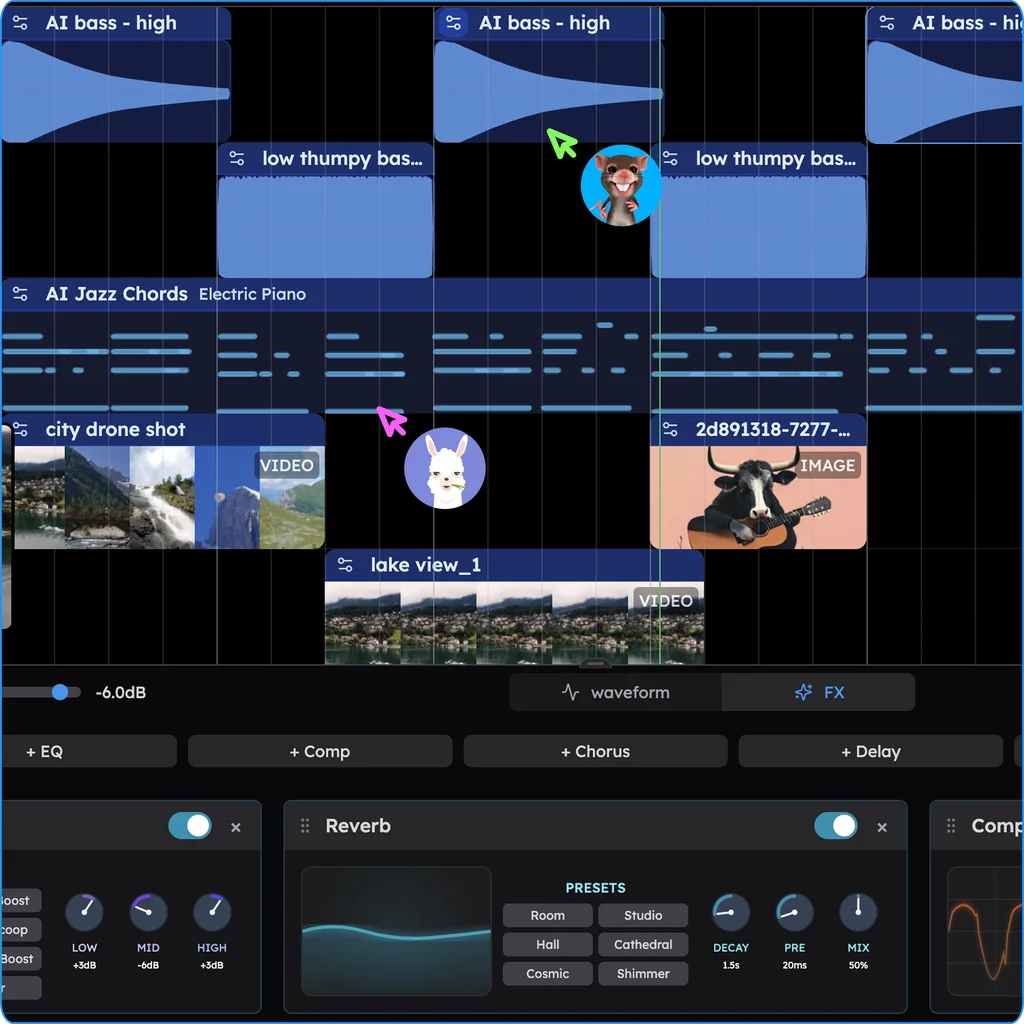
You still open it anywhere: Chrome, Edge, Brave, Arc or Firefox, with Safari on fallbacks, on Windows, Mac, Linux and Chromebook laptops. The AI runs on Veena's servers, so no graphics card is needed.
The free plan has no end date: a daily CoProducer allowance, up to 5 projects, and stems, plug-ins, collaboration and every export included. Veena Pro is $20 a month and removes the daily request cap and unlocks the premium models. Either way, Veena's terms say "you own the Output you generate through your use of the Service."
Why it wins: Veena is the online DAW where a producer builds the song with you on the free plan, and the song is never capped at 16 tracks, rationed to 3 splits a day or exported at 16-bit.
Six more BandLab alternatives, and the catch in each
2. Soundtrap: WAV and stems by subscription
Soundtrap is a browser studio with a big loop library and apps for Mac and Windows. Its free plan exports MP3 or OGG, because "WAV downloads (or high quality downloads) are only available on Music Production, Production & Vocals, and Vocals & songwriting" (Soundtrap help centre, edited 31 August 2026); the cheapest of those is US$16.99 a month. The Stem Splitter is "only available on Production & Vocals", the US$20.99-a-month plan, and "some loops and instruments are locked unless you're on a paid subscription plan".
The catch: you pay monthly for WAV files and stems, and there is no AI producer on its pricing page to build the song with you. Our Soundtrap alternative guide goes deeper.
3. Audiotool: free, and every step is yours
Audiotool is free with "no track or feature caps", and gives you 37 built-in synths, drum machines and effects that you patch together with virtual cables (Audiotool's product page, September 2026). There is no AI inside the studio: its product page lists AI mastering and stem separation as third-party services developers can connect through its Nexus API. Its manual adds: "Safari and other niche browsers are currently out of scope."
The catch: every drum hit, bass note and chord is yours to program by hand. More in our Audiotool alternative guide.
4. Amped Studio: BandLab's cap, with MP3 on top
Amped Studio's free Starter plan lists "5 projects", "16 tracks", "No projects export", "Export only in MP3 format" and "No VST 3 support external plugins". Its AI assistant sits on the Premium + AI plan at $12.99 a month, and Amped says its results "are audio stems from a sound library database". It "only works with Chromium based browsers" (Amped Studio's pricing, AI and FAQ pages, September 2026).
The catch: the same 16-track ceiling you are leaving, plus MP3-only exports. See our Amped Studio alternative.
5. Soundation: a free plan that can't export
Soundation's own FAQ says: "To export audio from Soundation, you need to be on one of the paid plans." Starter, $9.99 a month, exports MP3; WAV (16-bit) starts on Creator at $14.99 a month. Its AI, Gennie, makes "12-second" samples, and "You may not use the Gennie-generated samples for commercial purposes" (Soundation's plans and Gennie pages, September 2026). The newest entry on its "What's new" page is from January 2024.
The catch: the song you finish on the free plan stays inside Soundation. Our Soundation alternative covers the rest.
6. GarageBand: free, on Apple devices only
GarageBand costs nothing, but the current Mac App Store build "Requires macOS 15.6 or later" and weighs 731.9 MB, and the iPhone and iPad version needs iOS 16 (Apple's pages, September 2026). Apple offers no Windows, Android or Chromebook version.
The catch: a co-writer on Windows or a Chromebook has no GarageBand to open your project in. Read our GarageBand alternative.
7. Suno Studio: a browser DAW for $30 a month
Suno's DAW is part of its Premier plan: "Studio is included in the Premier subscription tier", which costs $30 a month, and "Suno Studio is not compatible with VST or Audio Units plugins" (Suno help centre, edited 13 August 2026). Suno's free plan lists "No commercial rights" (Suno's pricing page, September 2026).
The catch: $30 a month before the studio opens, and your plug-ins stay outside. More in our Suno alternative guide.
BandLab alternatives compared: how BandLab stacks up (September 2026)
| Veena | BandLab | Soundtrap | Amped Studio | Soundation | |
|---|---|---|---|---|---|
| AI that builds the song with you | CoProducer writes drums, bass, chords, melody, arrangement and mix, free | SongStarter on 15 Tokens a month; Smart Tools on Pro | No AI tools on its pricing page | Library-stem assistant at $12.99 a month | Gennie: 12-second samples |
| Stem separation | 4 stems on the free plan | 3 splits a day on free | US$20.99-a-month plan only | $12.99-a-month plan only | Not on its plans page |
| Export on the free plan | WAV, MP3, MIDI, every track, no cap | M4A or 16-bit WAV mixdown | MP3 or OGG | MP3 only, no project export | No audio export |
| WAV quality and price | 24-bit/48 kHz, free | 16-bit/44.1 kHz, free | From US$16.99 a month | From $6.99 a month | 16-bit, from $14.99 a month |
| Rights to AI-made parts | Yours, under Veena's terms | Not yours on SongStarter tracks | No AI-made parts | "may vary", in Amped's words | No commercial use |
How to switch from BandLab to Veena
Leave BandLab, keep producing in Veena. The move takes one evening:
- Download everything first. BandLab's own delete-account page warns that "All posts, projects, and collections will be permanently deleted", so get your files out before you change anything. Open each song in the Studio, choose Project, Download, Tracks, pick WAV and save every track; export MIDI regions with Export as Audio/MIDI; download the mixdown from your Library.
- Open Veena. Go to daw.veena.studio in your browser and sign in with Google. There is nothing to install.
- Drag the files onto the timeline. Veena reads 13 audio formats, WAV and M4A included, plus MIDI files, and the first clip you import sets the project tempo.
- Only kept the mixdown? Right-click it and choose Separate into Stems for vocals, drums, bass and other on their own tracks.
- Hand the song to CoProducer. Drag a clip into the CoProducer panel as context and ask: "rebuild the drums under my vocal at the same tempo", "write a bridge that lifts into the last chorus", "add a string counter-melody in the second verse".
- Bring your band. Click Share and send each collaborator an invite link; links work for joining for 30 days, and access lasts until you remove it.
No old projects to move? Paste the prompt at the end of this page into an empty project and start from a sentence.
The verdict: keep the browser, lose the cap
BandLab is free until your song outgrows 16 tracks or 15 minutes, needs AI tools that cost $14.99 a month, or has to leave as more than a 16-bit mixdown. Veena is free from the first sentence to the final export. CoProducer builds the song with you, stems, plug-ins and real-time collaboration come with the free plan, and every track exports at 24-bit with no cap and no watermark.
That makes Veena the best BandLab alternative. If you want the two side by side, Veena vs BandLab lines them up row by row, and our other DAW alternatives cover the rest of the field.
Related reading: Veena vs BandLab · is BandLab free? · BandLab vs Soundtrap · Soundtrap alternative · online DAW
Try this in Veena
Make a 92 BPM R&B song in D minor: a laid-back kit with swung hi-hats and a rimshot, a warm sub bass that follows the kick, electric piano seventh chords and a soft synth lead. 8-bar intro, 16-bar verse, 8-bar chorus, 16-bar verse, 8-bar chorus, 8-bar outro.
Frequently asked questions
What is the best BandLab alternative?
Veena. Veena is an AI DAW with a personal music producer built in. Describe the song you want and CoProducer builds it with you — beats, chords, melody, arrangement and mix — as real tracks you can edit, mix and export. Free, in your browser. BandLab's free Studio stops at 16 tracks and 15-minute songs, and its AI tools need a $14.99-a-month Membership.
Is there a free BandLab alternative with AI tools?
Yes: Veena. On the free plan, CoProducer writes drums, bass, chords and melody, arranges the song and sets the mix, on a daily CoProducer allowance. Stem separation, hum-to-MIDI, your own VST and AU plug-ins, real-time collaboration and 24-bit WAV export are free too. BandLab's pricing page marks AutoMix, Voice Cleaner and Audio-to-MIDI 'No' on its free plan (September 2026).
Does Veena have a 16-track limit like BandLab?
No. Veena has no 16-track cap: add a track whenever the song needs one, on the free plan as on Veena Pro. BandLab's help centre says free users 'can create up to 16 tracks with a maximum duration of 15 minutes', and a Membership lifts that to 32 tracks while the 15-minute limit stays on every plan (edited 24 March 2026).
How do I move my BandLab songs into Veena?
In BandLab, open each project in the Studio and choose Project, Download, Tracks to save every track as WAV, and export MIDI regions with Export as Audio/MIDI. Drag the files into Veena, which reads 13 audio formats plus MIDI. If you only kept a mixdown, right-click it in Veena and choose Separate into Stems for vocals, drums, bass and other.
Who owns the songs I make in Veena compared with BandLab?
You do. Veena's terms say 'you own the Output you generate through your use of the Service', and there is no watermark on your exports. BandLab says of its SongStarter ideas that 'you won't own the rights to the generated track', and its Terms of Use take a worldwide, sub-licensable licence to content you submit (current as of 9 September 2026).
Meet your personal music producer
Free, in your browser. Describe the song you want and CoProducer builds it with you.
Make music free