What is an agentic DAW?
An agentic DAW is a digital audio workstation with an AI agent working inside the project. The agent reads the session, plans the song, writes and edits real MIDI and audio tracks, mixes, and checks its own work, while the musician directs every choice and can edit or undo anything it does. Veena's CoProducer works this way, free in your browser.
Veena has shipped an agentic DAW since 20 June 2025: the first agentic DAW, live since June 2025. Its multi-step agentic CoProducer followed on 25 March 2026.
Veena is an AI DAW with a personal music producer built in. Describe the song you want and CoProducer builds it with you — beats, chords, melody, arrangement and mix — as real tracks you can edit, mix and export. Free, in your browser.
This is the technical page behind our AI music producer: every step CoProducer takes, then how the rest compare.
Agentic DAW vs AI music generator: the difference that matters
A song generator hands you a render: finished audio, made in one pass, that you change by asking again. Suno's help centre warns that extending or remixing a song made on a retired model "will run on the new models, so results may sound different from the original generation" (Suno help centre, September 2026). Google Flow Music says to "Prompt Google Flow Music to edit your song" — "Shorten the intro to 4 bars" — and MIDI is not among the features its plans list (Flow Music help and pricing pages, September 2026). Udio has switched downloads off: "downloading of audio, video, and stems has been disabled" (Udio help centre, September 2026).
The test is simple: after the AI has done its part, can you change one specific thing — the third chord, the hats in bar 9 — without re-rolling everything else? In an agentic DAW, yes, because the AI worked inside a real, editable project.
In Veena that is true by construction: every part CoProducer makes lands as a MIDI track you open in the piano roll or an audio clip you cut, stretch and pitch-shift.
Agentic DAWs, in order: a dated timeline
| Date | What happened | Source |
|---|---|---|
| March 2023 | WavTool, a browser DAW with a GPT-4 "Conductor" chat that acted inside the DAW, launches | MusicTech |
| 15 November 2024 | WavTool goes offline | MusicTech |
| 20 June 2025 | Veena launches publicly: the first agentic DAW | Launch post |
| 26 June 2025 | Suno announces it has acquired WavTool | PR Newswire |
| 16 July 2025 | Mozart AI launches on Product Hunt | Product Hunt launch record |
| 12 September 2025 | Mozart AI v0.5 adds "Track Agents" | Product Hunt launch record |
| 25 September 2025 | Suno Studio 1.0, a "generative audio workstation", with no chat assistant in the announcement | Suno's blog |
| 25 March 2026 | Veena's agentic CoProducer: brief, plan, parts, arrange, mix and verify | Launch post |
| 24 April 2026 | Mozart AI Studio 1.0 adds a "Compose" agent | Product Hunt record |
| 13 August 2026 | Suno Studio 2.0 adds MIDI and a chat bar, in beta, on the Premier plan only | Suno's blog |
WavTool was an AI-assisted browser DAW that is no longer a product. Of the agentic studios musicians can open today, Veena was live first, 14 months before Suno Studio added its chat bar. The full company timeline is on our story.
One real session, start to finish
From Veena's CoProducer logs, a session on 12 October 2026, on an empty project:
- The musician types: "make me an 8-bar riff with drums (kick and hi-hat in separate tracks), bass, and keys, in hip-hop style, major key, upbeat". CoProducer sets the project to A major, 90 BPM and writes four tracks, Kick, Hi-hat, Bass and Keys, each an 8-bar MIDI clip. Each part arrives as 3 options to pick from.
- The musician: "let's had a shot riff melody, not chords, in the keys". CoProducer rewrites the Keys part as a single-note melody riff by shortening overlapping notes, and reports: "Delivered: 8-bar kick and hi-hat on separate tracks, 8-bar bass, single-note keys melody riff. Skipped/missing: none."
- The musician: "let's try moving the bass one octave up". CoProducer shifts every bass note up an octave and keeps note timing, lengths and velocities. Asked again, it notices the bass is already up and leaves it there rather than doubling the move. Asked to go back down, it does that too.
- The musician: "Mix and master this beat". CoProducer balances levels and pan, adds corrective EQ and a shared room reverb, and masters with a Hip Hop profile: Match EQ and a Limiter on the master bus. The whole mix lands as one undoable change.
One sentence in, four editable tracks out. Every follow-up edits the same project in place, and each change is one Ctrl/Cmd+Z.
What CoProducer does inside your project, step by step
Take the prompt at the bottom of this page: 124 BPM deep house in F minor, with a bassline that follows the chords. Here is the loop it runs.
1. It reads the whole session first
Before its first move, CoProducer reads the project: every track and clip; tempo, key, time signature and sections; and each part's notes, grouped by bar and voice with pitch names and kit pieces (kick on 1, snare on 3), not raw numbers. It measures audio too — loudness in LUFS, the spectrum, the tempo grid, where the hits land, a recording's chords and key, and a flow map of where a vocal's syllables fall. With Veena Bridge connected, it sees your installed plug-ins. The loop runs in your browser tab, beside the live session.
2. It writes down what it will build
CoProducer doesn't open with questions. For anything bigger than a single edit, its first reply is a plain-text brief — internally, the success contract — posted before any tool runs, with fixed lines: Goal, Deliverable, Tempo, Layers, MIDI/Audio, Length, Energy, Structure, Movement, Production, Variations and Locked, plus Source when you bring in a full mix.
Goal carries only the mood words you used; Locked, only what you said must not change. On an empty project, the Tempo line picks a tempo for the genre and says why. Once your material is on the timeline, the key never changes unless you ask, and a song built around your recording moves to its tempo, with one line saying so.
3. It plans the song
Next comes a plan: the sections and their bar lengths, which layers play in each, and a task list that becomes the to-do strip counting through the build. The sections land on the ribbon under the ruler — intro, build, drop, break, outro — so the arrangement is labelled on your timeline.
4. It writes each part after the parts it depends on
There is no fixed "drums first". For each part, CoProducer asks: does this have to agree with another part's actual notes? Parts with nothing to agree on are written at the same time. A part that must fit another waits until that part is on the timeline, then reads its real placed notes — the voicings, where the chords change, where the kick lands — never a label or summary. In the deep house prompt, the bassline is written from the chords you picked.
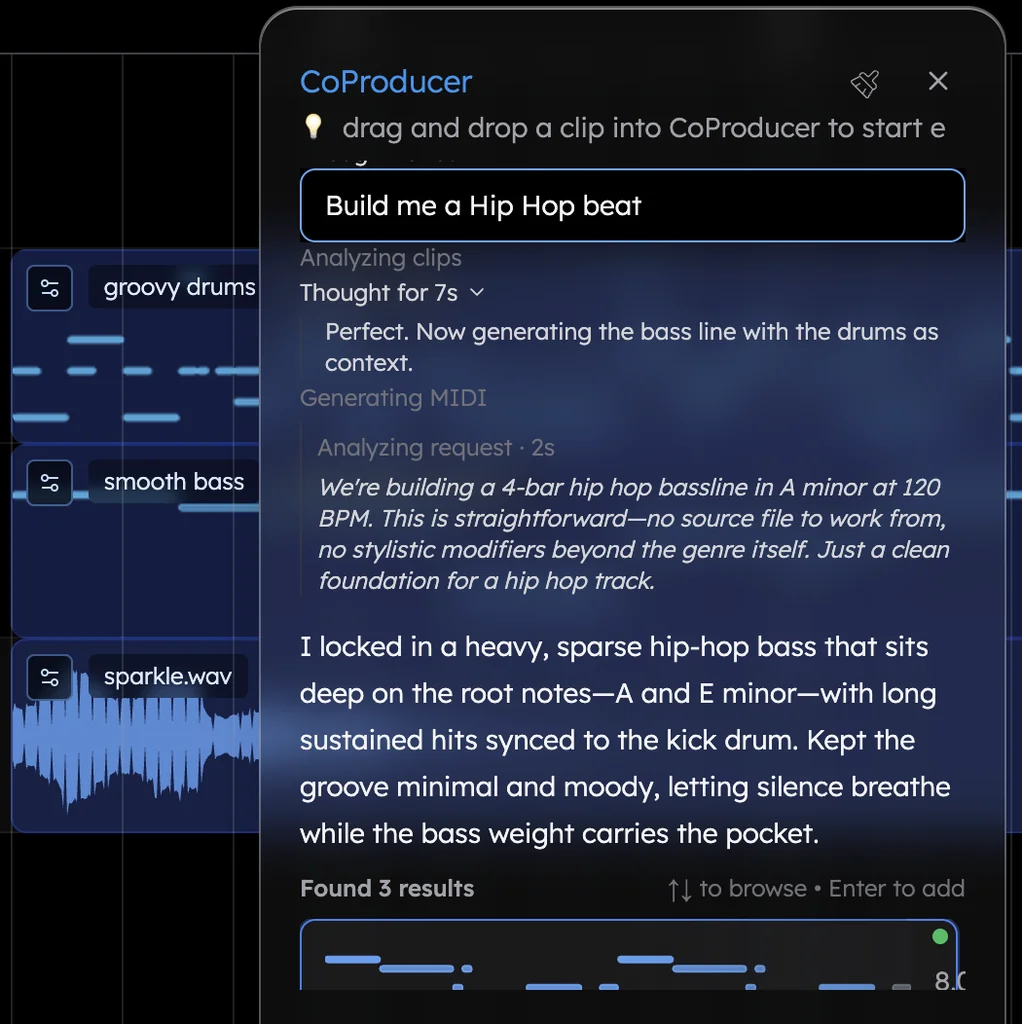
5. It offers 3 options and waits for your pick
Each new MIDI part arrives as 3 options in one carousel: hover to preview, ↑↓ to browse, Enter to add, More Options for another round, Skip to leave it to you. Each part's options arrive the moment it finishes.
Nothing that depends on a part is written until you pick it, so the next layer follows the music you chose. Change your mind while the carousel is open and the new option replaces the old one in place, keeping its track and any move you made. Picking and skipping don't use a request from your free allowance.
6. It edits with your tools, and one undo takes it back
CoProducer changes your project with the same kinds of edit you make: add, move, slice, trim, loop and delete clips; volume, pan, mute and solo; tempo, key and time signature; reverse, pitch shift, time-stretch and Auto-Tune; effects. Its instrument swap is the instrument menu's hot-swap, so the notes stay and only the sound changes; its stretch is the one you get by dragging a clip's edge. On Veena's own synth, every knob you can turn, CoProducer can turn.
Each change it applies is one Ctrl/Cmd+Z, however many edits it bundled.
7. It measures and refines the song
After a write, CoProducer checks the result against the targets it set: loudness in LUFS, true peak, low-end energy, brightness, whether a part is in key, the length in bars, whether there's a chorus and whether the sections really differ. It uses those measurements to refine the parts and the mix, then reviews the arrangement against your request and the brief.
8. It tells you what landed
The final message summarizes your song. "Delivered:" lists the layers on your timeline, so you can see the parts CoProducer built and choose your next direction.
You direct the session. Press Stop to end a run, then tell CoProducer what you want next. Failed CoProducer runs are refunded: the free request is not counted and Veena Pro credits come back.
CoProducer in a shared session
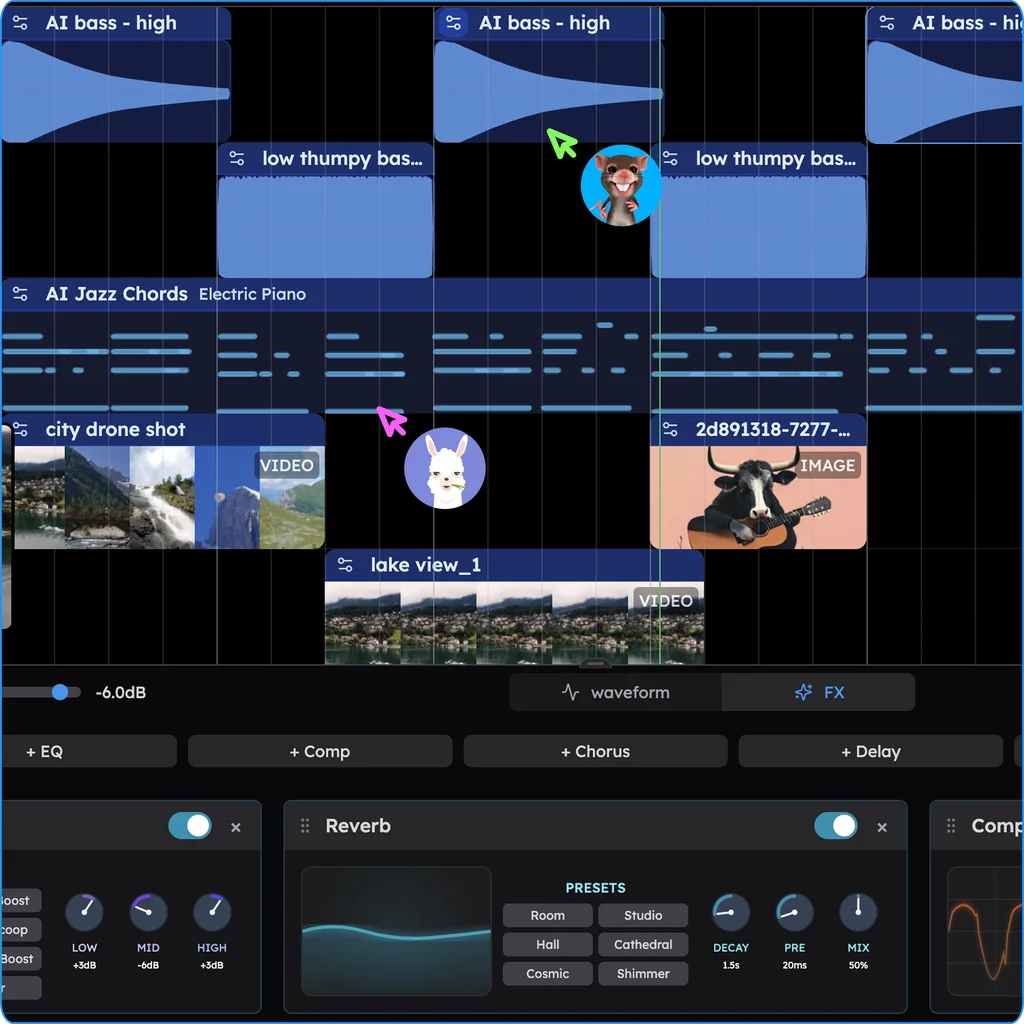
Real-time collaboration has been live in Veena since 12 September 2026, on every plan, and CoProducer comes into the room.
- Two chats. "My chat" is private to you. In "Shared chat", everyone watches CoProducer work while it works.
- One producer at a time. Exactly one CoProducer run per project, whichever chat asked, so two runs never rewrite each other's arrangement. Other requests wait in an "UP NEXT" strip in the order they will run; a private one holds its place without showing its words.
- Anyone can pick. Option cards reach the whole shared chat while they're still a choice. The pick lands on the timeline once, and the card reads "Selected by" with the picker's first name.
- Undo is per person.
Suno Studio's chat edits a project too — at $30 a month
Suno Studio has an AI that works inside a project: "Chat sees your project, understands what you have selected and edits using the same operations you would." The chat bar is "(currently in beta)" (Suno's Studio Chat help page, September 2026). The difference is the price of the room and what you can bring in:
- Entry. "Studio is included in the Premier subscription tier": $30 a month, or $288 a year (Suno's help and pricing pages, September 2026). CoProducer and live collaboration are on Veena's free plan, and Veena Pro is $20 a month.
- Plug-ins. "Suno Studio is not compatible with VST or Audio Units plugins." Veena runs your VST3 plug-ins, and Audio Units on a Mac, through the Veena Bridge helper app, and CoProducer plays a part on your instrument when you name it.
- Exports. Studio exports aren't capped on Premier, but Suno Pro, at $10 a month, stops at 20 song downloads a month. Veena exports WAV, MP3, MIDI and every track as stems, with no cap and no watermark, on every plan (export formats).
- Timing. Suno lists a known Studio issue: "some users may experience timing issues, where new generations fall slightly in front of or behind the beat." CoProducer's parts are MIDI notes you can see and move, and the loops it places line up on bar lines.
Leaving Suno? Our Suno alternative guide covers the switch.
DAWs with AI tools added on: LUNA 3.0 and BandLab
The other road starts from a DAW and adds tools, each doing one job in a session you still run.
LUNA 3.0 from Universal Audio arrived on 15 September 2026 as "the world's smartest, best-sounding DAW". Its own page says what the smarts are: "LUNA's smart tools handle the parts of a session that slow you down" — tempo and instrument detection, stem separation, audio-to-MIDI, and chord extraction and lyric transcription "powered by Moises" (Universal Audio, September 2026). The last three are LUNA Studio features, at $199 or $19.99 a month with UAD Spark Studio, on a desktop install for macOS and Windows.
BandLab calls its web Studio "100% free", and its AI page lists ten tools, from Voice Cleaner and AutoMix to SongStarter. Its pricing table marks AutoMix, Audio-to-MIDI and Voice Cleaner "No" on the free plan; they need Pro, at $14.99 a month. Of SongStarter's ideas, its help centre says: "While you won't own the rights to the generated track, you can still use it" (BandLab's own pages, September 2026).
Ten tools are ten buttons, and you still walk between them. CoProducer works the other way round: you say what the song is, it runs the session, and each new part comes back to you as a pick.
Veena vs Suno Studio, LUNA and BandLab (September 2026)
| Veena | Suno Studio | LUNA 3.0 | BandLab | |
|---|---|---|---|---|
| The AI, in its maker's words | "Your personal music producer", building the song with you as real tracks | "The chat bar (currently in beta) is how you talk to Studio" | "Smart tools" that "handle the parts of a session that slow you down" | "Smart Tools are available as part of your BandLab Membership" |
| Price of the AI | Free, with a daily CoProducer allowance; Pro $20 a month | $30 a month, Premier only | $199 for LUNA Studio, or $19.99 a month | AutoMix, Audio-to-MIDI, Voice Cleaner: Pro, $14.99 a month |
| Writes the music | Every part, 3 options each, in dependency order; then arranges and mixes | MIDI parts and alternate takes "for a section you've selected" | Its smart tools detect, separate and transcribe | SongStarter ideas: "you won't own the rights to the generated track" |
| Exports | WAV, MP3, MIDI and stems: no cap, every plan | No cap inside Studio (Premier); Pro: 20 song downloads a month | LUNA Free: "no watermark, no time limit" | Mixdown as M4A or 16-bit WAV at 44.1 kHz |
Your first run, and what to watch for
Paste the prompt below and watch the loop in order: the brief, with 124 BPM on its Tempo line because you named it; the to-do strip and the sections on the ribbon; activity rows such as "Adding human feel", with a "Thought" banner for the reasoning; the carousel filling as parts finish, the bassline waiting for your chords; then the AI mixing pass, the check and the receipt.
Name the genre, tempo and key, as this prompt does: in Veena's own data, 3 in 4 new users (75.7%) whose first request asks for a new song get a finished first result on day one, and 81.5% do when the request names a genre.
It is all yours: Veena's terms say "you own the Output you generate through your use of the Service."
Try this in Veena
Make a 124 BPM deep house track in F minor: four-on-the-floor kick with offbeat open hats, warm minor-seventh chords on a soft pad, a rolling bassline that follows the chords, and a short plucked lead hook. Intro, build, drop, break, drop, outro, with the kick and bass upfront in the mix.
Frequently asked questions
What was the first agentic DAW?
Veena. It launched publicly on 20 June 2025 as an AI-powered DAW that turns a musician's ideas into actions inside a fully functioning browser studio. That was before Mozart AI (Product Hunt, 16 July 2025) and Suno Studio 1.0 (25 September 2025), and 14 months before Suno Studio added a chat bar (13 August 2026). The dated sources are on Veena's story page.
What is an agentic DAW?
An agentic DAW is a music studio where the AI acts inside your project instead of handing you a finished file. In Veena, CoProducer reads the session, writes a plain-text brief, plans the song, writes each part as a real track with 3 options to pick from, checks its own work and reports what landed. You direct each choice, keep the notes editable and export the song from the same session.
Is an agentic DAW the same as an AI music generator?
No. A generator returns a finished render, and changing one thing means prompting again for a new one. In an agentic DAW the AI works through the DAW's own edits: Veena's CoProducer places drums, bass, chords and melody as separate tracks you can open and change, and one Ctrl/Cmd+Z reverses any change it makes. Exports are never capped or watermarked, on any plan.
Do I still make the creative decisions?
Yes. CoProducer makes the first move, then hands you the calls: 3 options for every new part, and nothing that depends on a part is written until you pick one. Change a pick while the options are open, skip a part to play it yourself, stop a run at any time, or undo any change with one Ctrl/Cmd+Z. In Veena, the producer works to your taste.
How is Veena's CoProducer different from Suno Studio's chat?
Both edit a project. Suno's chat bar is "(currently in beta)" and lives in Studio, which Suno includes only in its $30-a-month Premier plan, and "Suno Studio is not compatible with VST or Audio Units plugins" (Suno help centre, September 2026). Veena's CoProducer is on the free plan, uses your own VST3 and AU plug-ins through Veena Bridge, exports with no cap and works inside live collaboration.
Do I need to install anything to try an agentic DAW?
No. Veena runs in your browser on Mac, Windows, Linux and Chromebook laptops: sign in with Google and CoProducer is ready. The AI runs on Veena's servers, so no graphics card is needed. The free plan includes a daily CoProducer allowance, and Veena Pro, at $20 a month, removes the daily request cap and unlocks the premium models. The Veena Bridge helper app is only for your own plug-ins.
Meet your personal music producer
Free, in your browser. Describe the song you want and CoProducer builds it with you.
Make music free