AI Bassline Generator
A bassline generator writes the low end of a song for you. Veena's is free, and it listens before it plays: CoProducer, the personal music producer inside Veena's AI DAW, reads the chords and the kick already on your timeline, then writes a bassline that locks to both, as MIDI you can edit note by note.
Most AI bass generators write in a vacuum: pick a key and a style, get a loop, and hope it sits with a kick it has never heard. A bassist's first job is to listen, so that is where CoProducer starts.
How the bassline generator hears your song
When you ask for bass, CoProducer reads two parts of your session before it writes: the harmony the bass has to agree with, and the kick it has to lock to. Ask for a whole beat in one request and it orders the work itself; drums and chords that don't depend on anything are written at the same time, and the bass waits until they exist, then reads their actual placed notes.
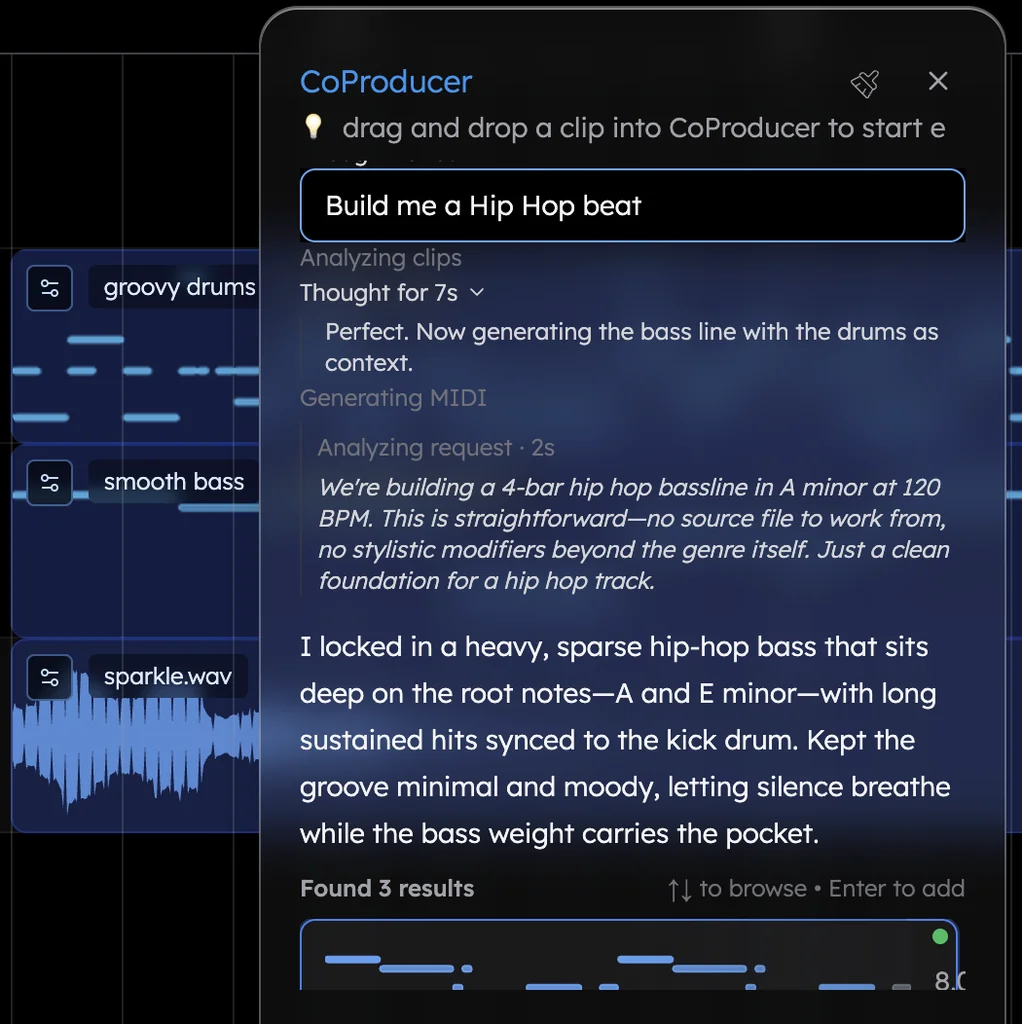
You then get 3 options for the part. Hover to preview, use the arrow keys to browse, Enter to keep one. Nothing that depends on the bass is written until you choose.
Four basslines, written out
Four lines in producer terms. Describe one of these and CoProducer writes it as MIDI on its own track, with 3 takes to choose from.
| Style | Tempo and key | Chords | What the bass plays | Sound |
|---|---|---|---|---|
| Trap | 140 BPM, F minor | Fm, Db, Ab, Eb | Roots F, Db, Ab and Eb, hitting with the kick on beat 1 and the "and" of 2, with an octave jump on the last sixteenth | 808 Long |
| Deep house | 122 BPM, A minor | Am7, Fmaj7, Cmaj7, G | Offbeat eighths between the kicks on A, F, C and G, with a short octave pop at the end of bar 4 | Deep House Bass |
| Funk | 112 BPM, E minor | Em7 to A7, two bars each | Octave eighths, E1 to E2 then A1 to A2, with sixteenth ghost notes before each change | Slap Bass 1 |
| Jazz walk | 132 BPM, swung | Dm7, G7, Cmaj7 | Quarter notes D2 F2 A2 Ab2, then G2 B2 D3 Db3, landing on C2 E2 G2 B2 | Acoustic Bass |
Why they work. The trap line doubles the kick, so the two read as one punch. The house line lives in the gaps between four-on-the-floor kicks, which is what makes the groove bounce. The funk octaves outline each chord while the ghost notes carry the pocket. And the walking line uses chromatic approach notes — Ab into G, Db into C — so every bar leans into the next chord.
Hip hop is the most-asked genre in Veena overall, and in Veena's own data 83.6% of new users who ask for trap get a first result on day one, as do 83.8% who ask for funk or disco and 84.5% who ask for jazz.
Pick a bass sound: 29 presets, six of them 808s
- Sampled basses: Acoustic Bass, Electric Bass (finger), Electric Bass (pick), Fretless Bass, Slap Bass 1, Slap Bass 2 and Synth Bass.
- 808s: 808 Long, 808 Short, 808 Glide, 808 Distorted, 808 Hard and 808 Classic Kick. 808 Glide is the drill 808: overlap two notes and it slides 150 ms between them. 808 Distorted keeps the sub clean while the harmonics survive a phone speaker.
- Synth basses: Sub Bass, Round Bass, Reese Bass, Acid Bass, Growl Bass, Dirty Sub, Wobble Bass, House Organ Bass, Deep House Bass, Techno Sub, Reggaeton Bass, Disco Octave Bass, Retro Pulse Bass, Log Drum Bass, Square Bass and Pluck Bass.
The 808s and the synth basses run on Veena's own synth, so every parameter is there to shape, and CoProducer can set them for you: "make the Reese darker", "shorten the 808 tail". Swap the sound at any time and every note stays where it is. Prefer your own synth? Through the Veena Bridge helper app, your VST3 or AU instruments play the same MIDI.
Edit it like a bassist would
Open the clip in the piano roll. Draw or delete notes, redraw velocities, snap to a bar, a beat or a finer grid with triplets included, and move a selection by an octave with Ctrl or Cmd plus the up or down arrow. Or say it: "play only roots in the verse", "add a slide into the chorus", "humanize the timing", "make the second half busier". One undo reverses any change CoProducer makes.
Have a bass idea already? Hum it into your microphone and CoProducer transcribes it to MIDI on a new track. When the part is done, click Download MIDI file on the clip, or export the bass as its own WAV or MP3 stem.
Why Veena beats the other bassline generators (September 2026)
Rival facts come from each maker's own product page, read on 23 September 2026.
| Veena | Reason Bassline Generator | Unison Bass Dragon | SoundGrail | |
|---|---|---|---|---|
| Price | Free | $69, plus a Reason licence or Reason+ subscription | $297 | Free |
| Runs in | Your browser, nothing to install | The Reason rack, Reason 10.1 or later | A plugin inside a DAW from its approved list | Your browser |
| Writes from | The chords and the kick on your timeline | Its own built-in phrases, mixed and randomized | The genre and key you pick | The chords in its own Chords section; there are no drums |
| What you get | Basslines across the whole song, arranged into sections | Patterns in the rack, with eight pattern memories | Audio or MIDI to drag into your DAW | A 4- or 8-bar MIDI file |
| Then what | Keep producing: drums, chords, mix, export | Finish the song in Reason | Finish the song in your DAW | Take the file to a DAW |
Reason Bassline Generator is a $69 Player device, and its shop page says it "requires a Reason+ subscription or Reason license" (Reason Studios, September 2026). It builds lines from its own library by mixing and matching "tailor-made phrases" or hitting Randomize, and you transpose them from a MIDI keyboard.
Unison Bass Dragon lists a regular price of $297 and asks buyers to "please do not purchase Bass Dragon unless you use one of the DAW's listed"; it installs as a VST2, VST3, AU or AAX plugin (Unison's product page, September 2026). You choose a genre and key, and the line goes to a DAW you already own.
SoundGrail's free generator writes 4 or 8 bars around the chords in its own Chords section, with three preview sounds — Sub Bass, FM Bass or Triangle — and hands you a MIDI file (SoundGrail, September 2026). There's no kick to lock to, and no song around it.
Veena hears the song before it writes a note, and all it needs is a browser.
Build the rest of the low end
Write the harmony first with the chord progression generator, then let the bass follow it. For a topline, the melody generator writes against the same chords, and the MIDI generator covers every other part. If the kick and bass still fight after the notes are right, AI mixing carves room for both.
Try this in Veena
Make a 140 BPM trap beat in F minor over Fm, Db, Ab and Eb, one chord per bar: hard drums with rolling hi-hats, dark bell chords, then a bassline on 808 Long that plays the roots, hits with the kick on beat 1 and the 'and' of 2, and jumps up an octave on the last sixteenth of every second bar. Keep the intro bass half-time.
Frequently asked questions
Is Veena's bassline generator free?
Yes. Veena is an AI DAW with a personal music producer built in. Describe the song you want and CoProducer builds it with you — beats, chords, melody, arrangement and mix — as real tracks you can edit, mix and export. Free, in your browser. The free plan includes a daily CoProducer allowance, and every bassline you make exports as MIDI, WAV or MP3.
Does the bassline follow my chords and my drums?
Yes. Before CoProducer writes a note of bass, it reads two things on your timeline: the chords the bass has to agree with and the kick it locks to. Ask for drums, chords and bass in one request and the bass waits until the parts it depends on exist, then reads their actual notes rather than a plan of them.
Can I edit the bassline after Veena writes it?
Every note. Open the clip in Veena's piano roll to move, lengthen or delete notes, redraw velocities, snap to a bar, a beat or a finer grid with triplets included, and move a whole selection by an octave with Ctrl or Cmd plus the arrow keys. Or ask CoProducer in plain words, such as "play only the roots in the verse".
What bass sounds does Veena have?
Veena has 29 bass presets: acoustic, fingered, picked, fretless and two slap basses; six 808s; and synth basses from Sub Bass and Reese Bass to Acid Bass, Wobble Bass, Deep House Bass and Log Drum Bass. Swap the sound and the notes stay, or play the part through your own VST or AU synth with the Veena Bridge app.
Can I export the bassline as a MIDI file?
Yes. Every MIDI clip in Veena has a Download MIDI file option, and Export writes all your MIDI tracks into one .mid file for any other DAW. You can also export the bass as a 24-bit WAV or 320 kbps MP3 stem, as often as you like, with no watermark and no cap.
Does Veena make 808 basslines for trap and drill?
Yes. Veena's six 808s cover the styles: 808 Long holds the root through the bar, 808 Short sits under fast hi-hats, 808 Glide slides 150 ms between notes you overlap for drill, 808 Distorted and 808 Hard cut through a busy mix, and 808 Classic Kick is the analog drum voice. CoProducer picks one, or you name it.
Meet your personal music producer
Free, in your browser. Describe the song you want and CoProducer builds it with you.
Make music free