Make a Beat from Scratch Online
Make a beat from scratch online with your own personal music producer. Free in your browser, you open an empty Veena project and build the beat one layer at a time — tempo, drums, 808, chords, melody, arrangement, mix — playing every note yourself or asking CoProducer for any part, which lands as a real track you can edit.
From scratch means no template and no finished loop doing the work for you, not doing everything the slow way. Below are the eight steps every producer runs, in Veena's actual controls, with the sentence to give CoProducer at each step when you'd rather direct than program. Start with the element that inspires you most, since there is no single correct order; if nothing is calling yet, go in this one.
What you need
- A laptop and a browser. Chrome or another modern browser on Mac, Windows, Linux or a Chromebook. Nothing to install and no graphics card needed: the AI runs on Veena's servers.
- Headphones. Laptop speakers hide the low end, which is where most of a beat lives.
- Optional: a MIDI keyboard, which Veena reads through the browser, and a microphone for humming ideas and recording your own sounds. No keyboard? Your computer keys play notes: A to the apostrophe are the white keys, W to the right bracket the black keys, and Z and X shift the octave.
Step 1: Choose a tempo and a key
| Beat style | BPM | What defines it |
|---|---|---|
| Lo-fi hip hop | 70–90 | Lazy swing, dusty keys, soft drums |
| Boom bap | 85–95 | Swung hats, a hard snare on 2 and 4 |
| Afrobeats | 100–115 | Syncopated percussion, a bouncy bass |
| House | 120–128 | A kick on every beat |
| Trap | 130–150, half-time feel | 808s, hat rolls, the snare on beat 3 |
| Drill | 140–145, half-time feel | Sliding 808s, off-kilter snares |
| Drum and bass | 170–176 | Fast breakbeats and heavy sub |
Set the tempo in the transport bar, by dragging the number or tapping it in; Veena runs from 40 to 300 BPM. Then pick a key from the 24 on offer. One trick decides a lot: the root of your 808 sounds best between about 40 and 55 Hz, which means E, F, F♯, G, G♯ or A in the lowest octave (E1 is 41 Hz, A1 is 55 Hz). That is why F minor, G minor and A minor are everywhere in dark beats.
Commit to the number. In Veena's own data, only 9.4% of first requests to CoProducer name a BPM. It picks a sensible tempo for the genre if you don't, but a tempo you chose is a decision you own.
Or ask: "Set the project to 90 BPM in A minor."
Step 2: Program the drums in the Beat Maker
Click +MIDI in the transport bar and set the new clip's instrument to Drums: its editor becomes the Beat Maker, Veena's step sequencer, with one row per drum, one column per step, click a step to place a hit, and the Add button brings in more drums such as toms, a ride or a crash. Choose the kit from the Preset menu. There are seven: Pop (clean and punchy, the all-rounder), Electronic (synthetic, for trap, drill and club beats), TR909 (the classic drum machine, for house and rave), JCLive (a live acoustic kit with room sound), Brush and Jazz (soft brushes and a swinging kit, for lo-fi and jazzy beats) and Chaos (distorted and aggressive).
Two starting bars, on a 16-step grid:
Boom bap, 90 BPM   1 e & a 2 e & a 3 e & a 4 e & a
Hat                x . x . x . x . x . x . x . x .
Snare              . . . . X . . . . . . . X . . .
Kick               X . . . . . X . . . X . . . . .

Trap, 140 BPM      1 e & a 2 e & a 3 e & a 4 e & a
Hat                x . x . x . x . x . x . x x x x
Snare              . . . . . . . . X . . . . . . .
Kick               X . . X . . . . . . . X . . . .
The boom bap bar puts the kick on 1, the "and" of 2 and the "and" of 3, and its off-beat hats should land a little late, which is swing. The trap bar moves the snare to beat 3 only, so 140 BPM feels like 70, and the last four hats run into 16ths as a roll. Keep the first four bars to kick, snare and hats; everything else can wait.
Real trap rolls use triplets and 32nds, and good hats never sit at one volume. Hand that part over: the AI drum generator writes rolls, fills and ghost notes with the velocity movement that keeps a pattern human.
Or ask: "Write a boom bap drum pattern with swung 8th hats and a snare fill every 4 bars."
Step 3: Add the 808 or the bass
Veena has six 808s, each built for a different job:
- 808 Long: a sustained 808 that holds the root through the bar.
- 808 Short: a punchy 808 with a click, made to sit under fast hi-hats.
- 808 Glide: the drill 808. Write two notes that overlap and it slides between them.
- 808 Distorted: the sub stays clean while the grit survives a phone speaker; phonk's favourite.
- 808 Hard: a fast, aggressive pitch drop with a square edge that cuts through a busy mix.
- 808 Classic Kick: the analog bass-drum voice itself, for boom bap and house.
The rule: the 808 plays when the kick plays. Put a note under each kick hit, on the root of the chord, and hold it to the next hit. If a beat wants a played bass instead, try Round Bass (warm, for hip hop and lo-fi), Electric Bass (finger) or Synth Bass. The bassline generator writes lines against the drums already on your timeline.
Or ask: "Add an 808 Long that follows the kick on the roots, with a slide into the last bar of every four."
Step 4: Chords and a melody
Add a MIDI clip and open it in the piano roll: draw and select tools, a velocity editor, and snap settings from a whole bar down to a 32nd note, including 8th- and 16th-note triplets. Draw notes with the mouse, or record them: pick an instrument and a sound, press record, and play your computer keys or a MIDI keyboard over a one- or two-bar count-in.
A formula that never fails: two to four chords across four bars, and a melody of three to five notes that repeats with one change at the end, like a question asked twice and then answered. Sounds that suit beats:
- Upright Piano: brighter and harder than the grand; stabs and riffs for boom bap.
- Electric Piano: mellow and round, for lo-fi and R&B chords.
- Bell Pluck and Snap Pluck: bell melodies and tight 16th-note hooks for trap and drill.
- Pizzicato Strings and String Ensemble: plucked ostinatos and lush beds for orchestral hip hop.
- Acoustic Guitar (nylon): soft fingerpicked loops for Latin and lo-fi beats.
Can't play it? Hum it. Record the melody with your voice and CoProducer turns the take into MIDI on a new track; that's voice to instrument.
Or ask: "Write a 4-bar Upright Piano loop on Am9–Fmaj7–Dm9–E7 in short stabs."
Step 5: Add samples and your own sounds
Ask CoProducer for a sound in plain words — "a vinyl drum loop at 90 BPM", "a dark vocal chop in A minor" — and it searches Veena's curated library of 27,356 samples plus a licensed professional catalogue, then shows ten preview cards. Hover to hear one, press Enter to add it, or ask for more options.
Your own sounds count too. Record a knock on a desk or your own voice straight into Veena, or drag in any audio file; load one-shots onto the 16-pad MPC-style sampler and play them like drums. To chop a recording, press C for split mode and slice it, drag a clip's edge to time-stretch it with the pitch kept or use Match BPM, then reverse or pitch-shift the slices. CoProducer will also chop a recording into a new groove for you.
Step 6: Arrange the loop into a beat
A loop isn't a beat until it changes. The standard hip hop layout gives an artist 16-bar verses and 8-bar hooks:
| Section | Bars | What changes |
|---|---|---|
| Intro | 8 | Piano and hats alone |
| Hook | 8 | Everything: drums, 808, piano, melody |
| Verse 1 | 16 | The melody drops out to leave room for vocals |
| Hook | 8 | Full again |
| Verse 2 | 16 | Verse 1 plus one new element, like a counter-melody |
| Hook | 8 | Full, with an extra percussion layer |
| Outro | 4 | Drums drop out; the piano plays it off |
That's 68 bars, just over three minutes at 90 BPM. Name the parts on the section ribbon under the ruler, and copy a clip by Ctrl+clicking empty space. One move improves every beat: mute the kick and 808 for the last bar before each hook, and the hook lands twice as hard.
Or ask: "Spread the loop across the arrangement, drop the drums in the intro and the melody in the verses."
Step 7: Mix it
Every track has a fader, a pan knob, mute and solo, and every clip carries its own effects: 8-Band EQ, Compressor, Reverb, Delay, Distortion and more. Mix in this order: kick and 808, snare, hats, then everything musical.
- Kick and 808: they share the low end, so make them agree. Keep both mono with Utility, and if the kick disappears under the 808, shorten the 808 note or pick 808 Short.
- Snare: the loudest drum after the kick. A Compressor with a medium attack adds snap.
- Hats: lower than you think, panned slightly off-centre.
- Keys and melody: cut 200–400 Hz on the 8-Band EQ so they don't muddy the 808, and give them a short Reverb so they sit behind the drums.
Leave headroom: if the master meter is pinned, pull every fader down together. Or ask CoProducer for "a punchy mix: kick and 808 locked, snare loud, piano tucked behind" and it sets levels, pans and effects on every part.
Step 8: Export
Open the account menu and choose Export: a 24-bit/48 kHz WAV, a 320 kbps MP3, the MIDI, or every track as stems in one zip, which is what an artist's engineer will ask for. There's no cap on exports and no watermark, and you own the beat.
Or build the whole beat in one sentence
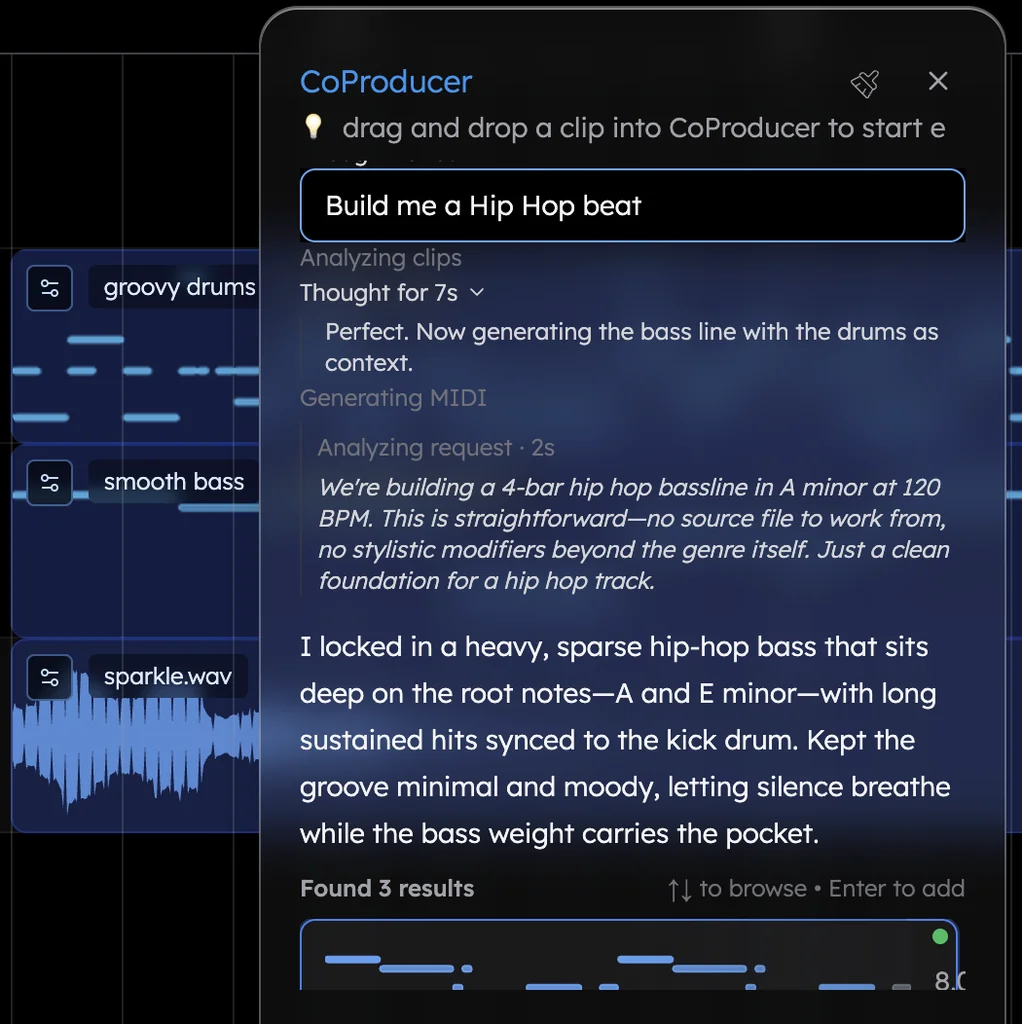
CoProducer runs all eight steps from one message:
Make a 90 BPM boom bap beat in A minor: kick on 1, the and of 2 and the and of 3, a hard snare on 2 and 4, swung 8th-note hi-hats with an open hat on the last and of every second bar; Round Bass following the kick on the roots; Upright Piano playing a 4-bar loop on Am9–Fmaj7–Dm9–E7 in short stabs; a sparse Bell Pluck melody in the hooks only. Intro 8 bars with piano and hats alone, hook 8, verse 16, hook 8, verse 16, hook 8, outro 4 with the drums dropping out.
The order comes from your request, not a fixed recipe: parts that don't depend on each other are written at the same time, and a part that has to fit another, like the bass against the kick, reads the notes you already picked. Each part arrives as three options. Speed comes from selection, not perfection: audition, keep one, move on.
Then push it further:
- "Swing the hats harder and add a roll before each hook."
- "Swap the bass for 808 Glide and slide into the last note of every four bars."
- "Give verse 2 a Pizzicato Strings counter-melody."
- "Find a soft vinyl texture and put it under the intro."
- "Drop the drums for the first two bars of the second verse."
Beat-making mistakes
- Ten weak layers. A beat with three strong elements — drums, bass, one melodic hook — will always sound better than one with ten weak layers.
- A kick and 808 that fight. Different rhythms in the same low frequencies turn to mush. Lock them together and tune the 808 to the key.
- Robot hats. Every hit at one volume on the grid. Vary velocities and add swing.
- The endless 8-bar loop. Arrange it: an intro, hooks and verses that differ.
- Melody over the vocal. A busy melody through the verses leaves the artist nowhere to go. Save it for the hooks.
- Mixing loud. A clean beat at a sensible level masters well; a clipped one never recovers.
Words beatmakers use
BPM: beats per minute, the tempo. Step sequencer: a grid where each square is a drum hit. 808: the pitched bass drum that doubles as a bass line. Swing: delaying every second subdivision so the groove rolls. Quantize: snapping notes to the grid. Stems: each track exported as its own file. Hook: the chorus of a beat, where the best idea lives.
Beat styles to build next
Each style has its own page with the full formula: how to make hip-hop beats, how to make trap beats and how to make lofi music. For drums on their own, the free online beat maker is the quickest start, and every other style is under make music by genre.
Try this in Veena
Make a 90 BPM boom bap beat in A minor: kick on 1, the and of 2 and the and of 3, a hard snare on 2 and 4, swung 8th-note hi-hats with an open hat on the last and of every second bar; Round Bass following the kick on the roots; Upright Piano playing a 4-bar loop on Am9–Fmaj7–Dm9–E7 in short stabs; a sparse Bell Pluck melody in the hooks only. Intro 8 bars with piano and hats alone, hook 8, verse 16, hook 8, verse 16, hook 8, outro 4 with the drums dropping out.
Frequently asked questions
Can I make a beat from scratch online for free?
Yes. Veena is an AI DAW with a personal music producer built in. Describe the song you want and CoProducer builds it with you — beats, chords, melody, arrangement and mix — as real tracks you can edit, mix and export. Free, in your browser. For a beat, you can program every drum hit yourself in the Beat Maker, ask CoProducer for any single part, or have it build the whole beat.
What do I need to make a beat from scratch?
A laptop with a modern browser and a pair of headphones. Veena runs in Chrome and other modern browsers on Mac, Windows, Linux and Chromebook, with seven drum kits, six 808s, 61 instrument presets and a 16-pad sampler built in, so there is nothing to install or buy. A MIDI keyboard and a microphone help, but your computer keys can play every note.
Should I start a beat with drums or melody?
Start with the element that inspires you most; there is no single correct order. Many beats start from a drum groove, others from a chord loop or a hummed melody. Veena's CoProducer works the same way: it writes independent parts at the same time and waits only when one part must fit another, like a bass that has to lock to the kick you already picked.
Do I own the beats I make in Veena?
Yes. Veena's terms say you own the Output you generate through your use of the Service, and exports carry no watermark. Export the beat as a 24-bit WAV or a 320 kbps MP3, or every track as stems for the artist or engineer you're working with, as often as you like. The MIDI exports too, so the notes stay yours to reuse.
Can I make a beat by humming?
Yes. Hum a melody or a bass line into your microphone and ask Veena's CoProducer to turn it into MIDI. The notes land on a new track, ready to edit in the piano roll and play on any instrument, from Upright Piano to 808 Glide. CoProducer can then build the drums and chords around your idea, so a tune in your head becomes a whole beat.
Meet your personal music producer
Free, in your browser. Describe the song you want and CoProducer builds it with you.
Make music free