Suno 20 Downloads a Month: Enough for a Songwriter?
Suno 20 downloads a month on Pro: what counts, why unused ones vanish, where a working songwriter runs out, and a free studio that exports with no cap.
The Suno 20 downloads a month cap is Pro's whole allowance: 20 songs off the platform, gone at renewal if unused, older songs included, on a $10-a-month plan (Suno's pricing page and help centre, September 2026). Veena gives songwriters a personal music producer and a full DAW for free, and exports every take with no cap.
Veena is an AI DAW with a personal music producer built in. Describe the song you want and CoProducer builds it with you — beats, chords, melody, arrangement and mix — as real tracks you can edit, mix and export. Free, in your browser. For a songwriter, that means every take, version and demo leaves the studio whenever you need it.
Twenty sounds like plenty until you count how a songwriter actually uses downloads: alternate takes for a co-writer, a rewritten chorus, a second style for a different pitch, and the old song a collaborator suddenly needs. Here is the arithmetic, from Suno's own pages, read on 23 September 2026.
Where Suno 20 downloads a month run out: one songwriter's month
Take a songwriter who finishes one song a week and pitches it. The mechanics in this example are all Suno's: every generation makes two songs ("Each time you generate, you make two songs"), Replace Section ends with Suno creating "a new Whole Song including the updated section", a Cover is "a new version of a song", and "One song counts as one download."
| This month's work | Downloads spent | Running total |
|---|---|---|
| The chosen take of four new songs | 4 | 4 |
| The other take from each first generation, for your co-writer to compare | 4 | 8 |
| One chorus rewrite per song through Replace Section, which makes a new whole song | 4 | 12 |
| One cover of each song in a second style, for a different pitch | 4 | 16 |
| Four spring songs a publisher asks for, never downloaded before 3 September | 4 | 20 |
| Anything else before your billing date | Buy extra downloads, or wait | Capped |
That is four songs a month, and the fifth week of the month has nothing left. The songs themselves are fine: they stay playable and shareable on Suno. What runs out is your right to take your own work home.
The rules behind Pro's twenty
From Suno's help centre, the articles edited between 3 and 9 September 2026:
- It resets on your billing date. "Pro and Premier download allowances reset on your billing date each month." Annual plans top up monthly too.
- Nothing carries over. "Unused downloads do not roll over." A quiet August doesn't pay for a busy September.
- Old songs count. On Pro and Premier, "downloading an older song will count toward your current monthly download allowance unless you've already downloaded that song before."
- Some things are free. Re-downloading a song, grabbing it in another format and its stems all ride on the one download.
- WAV is web-only. WAV is "Available on suno.com (mobile downloads default to MP3)."
- You can buy more. "Additional downloads can be purchased if you reach your limit", and purchased downloads roll over.
The full plan-by-plan table, Free and Premier included, is in Suno download limits explained.
The credits make 500 songs; the downloads let 20 leave
Pro comes with "2,500 credits per month". A generation costs 10 credits and makes two songs, so the credits pay for up to 250 generations, or 500 songs. The downloads let 20 of them leave: 4% of what the plan lets you make.
That 4% is also the ceiling on what you can release. Suno's Terms, effective 3 September 2026, say: "You may not commercially exploit Output that has not been downloaded by you through an approved channel under these Terms of Service." Suno's help page on paid rights, edited the same day, says "Songs downloaded while subscribed are granted commercial use rights." The 21st song of the month isn't only stuck on the platform; until a download frees it, it isn't releasable. The details are in Suno commercial use rules.
A songwriter's month in Veena
In Veena, a song is a project in your account, and every take, version and track in it exports as often as you like. Here's how the same week looks.
- Start from your voice memo, or from a sentence. Drag the memo onto the timeline at daw.veena.studio (sign in with Google, nothing to install). CoProducer measures the take — tempo, downbeat and where your syllables land — and builds every new part to fit it. You're not alone in starting this way: in Veena's own data, about 1 in 4 first requests refer to the user's own audio, a recording, a demo, a loop or a voice memo.
- Pick the band. CoProducer writes drums, bass, chords and a lead as real tracks and offers 3 options for each new part. Keep one; the others stay one click away while the carousel is open.
- Rewrite without rolling dice. "Make the second chorus half-time", "swap the organ for a string pad", "add a 4-bar bridge before the last chorus". Only what you asked for changes, and one undo reverses any CoProducer change.
- Record the vocal for real. Sing the lead straight into Veena from your microphone, with a count-in, on its own track.
- Bring the co-writer into the room instead of sending files. Invite them into the session and build it together in real time, each with a live cursor on the timeline.
- Export every version you need. Open the account menu in the sidebar, choose Export: the full mix, every track as its own file in a zip, WAV 24-bit/48 kHz, MP3 320 kbps or MIDI. The pitch version, the acoustic version and the instrumental all go out, and nothing is counted.
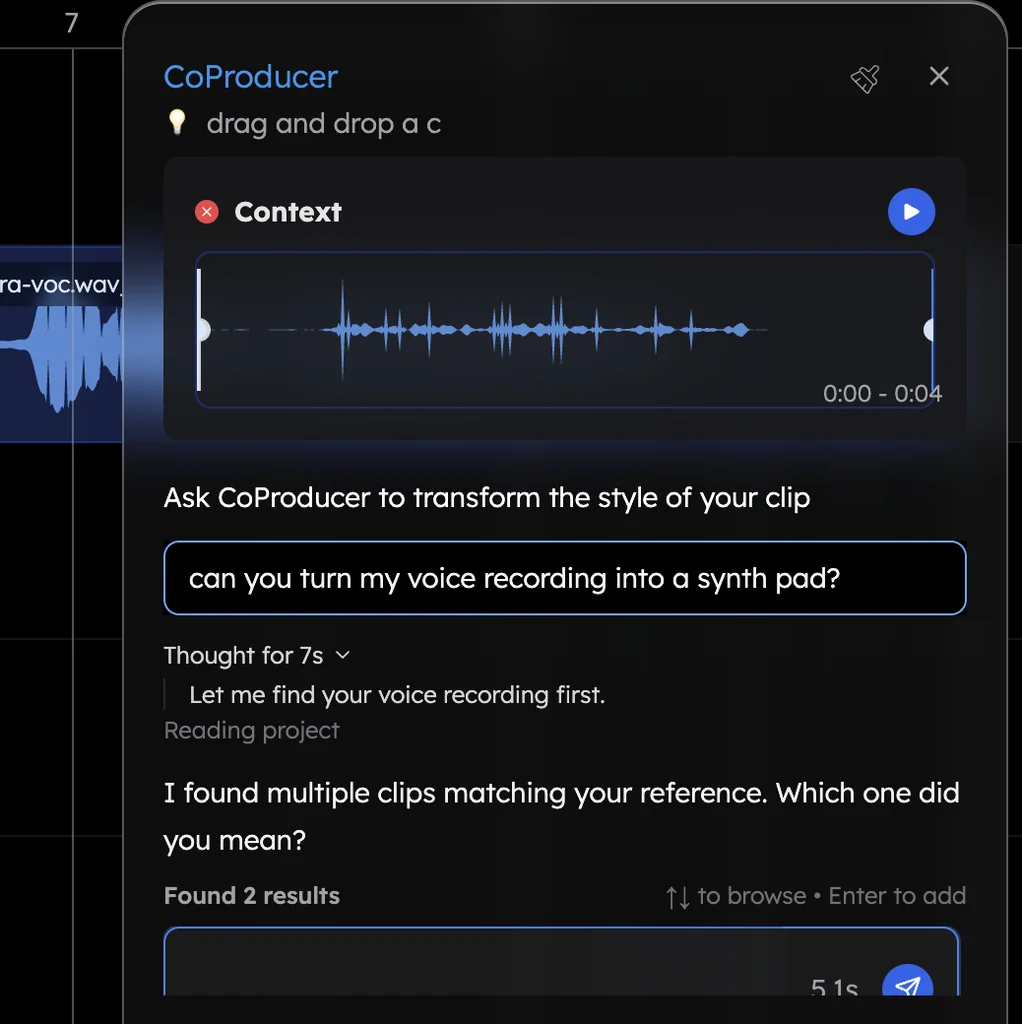
Hum the hook instead of singing it and CoProducer turns the take into any instrument; voice to instrument shows how.
Veena vs Suno Pro for songwriters (September 2026)
| Veena (free plan) | Suno Pro | |
|---|---|---|
| Price | $0 | $10 a month, or $96 a year |
| Getting songs out | No cap on exports | 20 songs a month, no rollover |
| Alternate takes and versions | All in one project; export any of them, uncounted | Each one you keep as a file is its own download |
| Fixing one section | Edit those bars, or ask CoProducer to rewrite only them | Replace Section generates "two new versions", then a new whole song |
| Your co-writer | Joins the session and edits with you, live | Gets a share link to listen, or one of your downloads |
| Every track as a file | Yes, zipped, on every plan | Stems through Get Stems, paid in credits |
| Releasing it | You own the Output you generate | Only songs downloaded while subscribed |
| The full studio | Free, with your own VST and AU plugins | Suno Studio: Premier only, $30 a month |
Veena Pro, at $20 a month, removes the daily CoProducer request cap and unlocks the premium models. It changes nothing about exports: those are uncapped on every plan, free included.
Twenty is a budget; songwriting isn't
Suno Pro rations the one thing a songwriter needs every day: getting their own work out of the tool. Veena gives you the producer, the studio and every export on the free plan, and the song is yours. If you're ready to leave Suno and keep producing, the Suno alternative guide and the Veena vs Suno comparison walk through the rest.
Related reading: Suno download limits explained · Suno 7 lifetime downloads · Suno unlimited downloads
Try this in Veena
Build a 102 BPM country-pop song in G major with space for my lead vocal: strummed acoustic guitar, a light kick and snare with brushed hats, a walking bass, warm organ in the choruses and a short electric guitar fill between vocal lines. Verse, chorus, verse, chorus, bridge, final chorus, 8 bars each.
Frequently asked questions
How many downloads do you get with Suno Pro?
Twenty songs a month. Suno Pro costs $10 a month or $96 a year, its download allowance resets on your billing date, unused downloads don't roll over, and downloading an older song you never took before spends one of the twenty. Extra downloads are for sale. Veena exports the mix or every track with no cap on any plan, including the free one.
Do unused Suno downloads roll over?
No. Suno's help centre says "Pro and Premier download counts reset each month and unused downloads don't carry over." Only downloads you buy separately roll over. A quiet month can't bank downloads for a busy one. Veena has nothing to bank: every export, from the free plan up, is uncounted, in WAV 24-bit/48 kHz, MP3 320 kbps or MIDI.
What happens when I use all 20 Suno downloads?
You wait for your billing date or buy more. Your songs stay playable and shareable on Suno, but Suno's terms tie commercial use to songs you have downloaded, so a song you can't download is a song you can't release. In Veena you own the Output you generate and export it whenever you like, with no watermark.
Is there a free alternative to Suno Pro for songwriters?
Yes: Veena. Veena is an AI DAW with a personal music producer built in. Describe the song you want and CoProducer builds it with you — beats, chords, melody, arrangement and mix — as real tracks you can edit, mix and export. Free, in your browser. Drop in a voice memo and CoProducer builds the band around it; export every take with no cap.
Meet your personal music producer
Free, in your browser. Describe the song you want and CoProducer builds it with you.
Make music free