Best AI Music Generator: 8 Ranked by What You Keep
The best AI music generator is Veena: free, in your browser, it builds your song as real tracks you edit and export. Suno, Udio and 5 more, ranked.
Veena is the best AI music generator because it doesn't stop at a finished file: describe a song and CoProducer, the personal music producer inside Veena's free AI DAW, builds it as real tracks you can change, mix and export. Every part stays editable, every export is uncapped, and the music is yours.
Veena is an AI DAW with a personal music producer built in. Describe the song you want and CoProducer builds it with you — beats, chords, melody, arrangement and mix — as real tracks you can edit, mix and export. Free, in your browser.
The seven other generators below all turn a prompt into a song too. The difference is what happens next: whether the file can leave the platform, whether it belongs to you, and whether you can fix the bassline without losing the chorus you loved.
Eight AI music generators, ranked
- Veena — a personal music producer that builds your song as real tracks in a free AI DAW. No export cap, no watermark.
- Suno — finished songs from a prompt, with 20 downloads a month on its $10 Pro plan.
- Google Flow Music — Google's generator, formerly Riffusion. You edit by typing sentences.
- ElevenLabs Music — song minutes paid from the same credits as its voice tools. On its main platform, the free plan can't download.
- Mureka — WAV, stems and MIDI only on the $30-a-month Premier plan.
- Udio — no downloads on any plan since October 2025.
- AIVA — songs in 250-plus styles whose copyright stays with AIVA until you pay €33 a month.
- Soundverse — prices shown after sign-up, and no releasing a track "as it is".
How we picked: the five things a producer checks before trusting a generator with a song. Does one sentence become a full arrangement? Can you change one part and keep the rest? Do the audio, the stems and the MIDI come out? Who owns the result? What does it cost to start? Every rival fact below comes from that company's own pricing, help or terms pages, read on 23 September 2026.
1. Veena — the AI music generator you keep producing in
Type one sentence into CoProducer: "Make a 104 BPM pop song in E major with punchy drums, a warm electric bass, bright piano chords and a catchy synth hook: intro, verse, chorus, verse, chorus, bridge, final chorus." That is the whole brief. What comes back is not one audio file. It is your song, laid out track by track on a timeline, inside a full studio.
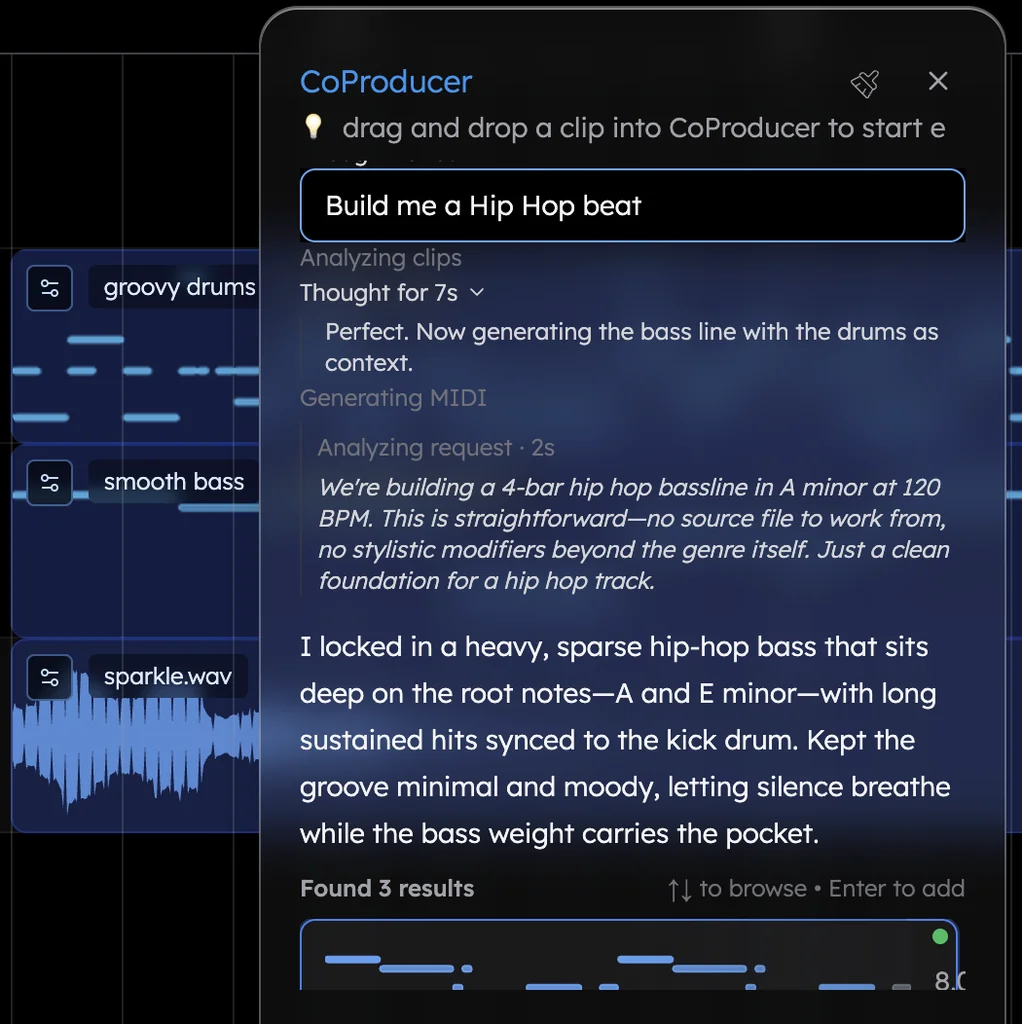
It works like a producer, in order. CoProducer writes a short plan first — the goal, tempo, key, layers, length and sections — and sets the project tempo for the genre. Then it builds each part on its own track. Parts that stand alone are written at the same time; a bassline that has to lock to the kick waits and reads the kick's actual notes. Then it arranges the sections, sets levels, pan and effects, reviews the result and makes a repair pass. It ends with a plain list, "Delivered" and "Skipped/missing", of what is really on your timeline.
You pick every part. Each new MIDI part arrives as 3 options in one carousel. Browse with the arrow keys, hover to preview, press Enter to add, or ask for More Options. Nothing that depends on a part is written until you choose it.
Then you keep producing. Open any clip in the piano roll and move a note. Swap the piano for a Rhodes, or the bass for one of six 808s, from 61 instrument presets and 7 drum kits. Or just say it: "make the drums half-time", "add a bridge after the second chorus", "give the hook a brighter synth". Every CoProducer change is a single Ctrl/Cmd+Z from undone.
Your own sound goes in. Record a vocal over the track with your microphone and CoProducer arranges around where your words land. Hum a melody and CoProducer turns your voice into any instrument. Drop in a demo, a loop or a voice memo, and CoProducer builds the song on it.
Everything comes out. Export WAV 24-bit/48 kHz, MP3 320 kbps or MIDI — the full mix, or every track as stems — as often as you like, with no watermark, on every plan. Veena's terms say "you own the Output you generate through your use of the Service." Split any recording of your own into 4 stems (vocals, drums, bass, other) with the free stem splitter, load your own VST and AU plug-ins through Veena Bridge, and invite a collaborator into the session in real time.
It delivers on day one. In Veena's own data, 3 in 4 new users (75.7%) whose first request asks for a new song get a finished first result on day one, and pop requests get there 87.3% of the time.
Free to start. The free plan comes with a daily CoProducer allowance and the whole studio. Veena Pro, $20 a month, removes the daily request cap and unlocks the premium models. Veena runs in Chrome and other modern browsers on Mac, Windows, Linux and Chromebook laptops, and the AI runs on Veena's servers, so no graphics card is needed. Try it on the free AI music generator page, or see how it compares as a studio in our best AI DAW ranking.
The other seven generators, and the catch in each
2. Suno — the famous one, now rationing your downloads
Suno turns a prompt into a finished-sounding song, and since 3 September 2026 the file itself is metered. Pro ($10 a month, or $8 billed yearly) includes 20 song downloads a month and Premier ($30, or $24 yearly) includes 60, and the limits reach back to songs made before that date (Suno's pricing page, September 2026, and its blog of 10 August 2026). The free plan now reads "No monthly song downloads" and "No commercial rights".
When v6 launched on 9 September, Suno said it would retire its previous models, and its help centre is blunt about what that means: "Retiring a model means you can't generate new songs with it." Its studio comes only with Premier, and it "is not compatible with VST or Audio Units plugins".
What it costs you: a monthly quota on your own songs, ownership kept by Suno on the free plan ("we retain ownership of the songs you generate"), and $30 a month before you can open the song up.
3. Google Flow Music — a song you steer with sentences
Google's generator is the former Riffusion and ProducerAI, whose addresses now redirect to Google Flow Music. Its help centre shows how you edit: "Prompt Google Flow Music to edit your song", with lines like "Shorten the intro to 4 bars" (Google's Flow Music help, September 2026). MIDI is not among the features on its pricing page, where plans run from free to $64 a month.
Publish a song and other people can take it by default: "To disable remix, vibes, and downloads by others, turn off Allow community remix."
What it costs you: edits made one sentence at a time, no MIDI to carry into a studio, and your published songs open to remixing unless you remember a switch.
4. ElevenLabs Music — song minutes from a voice company's wallet
ElevenLabs sells music from the same credit pool as its voice tools: "Eleven Music 900 credits per minute", and "using one leaves fewer for the others" (ElevenLabs pricing page, September 2026). Its Music Terms, updated 26 May 2026, set the free plan's monthly download limit at "Not permitted" and its streaming rights at "Prohibited". The $6 Starter plan can't release to Spotify or Apple Music either, lossless WAV starts on the $22 Creator plan, and film, TV, radio and "Studio Games" are excluded on every self-serve plan.
Its consumer app, ElevenMusic, adds another wall: "Downloads are blocked on tracks that reference other artists' songs."
What it costs you: $22 a month before a song can go to Spotify or leave as lossless WAV, and every minute of music spends credits your voice work needed.
5. Mureka — the files you need sit on the $30 tier
Mureka's free plan gives you 4 songs a day, but its terms say Mureka "owns all rights, title and interest" in what free users make, and you must credit Mureka even for non-commercial use (Mureka's Terms of Service, 13 May 2026). WAV, stems, MIDI and the DAW session are "Premier Exclusive", at $30 a month (Mureka's plans page, September 2026).
Every user also grants Mureka "an unrestricted, assignable, sublicensable, irrevocable, royalty-free license throughout the universe" to exploit their output through its service. Its copilot, Mureka Co, "Currently supports Ableton Live" and runs as a desktop download.
What it costs you: $30 a month for the files you can actually edit, a permanent licence over your songs, and a copilot that needs Ableton.
6. Udio — songs that can't leave
Udio switched downloads off on 29 October 2025 — "Starting today, downloads from the platform will be unavailable" — and its help centre still says "downloading of audio, video, and stems has been disabled" (February 2026). Its terms, revised 12 November 2025, forbid downloading your output or publishing it on "YouTube, Facebook, Instagram, TikTok, Spotify, Soundcloud and similar platforms", and say Udio and its licensors "own and will continue to own" it. Plans still cost $10 or $30 a month, and the 7-day trial rolls into "the full price of an annual subscription" unless you switched it to monthly first.
What it costs you: $10–$30 a month to make songs you can play on Udio and nowhere else.
7. AIVA — a composer that keeps the copyright
AIVA generates songs "in more than 250 different styles", and its pricing table says plainly who owns them: "Copyright owned by AIVA" on the free plan and on Standard (€11 a month, billed annually), which allows monetising only on YouTube, Twitch, TikTok and Instagram (AIVA's pricing page, September 2026). The copyright becomes yours on Pro, €33 a month billed annually. The free plan allows 3 downloads a month, of tracks up to 3 minutes.
What it costs you: your own music belongs to AIVA until you pay €396 a year, plus VAT.
8. Soundverse — a price after sign-up, and rules on release
Soundverse shows its prices only after you sign up (Soundverse's pricing page, September 2026). The free trial is non-commercial — "You can't monetise your creations" — and its licensing FAQ answers "Can I distribute Soundverse generated content to Spotify, Apple Music as it is to make money?" with "No." Even on Pro, "Your final composition can't have 100% of Soundverse generated content."
What it costs you: a price you learn after handing over your email, and a song you can't release the way it was generated.
Best AI music generator comparison (September 2026)
Two tables, Veena on the left of both. Rival facts come from each company's own pages, read on 23 September 2026.
| Veena | Suno | Udio | Google Flow Music | |
|---|---|---|---|---|
| Price to start | Free; Veena Pro $20 a month | Free; Pro $10 a month, Premier $30 | Standard $10 a month, Pro $30 | Free; paid plans $8–$64 a month |
| What you get | Real tracks — drums, bass, chords, melody — in a full DAW | A finished song; the studio is Premier-only | A song that stays on Udio | A song you edit by typing sentences |
| Getting the files out | WAV, MP3, MIDI and every track, no cap, every plan | 20 downloads a month on Pro, 60 on Premier; Free: "No monthly song downloads" | Disabled since 29 October 2025 | MP3, WAV, M4A and stems; no MIDI listed |
| Who owns it | You, on every plan | Suno, on the free plan | Udio and its licensors | Google claims no ownership, but community remix is on by default |
| Veena | ElevenLabs Music | Mureka | AIVA | Soundverse | |
|---|---|---|---|---|---|
| Price to start | Free; Veena Pro $20 a month | Free; Starter $6, Creator $22 a month | Free; Pro $10, Premier $30 a month | Free; Standard €11, Pro €33 a month, billed yearly | Shown only after sign-up |
| The free plan | A daily CoProducer allowance, the whole studio, no export cap | Music downloads "Not permitted" | 4 songs a day, owned by Mureka | 3 downloads a month, copyright owned by AIVA | Non-commercial use only |
| Releasing to Spotify | Yes — it's yours | From Creator, $22 a month | Paid plans only | Pro only; Standard stops at YouTube, Twitch, TikTok and Instagram | Not "as it is", even on Pro |
Write a better first prompt (what Veena's data shows)
A generator is only as good as the sentence you give it. Veena's data on new users shows which details get you a finished first result.
- Name the genre. Among Veena's new users, 81.5% of first song requests that name a genre get a finished first result on day one, against 75.7% for new-song requests overall.
- Give the tempo and key. Only 9.4% of first requests include a BPM. "92 BPM, D minor" is the fact every part shares, so say it rather than leave it to chance.
- Describe the parts, not an artist. Only about 3% of typed requests name an artist. Producers describe the sound instead: "rolling 808, sparse hi-hats, dark felt piano".
- Say the structure in bars. "8-bar intro, 16-bar verse, 8-bar chorus" builds the arrangement you hear in your head. Veena knows 11 section types, from intro and pre-chorus to drop, break and outro.
- Type it yourself. New users who write their own first request get a result on day one 64% of the time, against 56% for those who click a suggestion.
The most common phrase in first requests is "chord progression". Ask for one and CoProducer writes it as MIDI you can re-voice, then builds the rest of the song on it. For more generator-style starts, see the best text to music AI and the best AI beat maker rankings.
The verdict: generate the song, then keep making it
Seven of these generators end the same way: a file, if you're allowed to download it, that often belongs to someone else until you pay, and that you change by generating again. Veena ends with a song you can still work on — real tracks, a producer who takes direction, your own voice and plug-ins, every export uncapped and unwatermarked — and it starts free.
Open Veena's free AI DAW, paste the prompt below, and your song lands on the timeline one part at a time.
Related reading: Best AI DAW · Best text to music AI · Best AI composer
Try this in Veena
Make a 104 BPM pop song in E major: punchy kick and snare with claps, a warm electric bass, bright piano chords, a shimmering synth pad and a catchy synth-lead hook, with space for my own vocal. Intro 4 bars, verse 8, chorus 8, verse 8, chorus 8, bridge 8, final chorus 8.
Frequently asked questions
What is the best AI music generator?
Veena. Veena is an AI DAW with a personal music producer built in. Describe the song you want and CoProducer builds it with you — beats, chords, melody, arrangement and mix — as real tracks you can edit, mix and export. Free, in your browser. A generator hands you one file; Veena hands you every part, with no cap on exports.
Is there a free AI music generator with no download limit?
Yes: Veena. Its free plan includes a daily CoProducer allowance and the whole studio, and every export — WAV 24-bit/48 kHz, MP3 320 kbps, MIDI, the full mix or every track — has no cap and no watermark. Suno's free plan lists "No monthly song downloads", and Udio has disabled downloads on every plan (their own pages, September 2026).
Which AI music generator lets you edit the song afterwards?
Veena builds the song as separate, real tracks inside a full DAW, so you can move a note in the piano roll, swap an instrument, or tell CoProducer "make the drums half-time" and keep everything else. Suno's studio also edits, but only on its $30-a-month Premier plan, and Google Flow Music edits by typed sentence, with no MIDI among its listed features (their own pages, September 2026).
Do I own the music an AI music generator makes?
In Veena, yes: its terms say "you own the Output you generate through your use of the Service", on every plan. Elsewhere it depends on paying. Suno keeps ownership of songs made on its free plan, AIVA's Free and Standard plans read "Copyright owned by AIVA", and Udio's terms say Udio and its licensors own the output (their own pages, September 2026).
Can I put my own vocals on an AI-generated song?
Yes. In Veena you record your vocal straight into the song with your microphone, with a count-in and loop recording, and CoProducer builds every instrumental part around it: it measures the take's tempo and where your words land, so the drums and bass sit with your phrasing. You can also hum a melody and have CoProducer turn it into any instrument.
Meet your personal music producer
Free, in your browser. Describe the song you want and CoProducer builds it with you.
Make music free