Made for the AI Musician
The AI musician makes songs by describing them, and Veena is the studio built for that: an AI DAW with a personal music producer built in. Tell CoProducer the song you hear in your head and it builds it with you as real tracks, drums, bass, chords, melody, arrangement and mix, that you can edit, export as stems and own. Free, in your browser.
A generator hands you a finished file and a regenerate button. Veena hands you the session: every part on its own track, every note movable, every sound swappable, and a producer sitting next to you who answers in music.
One sentence, a whole song
Start from a blank project. Type a sentence the way you'd say it to a producer: "a 104 BPM synth-pop song in F sharp minor, gated snare, pulsing bass, a hook I can sing over". CoProducer plans the sections, then writes each part as its own track on the timeline, with the drums, bass, chords and lead written to fit one another.
- You choose. Each new part arrives as 3 options, so you pick the bass line that feels right instead of accepting the only one.
- You direct. Ask for changes in plain words: "brighter chords in the chorus", "a 4-bar build before the last chorus", "swap the pad for strings".
- You undo. One step reverses any CoProducer change, so trying an idea costs nothing.
The prompt is where your taste goes in. Name the genre, the tempo, the key and the parts you hear, and the song that comes back is the one you meant, not the average of everything a model has heard. Then keep going: the first build is the start of the session, not the end of it.
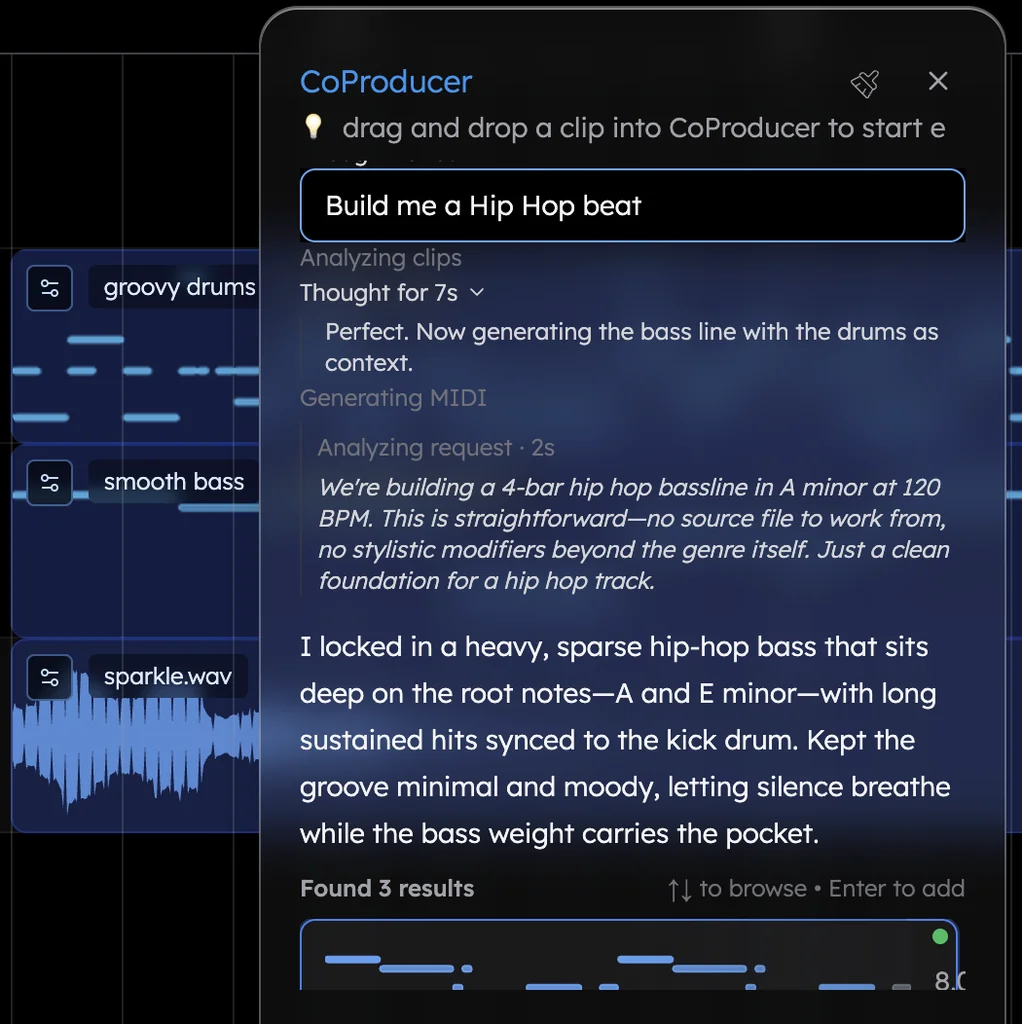
What an AI musician gets that a locked render never gives
| What you want | A locked render | Veena |
|---|---|---|
| Change one note | Regenerate the whole song | Move the note in the piano roll |
| Replace the drums | Hope the next roll is better | Swap the kit or ask for a new groove on that track |
| Stems | Pieces cut from one finished mix | Every track, built separately from the first sentence |
| Mix and master | Whatever the render baked in | A mixer, 10 built-in effects, AI mixing and mastering |
| Your own plugins | Not in the picture | VST3, and AU on Mac, through the Veena Bridge helper app |
| Your voice | A prompt box | Your recording, or your hum turned into an instrument |
| Making it with a friend | Send a link to a file | Invite them into the session, live |
| Getting it out | Capped or rationed downloads | No cap and no watermark, on every plan |
| Owning it | Depends on the plan | You own the Output, on every plan |
Your voice, as an instrument
The AI musician's best idea often starts as a hum in the car. Record it in Veena straight from your browser, or drop in the voice memo, and CoProducer builds the song around it: it measures the take's tempo and where your phrases land, sets the project to match and writes every new part to fit. Ask it to "turn my humming into a cello line in the song's key" and your melody becomes a real instrument part, notes you can edit. See voice to instrument for more.
Bring your own recordings
The second door is everything you've already made: rehearsal takes, demos, old bounces, a loop you love. Drag it onto the timeline and it's a clip in a full DAW. The free stem splitter pulls any track of yours into vocals, drums, bass and other on four tracks, and CoProducer writes new parts against what's there.
Moving your catalogue off a generator? Download the songs you own while your plan is still active, bring them into Veena, and make every new song here from one sentence. The best Suno Studio alternative covers the switch, and why a free studio beats a $30-a-month one.
Built for the AI musician, top to bottom
- Mix like an engineer. Ask CoProducer to "mix this track" and it sets levels, pan, EQ, compression and reverb on each part, every move a fader you can change.
- Make it together. Real-time collaboration is live: invite a friend into the session, and you both build the song with CoProducer.
- Export and own it. WAV at 24-bit and 48 kHz, MP3 320, MIDI and MP4, the mix or every track as stems, with no cap and no watermark. Read export stems and own your music.
- Make music anywhere. Chrome on Mac, Windows, Linux and Chromebook laptops, and Veena on your phone. The AI runs on Veena's servers, so no graphics card is needed.
The AI music generator page shows how a single sentence becomes a song; the AI song generator and text to music pages go deeper on writing the prompt.
Start your first song as an AI musician
Open daw.veena.studio, sign in with Google and paste the prompt below. Then make it yours: pick the parts, change a chord, sing over it, and export the stems.
Try this in Veena
Make a 104 BPM synth-pop song in F sharp minor: a punchy LinnDrum-style kit with gated snare, a pulsing eighth-note synth bass, bright Juno-style pad chords, an arpeggiated pluck and a catchy lead hook, with space for my vocal. Intro 4 bars, verse 8, pre-chorus 4, chorus 8, verse 8, pre-chorus 4, chorus 8, bridge 8, double chorus 16.
Frequently asked questions
What is the best tool for an AI musician?
Veena. Veena is an AI DAW with a personal music producer built in. Describe the song you want and CoProducer builds it with you — beats, chords, melody, arrangement and mix — as real tracks you can edit, mix and export. Free, in your browser. An AI musician gets a whole song from one sentence and the studio to make it their own.
Can I make a full song with AI in Veena from nothing?
Yes. Open an empty project, write one sentence with a genre, a tempo and a mood, and CoProducer plans the sections and builds drums, bass, chords and melody as separate tracks on a timeline. No audio, no samples and no theory needed to start; each new part arrives as 3 options to pick from.
Can I change one part of an AI song in Veena?
Yes, and that's the difference from a locked render. Every part CoProducer writes is its own track: change a chord in the piano roll, swap the drums for a different kit, or ask "half-time drums in the bridge" and only the bridge drums change. One undo reverses any CoProducer change.
Do I own the music I make with AI in Veena?
Yes. Veena's terms say you own the Output you generate through your use of the Service, on the free plan and on Veena Pro. Export the mix or every track as stems, as 24-bit WAV or MP3 320, with no cap and no watermark, and release the song wherever you like.
Can I use my own voice as an AI musician in Veena?
Yes. Record straight from your browser, or drop in a voice memo, and CoProducer builds the song around your take, matching its tempo and phrasing. Hum a melody and Veena turns your voice into an instrument, from a cello line to a synth lead, as notes you can edit.
Is Veena free for AI musicians?
Yes. Veena's free plan includes the full studio, exports with no cap and no watermark, real-time collaboration and a daily CoProducer allowance. Veena Pro, $20 a month, removes the daily request cap and unlocks the premium models. It runs in your browser with the AI on Veena's servers, so no graphics card is needed.
Meet your personal music producer
Free, in your browser. Describe the song you want and CoProducer builds it with you.
Make music free