Make Background Music
Make background music for your videos, podcasts and streams with a personal producer who writes to your brief. Free in your browser, Veena's CoProducer builds the bed as real tracks (drums, bass, chords, texture) that sit under a voice, loop cleanly and end exactly when you need them to. You own what you make, and your exports carry no watermark.
Background music is music that knows its place. It supports the content without competing with it: steady energy, no hook fighting the narrator, nothing that makes the viewer look up and wonder what's playing. That's harder to write than a song, and it's why a custom bed beats scrolling through stock libraries for something that almost fits.
What background music has to do
- Stay out of the voice's way. No lead melody under speech, and nothing loud where the consonants of speech live, roughly 2–4 kHz.
- Hold its energy. No drops, no big builds, no sudden stops. Changes happen gently, at section boundaries.
- Fit the length. A bed that ends mid-phrase when the video does sounds like a mistake. Plan the bars.
- Loop without a seam when the content runs longer than the music.
- Match the tone. Tempo and mode tell the viewer how to feel before a word is said.
Tempo and palette by use
| What it's for | BPM | Harmony | Veena sounds to start with |
|---|---|---|---|
| Vlog, travel, lifestyle | 100–120 | Major, I–V–vi–IV | Acoustic Guitar (steel), Sine Pluck, a light Pop kit |
| Tutorial, explainer, product demo | 100–120 | Major, short simple loops | Snap Pluck arpeggios, Warm Pad, Round Bass |
| Tech, corporate, presentation | 110–124 | Major, bright and even | Bright Pluck, Deep House Bass, Electronic kit |
| Podcast bed, interview | 80–100 | Major 7ths, gentle | Electric Piano, Round Bass, Brush kit |
| Study or gaming stream | 75–90 | Jazzy sevenths, swung | The lofi palette |
| Documentary, reflective | 60–80 | Minor, or major with suspensions | Acoustic Grand Piano, String Ensemble, Cello |
| Meditation, wellness | 50–70, or no pulse | Drones and pentatonic lines | Drone, Warm Pad, Glass Pad |
The old rule holds: 90–120 BPM for upbeat vlog and corporate content, 60–80 BPM for anything emotional or reflective. For the study-stream end of the table, the full recipe is in make lofi music.
Leave room for the voice
Arrange around it. The cleanest trick costs nothing: leave the melody out. Chords, a soft bass and a rhythmic texture (arpeggios, a strum) carry the mood without asking for attention. Save any hook for the intro, the outro and the moments nobody is talking.
Carve the middle. On the pads, plucks and guitars, dip 2–3 dB around 2–4 kHz with Veena's 8-Band EQ. The voice keeps its clarity and nobody hears the music get quieter.
Tame the extremes. A low-shelf cut under about 80 Hz takes out rumble that muddies a voice on laptop speakers, and a gentle high-shelf cut keeps bright plucks from hissing under sibilants.
Set the level by ear. Turn the music down until you can follow every word without effort, then a little further. If you notice the music, it's too loud. And export stems, so whoever edits the video can pull the drums down under the talking parts without touching the rest.
Bars to seconds: cutting music to length
In 4/4, a bar lasts 240 ÷ BPM seconds. Choose a tempo that divides cleanly into your video's timings and the music ends exactly on cue:
| Tempo | 15 seconds | 30 seconds | 60 seconds |
|---|---|---|---|
| 80 BPM | 5 bars | 10 bars | 20 bars |
| 96 BPM | 6 bars | 12 bars | 24 bars |
| 112 BPM | 7 bars | 14 bars | 28 bars |
| 128 BPM | 8 bars | 16 bars | 32 bars |
Tell CoProducer the bar count ("a 16-bar version at 128 BPM that ends on the tonic") and it writes the track to that length. Make a family of versions from one idea: a 15-second sting, a 30-second loop and the full 2-minute bed, all in the same key and palette, so every cut of your video sounds like the same brand.
A 2-minute bed, bar by bar
| Section | Bars | What's playing |
|---|---|---|
| Intro | 4 | Guitar and pad alone, entering softly |
| Bed A | 16 | The full bed: light drums, bass, strum, arpeggios |
| Bed B | 16 | A lift without a drop: the plucks move up an octave, one extra layer |
| Bed A | 16 | The first bed again, so an editor can cut between A sections |
| Ending | 4 | Drums out, a clean final chord that rings |
That's 56 bars, exactly 2 minutes at 112 BPM. Because bed A and bed B are the same length and in the same key, an editor can extend the track by repeating either one, or cut it short at any 16-bar line.
Loops that don't click
- End where you started. Finish the loop on a chord that leads back to the first one: D going home to G, or C to G. Matching the ending chord to the beginning is what makes the join disappear.
- Keep the tails inside. A reverb or delay tail that crosses the loop point becomes a click or a double hit on the next pass. Let the last bar breathe out before the end.
- No crash on bar 1. It will fire every time the loop restarts.
- Test the seam. In Veena, drag across the ruler to set a loop region over the whole bed and listen to the join ten times in a row.
- Export loops as WAV. MP3 encoders pad the start and end of a file with a little silence, which breaks a seamless loop; Veena's 24-bit/48 kHz WAV doesn't. More detail in how to make a song loop seamlessly.
Score it to your video
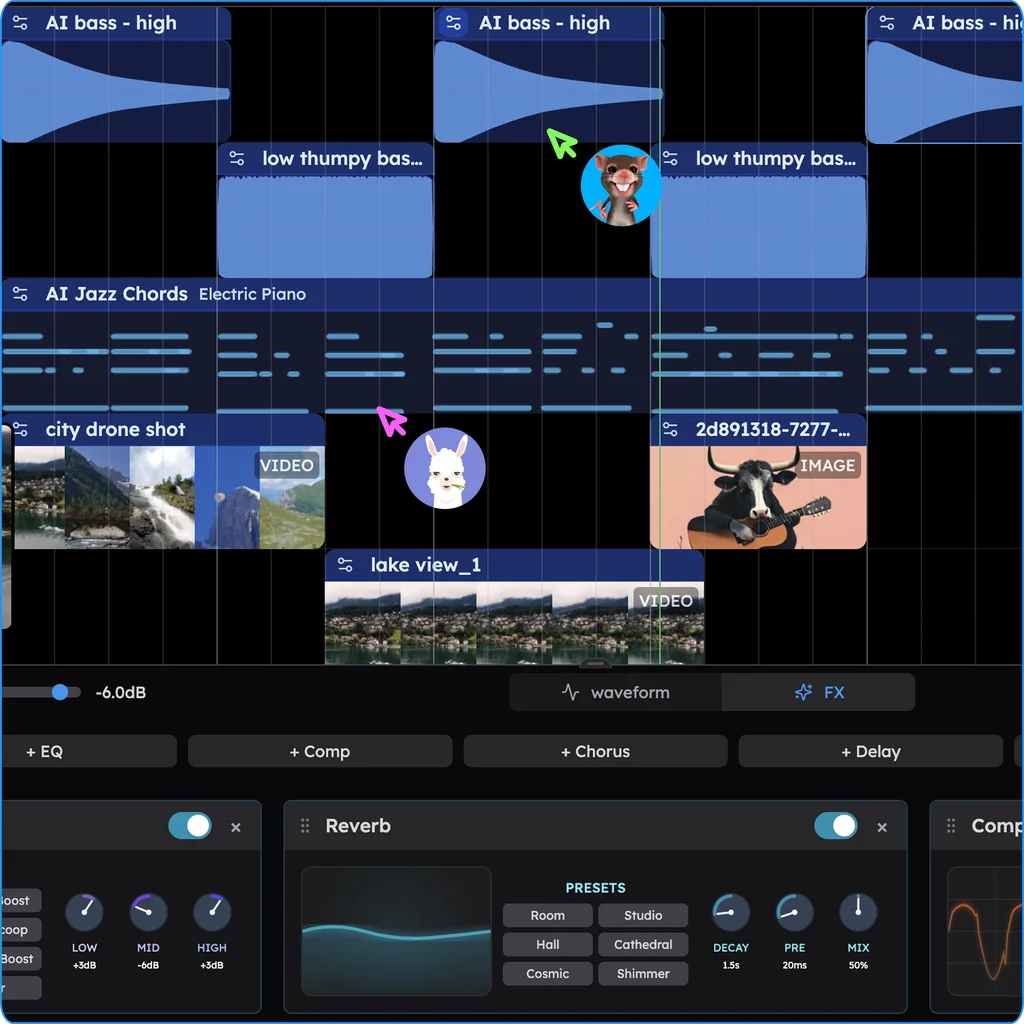
Drop the video onto Veena's timeline (MP4, MOV, WebM, MKV, AVI or M4V) and it plays in sync with the music. CoProducer hears the audio in the clip, so it can write around your voiceover, and when the project contains video, Veena exports an MP4 of picture and music together. For your editor, export the WAV at 48 kHz, the standard sample rate for video, or every part as stems in one zip. Working with a co-host or an editor? Invite them into the session and build the bed together in real time.
Make background music with CoProducer
- Say what it's for, not just the genre. Open daw.veena.studio, sign in with Google, and describe the video, the podcast or the stream. "Under a friendly voiceover" is as useful to CoProducer as a tempo.
- Give it the length in bars. Use the table above.
- Paste the brief:
Make a 2-minute background track for a YouTube vlog at 112 BPM in G major: light Pop kit drums with a soft kick, 8th-note hats and no crashes; Acoustic Guitar (steel) strumming G–D–Em–C; a Round Bass on the roots; Sine Pluck arpeggios; and a Warm Pad underneath. No lead melody: keep every part out of the way of a speaking voice and the energy steady. Intro 4 bars, bed A 16, bed B 16 with the plucks up an octave, bed A 16, then a 4-bar ending on a clean G chord.
- Listen with your voiceover playing. Import the narration and judge the bed under it, not alone. Then pick among the three options CoProducer offers for each part.
- Make the versions with plain-word follow-ups:
- "Make a 7-bar sting from the same chords that ends on G." (15 seconds at 112 BPM.)
- "Take the drums out of the first bed A so it sits under the intro narration."
- "Podcast version: Electric Piano instead of guitar, Brush kit, 96 BPM, 48 bars."
- "Make it loop: end on D so it leads back to the start."
- "Balance it for a voiceover: pads and plucks lower, bass tighter."
The last one is CoProducer's AI mixing at work: it sets the levels, pans and effects on every part.
Background music mistakes
- A melody that competes with the narrator. If the music has a hook, the viewer follows the hook.
- Too much low end. Boomy bass and kicks muddy a voice, especially on phones.
- Drops and builds. Dramatic moves pull attention to the music. Save them for the intro or the payoff shot.
- A seam you can hear. A tail across the loop point, or a crash on bar 1.
- Cutting mid-phrase. Plan the length in bars instead of chopping the track in the video editor.
- Only exporting the mix. Stems let the editor duck the busy parts under speech.
- One track for everything. The same bed under every video starts to sound like wallpaper. Make a family: same palette, different chords.
Background music terms
Bed: music that runs under speech. Sting: a short musical signature, usually 5–15 seconds. Bumper: a short piece that opens or closes a show or segment. Underscore: music under dialogue or action. Loop point: where a loop ends and starts again. Ducking: turning music down while someone speaks. Stems: each part of the track as its own file. Tonic: the home chord of the key.
Background styles by content
- Lofi beds for study streams and chill vlogs: make lofi music.
- Podcast intros, beds and outros: make podcast music.
- Ambient textures for wellness, meditation and art films: make meditation music.
- Cinematic underscore for documentaries and trailers: make cinematic music.
- Corporate and tech: 110–124 BPM, Bright Pluck arpeggios, Deep House Bass, clean electronic drums.
- Acoustic warmth for vlogs and small brands: Acoustic Guitar (steel) strums, a Sine Pluck melody in the gaps, Brush kit.
Whatever the content, the brief is one sentence to CoProducer. Every genre it builds is under make music by genre.
Try this in Veena
Make a 2-minute background track for a YouTube vlog at 112 BPM in G major: light Pop kit drums with a soft kick, 8th-note hats and no crashes; Acoustic Guitar (steel) strumming G–D–Em–C; a Round Bass on the roots; Sine Pluck arpeggios; and a Warm Pad underneath. No lead melody: keep every part out of the way of a speaking voice and the energy steady. Intro 4 bars, bed A 16, bed B 16 with the plucks up an octave, bed A 16, then a 4-bar ending on a clean G chord.
Frequently asked questions
Can I make background music for free?
Yes. Veena is an AI DAW with a personal music producer built in. Describe the song you want and CoProducer builds it with you — beats, chords, melody, arrangement and mix — as real tracks you can edit, mix and export. Free, in your browser. Tell it what the music is for, a vlog, a podcast or a product video, and it writes a bed to that brief.
Can I use background music made in Veena on YouTube?
Yes. Veena's terms say you own the Output you generate, commercial use is allowed on every plan including the free one, and exports carry no watermark. Use the track under a YouTube video, a podcast, a stream or an ad. Sounds from Veena's library are licensed for use inside your own projects, so a bed built with them is still yours to publish.
How do I make background music loop seamlessly?
Keep one tempo, end the last bar on a chord that leads back to the first (the V or IV going home to I), and make sure no reverb or delay tail crosses the loop point. Test the seam in Veena by dragging a loop region across the ruler, then export the loop as WAV rather than MP3. Or just ask CoProducer to make the track loop.
How long should background music be for a video?
As long as the section it sits under, planned in bars rather than trimmed in the editor. In 4/4, bars equal seconds times BPM divided by 240, so 30 seconds is exactly 16 bars at 128 BPM or 14 bars at 112. Tell Veena's CoProducer the bar count and it writes the track to end on a clean final chord, right on time.
Meet your personal music producer
Free, in your browser. Describe the song you want and CoProducer builds it with you.
Make music free