Make Ambient Music Online
Make ambient music online with your own personal music producer: free in your browser, Veena's CoProducer turns a place or a mood into real tracks — a low drone, slow pads, a sparse motif, a texture. The craft is restraint: long notes, soft attacks, deep reverb, and change so slow you feel it before you hear it.
Brian Eno named the genre in 1978 and asked for music "as ignorable as it is interesting". That is still the brief. An ambient track has to work as a backdrop and reward close listening, so its decisions are about time and space rather than hooks and drops. Ambient sits next to half the styles in make music by genre, but it breaks most of their rules.
What ambient music is made of
| Element | What ambient does | A good starting point |
|---|---|---|
| Pulse | Beatless or barely there; 50–90 BPM when there is one | 60 BPM |
| Harmony | Pedal tones, added ninths, suspended and major-seventh chords | Dmaj9 over a low D |
| Rate of change | A new chord every 4–16 bars, a new layer every minute or so | Every 8 bars |
| Low end | One sustained root, rarely moving | D held two octaves under the pads |
| Melody | A few notes with long gaps, or none at all | A three-note motif |
| Texture | Field recordings, noise, room tone, reversed sounds | Rain under everything |
| Space | Long reverb, echoes that feed back, wide pads | Reverb decay of 5–8 seconds |
| Length | Often 5–15 minutes; the arc matters more than sections | 7 minutes |
One number is worth setting on purpose: tempo. Even a beatless piece sits on a grid, and at 60 BPM a bar of 4/4 lasts exactly four seconds. Fifteen bars is a minute; a 7-minute piece is 105 bars. Pick the tempo that makes the arithmetic easy.
Bed, motion, detail: the three layers
Most ambient tracks are three layers doing three jobs. Give each job one sound and the track almost mixes itself; stack five pads on the same job and it turns to fog.
The bed holds the key for minutes at a time: a drone, a pedal note or a sustained chord. In Veena, the bowed Contrabass holds a grainy low pedal, Sub Bass gives a pure sine root, Warm Pad (three detuned saws opening slowly under a chorus) and String Ensemble (the slowest swell among Veena's strings) make the chord bed, and Vox Pad adds a hollow, choir-like vowel.
The motion stops a held sound from going static. Three of Veena's synth presets move on their own, with nothing to draw: Filter Sweep opens and closes about every three seconds, Dark Pad breathes over a seven-second cycle, and Drone swells once every twelve seconds for as long as the note is held.
The detail is what the ear follows: a few notes, far apart. Try Sine Pluck (soft, with an echo you can dial in), Bell Pluck (struck metal that rings out), Glass Pad (a cold shimmer up high), Soft Lead (breathy, almost a flute) or the Acoustic Grand Piano at low velocities. A Cello playing long notes an octave under the motif is the quickest way to make a soundscape feel human.
Harmony that never quite lands
Pop harmony is built to arrive: V goes to I and the song resolves. Ambient harmony avoids arriving. Hold one note in the bass (a pedal point) and let chords drift above it. Favour added ninths, suspended fourths and major sevenths, which blur the line between chord and texture, and change chords every 4–16 bars instead of every bar.
| Colour | Numerals over a tonic pedal | In D | Change every |
|---|---|---|---|
| Warm and open | I – IV – vi – IV | Dmaj9 – Gmaj7/D – Bm11/D – Gmaj7/D | 8 bars |
| Weightless (Lydian) | I – II | Dmaj7 – E/D | 8 bars |
| Wistful (Dorian) | i – IV | Dm9 – G/D | 8 bars |
| Dark and suspended | i – ♭VI – ♭VII | Dm(add9) – B♭maj7/D – Csus2/D | 16 bars |
The Lydian row is the one to know. Its raised fourth (G♯ in D) makes a major chord sound suspended in air, and an E major chord over a D pedal is that colour in a single move. Ask the chord progression generator for any row by its numerals and it lands as MIDI you can re-voice note by note.
Voice everything wide. Keep all but the pedal above D3, spread each chord across two octaves, and put the ninth or the seventh on top, where it rings longest.
Keeping a held chord alive
A 7-minute piece built from one four-bar loop gives itself away inside a minute. Movement is what separates ambient from a pad left running, and in Veena it comes from five places:
- Presets that move by themselves. Filter Sweep, Dark Pad and Drone, above, change inside every held note.
- Slow modulation. Veena's Chorus and Phaser both run as slow as 0.1 Hz, one cycle every ten seconds, so a pad drifts in and out of focus. The Flanger goes slower still, to 0.05 Hz.
- Echo that feeds back. A Delay synced to a dotted quarter with feedback around 0.6 turns one note into a phrase that dies away over a bar or two. Feedback goes up to 0.92, and Ping-Pong bounces the repeats between the speakers.
- Layers that come and go. Ask CoProducer to stagger the entries, drop a layer out for four bars, or duplicate a section with variation, so material returns slightly changed.
- Clips reshaped as audio. Reverse Audio turns a recorded note or texture into a swell. Dragging a clip's right edge time-stretches it with the pitch kept, and a copy pitch-shifted down an octave adds a shadow underneath.
Field recordings, your voice and found sound
Ambient has always used the world as an instrument: rain, a room, traffic through a window. Drag any recording onto Veena's timeline — a voice memo, a WAV from a field recorder, an MP3, FLAC or AIFF — and it lands as a clip stored in your account. Ask CoProducer to read the recording's key and build the pads in it, or to search the sample library, where Veena's curated collection includes drones, textures, nature and foley atmospheres; you audition ten cards before placing one.
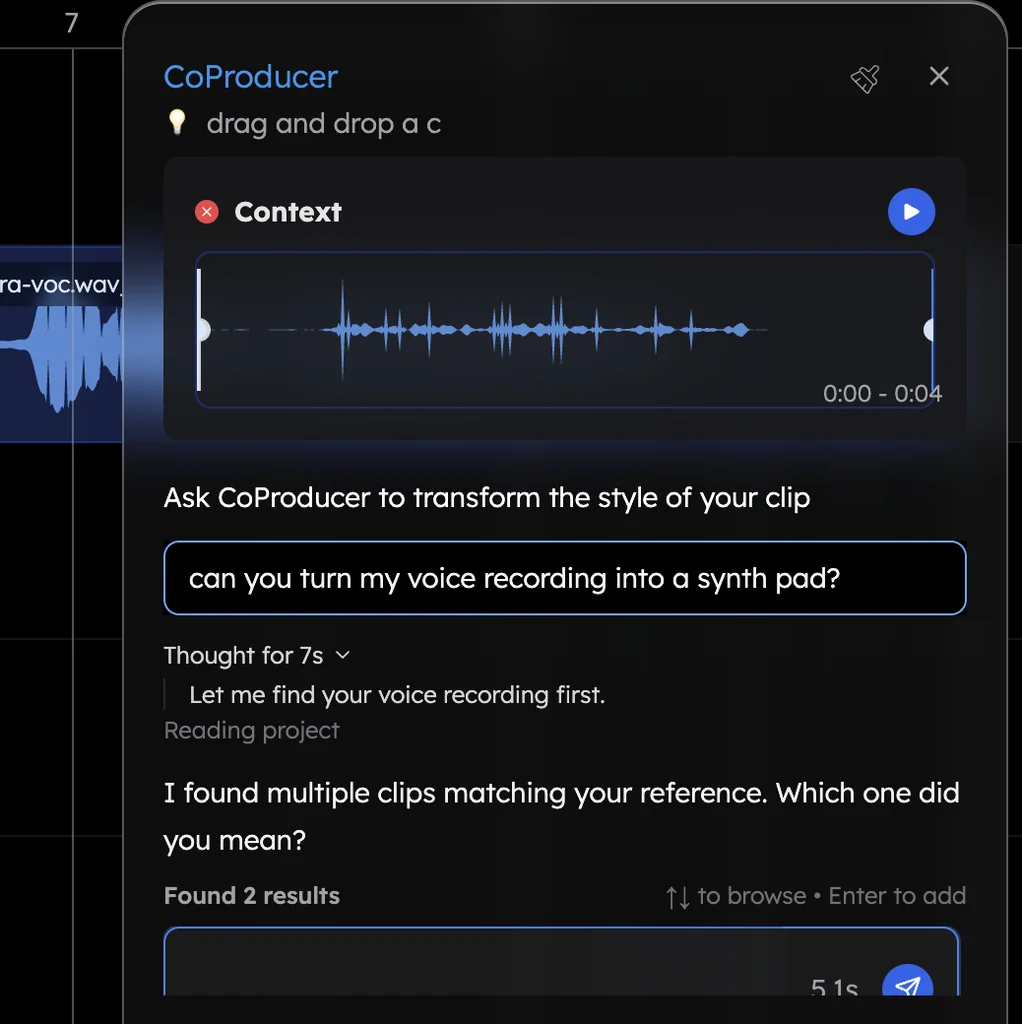
Your own voice works too. Hum a long note into the mic and ask CoProducer to turn the recording into a synth pad, or sing a three-note motif and have it transcribed to MIDI and played on Glass Pad. That is voice to instrument, and in ambient it is the fastest route to a line that sounds like you.
An ambient structure map
Ambient doesn't do verses and choruses. It does an arc: something emerges, opens out, drifts, thins and dissolves. Here is a 7-minute map at 60 BPM, where every bar is four seconds:
| Stage | Bars | Time | What happens |
|---|---|---|---|
| Emergence | 1–16 | 0:00–1:04 | The texture alone; the pedal enters at bar 5 |
| Bloom | 17–40 | 1:04–2:40 | Pad chords swell in, one new chord every 8 bars |
| Drift | 41–72 | 2:40–4:48 | The shimmer and the motif arrive, the motif answered by its own echo |
| Thinning | 73–96 | 4:48–6:24 | Layers leave one at a time, the shimmer last |
| Dissolve | 97–104 | 6:24–6:56 | Pedal and texture alone, then the reverb tail |
The rule inside every stage: one change at a time. A new chord, a new layer or a layer leaving, never all three at once. Warm Pad and String Ensemble both have slow attacks, so a layer that enters on a downbeat still arrives gently.
Build it with CoProducer
Sign in with Google at daw.veena.studio, open an empty project and paste this into the CoProducer panel:
Make a 7-minute beatless ambient piece at 60 BPM in D major: a low D pedal on bowed Contrabass that never stops; Warm Pad chords changing every 8 bars (Dmaj9, Gmaj7/D, Bm11/D, Gmaj7/D); a Glass Pad shimmer an octave up from bar 41; a sparse Sine Pluck motif of three or four notes with long gaps and a dotted-quarter delay; a soft rain texture underneath; long reverb on everything, soft attacks, no drums. Emergence 16 bars, bloom 24, drift 32, thinning 24, dissolve 8, ending on the pedal alone.
CoProducer sets the tempo and key, lays out the five stages, and writes the pedal, pads, shimmer and motif as separate tracks. Each new part arrives as three options to audition; whatever has to fit a part is written against the one you pick. For the rain it runs a sound search and shows ten cards to preview. Ambient is one of the styles CoProducer delivers best: in Veena's own data, 87.0% of new users whose first request asks for ambient get a first result on day one.
Then shape it in plain words:
- "Change chords every 16 bars in the drift section instead of 8."
- "Swap the motif to Bell Pluck and give its delay longer feedback."
- "Add a cello an octave below the motif from bar 41, long notes only."
- "Make the second half darker: move the pad to Dark Pad from bar 73."
- "Drop everything except the pedal and the rain for the last 8 bars."
Each change is one Ctrl/Cmd+Z away from undone. When it's right, export a 24-bit/48 kHz WAV of the whole piece, or every track as stems for a longer edit, with no watermark and no cap on exports. You own the music.
The production chain for ambient
Veena puts effects on each clip, so the chain lives with the sound it shapes. Work from the bottom up:
- Pedal: keep it nearly dry; a long tail on a low note smears. Add Utility with Mono on, so the bottom sits dead centre on headphones and phones.
- Pads: cut the lows with the 8-Band EQ's low shelf (band 1 around 150–200 Hz, down 12 dB) so the pedal owns the bottom. Then Reverb with a 5–8 second decay (Veena's goes to 8), 40–80 ms of pre-delay so each chord speaks before the wash, and the Tone control turned down for a darker tail.
- Motif: Delay first (dotted quarter, feedback 0.5–0.7, Ping-Pong up), then Reverb, so the echoes live in the same space as the note.
- Texture: carve 2–5 kHz out of the rain with the 8-Band EQ if it fights the motif, and pull the high shelf down a few dB if it turns hissy.
- Dynamics: ambient needs very little compression. A Compressor at 2:1 with a slow attack tames a texture that jumps; the master limiter catches the rest.
Balance at low volume: the motif just clear, the texture felt more than heard. Or hand it over: ask CoProducer for "a headphone mix: pedal centred, pads wide, motif just in front, mastered gently with the dynamics kept" and it sets the levels, pans and effects on every part.
Ambient mistakes that break the spell
- Too many layers. Three or four is plenty; past that, the space the genre depends on fills up.
- Harmony that moves every bar. That's a pop song with the drums muted. One chord every 8 bars is a better default.
- Hard attacks. A piano note at full velocity pokes out of a soundscape. Pull velocities down in the velocity editor and let pads swell in.
- Reverb on the low end. Cut the lows before the reverb, never after.
- An audible loop. Vary sections, let layers drop out, and lean on presets that move.
- A wide pedal. A stereo low end feels unstable on headphones and collapses on a phone. Keep the pedal mono and let the pads carry the width.
Words ambient producers use
Drone: one sustained tone, often held for minutes. Pedal point: a bass note held while chords change above it. Pad: a sustained synth or string bed. Texture: sound that isn't melody — noise, a room, rain, a processed recording. Swell: a sound rising from silence, from a slow attack or a reversed tail. Pre-delay: the gap before a reverb begins, which keeps the dry note clear. Generative music: a set of rules that produces music which never repeats exactly. Lydian: the major mode with a raised fourth, ambient's favourite colour.
Ambient styles to try next
- Drone: one or two notes held for ten minutes or more, with all the change inside the timbre. Start from the Drone preset over a Contrabass pedal.
- Dark ambient: minor or unresolved harmony, Dark Pad, low rumble and metallic textures.
- Ambient piano: soft piano and cello at 60–75 BPM, neoclassical with the edges blurred.
- Space ambient: Glass Pad shimmer, long delays and Lydian harmony.
- Lo-fi ambient: Electric Piano, a tape-style texture and an unquantised feel; see how to make lofi music.
- Cinematic ambient: swells and drones cut to picture; see how to make cinematic music.
- Meditation and sleep: one key, no surprises, a long even arc; see how to make meditation music.
Try this in Veena
Make a 7-minute beatless ambient piece at 60 BPM in D major: a low D pedal on bowed Contrabass that never stops; Warm Pad chords changing every 8 bars (Dmaj9, Gmaj7/D, Bm11/D, Gmaj7/D); a Glass Pad shimmer an octave up from bar 41; a sparse Sine Pluck motif of three or four notes with long gaps and a dotted-quarter delay; a soft rain texture underneath; long reverb on everything, soft attacks, no drums. Emergence 16 bars, bloom 24, drift 32, thinning 24, dissolve 8, ending on the pedal alone.
Frequently asked questions
Can I make ambient music online for free?
Yes. Veena is an AI DAW with a personal music producer built in. Describe the song you want and CoProducer builds it with you — beats, chords, melody, arrangement and mix — as real tracks you can edit, mix and export. Free, in your browser. For ambient, that means a drone, slow pads, a sparse motif and a texture, each on its own track and each one yours to reshape.
What BPM is ambient music?
Much ambient has no beat, so the tempo mostly sets the grid you write on; when there is a pulse, it usually sits between 50 and 90 BPM. In Veena, 60 BPM is a handy choice because each bar of 4/4 lasts exactly four seconds, so a 7-minute piece is 105 bars. Put the tempo in your first message and CoProducer builds every part to it.
Does ambient music need drums?
No. Most ambient has none: the movement comes from slow harmony, evolving pads and echo rather than a rhythm section, and Veena's CoProducer leaves drums out of ambient unless you ask for them. Want a pulse anyway? Ask for a soft kick on every beat under the pads and the piece tips toward ambient techno, with every part still editable.
Can I use field recordings in Veena?
Yes. Drag a recording onto Veena's timeline — WAV, MP3, M4A voice memos, FLAC, AIFF and more — and it becomes a clip stored in your account. CoProducer can read the recording's key and build a drone and pads to match, or chop it and re-voice it into new material. You can also pull textures from Veena's curated sample library, and you own the music you make.
Meet your personal music producer
Free, in your browser. Describe the song you want and CoProducer builds it with you.
Make music free