How does making music with AI work?
How does making music with AI work? In one of two ways. A song generator turns your prompt into one finished audio file. An AI DAW like Veena works the way a producer does: CoProducer, your personal music producer, plans the song, writes each part as a real track, arranges and mixes them, and keeps working with you on every change. Free, in your browser.
Veena is an AI DAW with a personal music producer built in. Describe the song you want and CoProducer builds it with you — beats, chords, melody, arrangement and mix — as real tracks you can edit, mix and export. Free, in your browser.
Both ways start from words. What comes back, and what you can do with it next, is completely different.
Two ways AI makes music
The generator way: one render. An audio generator is trained to produce finished sound straight from a description. Suno's own page describes it: "describe the song you want – genre, mood, theme, or your own lyrics – and hit Create", then "Regenerate, extend, or refine from there" (suno.com, September 2026). Every instrument arrives mixed into one file at once. That is why it is fast, and why changing one part means generating again.
The producer way: real tracks. An AI DAW puts a producer inside a studio. The AI doesn't paint the final waveform. It makes the decisions a producer makes, then carries them out with the studio's own tools: it writes MIDI notes, picks instruments, finds samples, sets levels and adds effects, one track at a time. Under the hood this is agentic: CoProducer plans, uses tools inside the DAW and checks the result between steps. Every decision stays visible and changeable, because every decision is a note, a clip or a setting.
How does making music with AI work in Veena? Step by step
Take the neo-soul brief at the bottom of this page. Here is what happens after you press enter.
- A brief. CoProducer turns your words into a plain-text brief first: goal, tempo, layers, length, structure, production. It acts on your first message instead of asking you ten questions, and on an empty project it sets a tempo that suits the genre.
- A plan. It maps the song: intro, verse, hook and outro, the bar length of each, and which layers play where. You watch it as a task list.
- Parts, in the order the music needs. Parts that don't depend on each other are written at the same time. A part that has to fit another waits and reads that part's actual notes. In this brief, that can mean the bass locking to where the kick really lands, and the lead following where the Rhodes chords really change.
- Your pick. Each new part arrives as three options in one carousel. Browse with the arrow keys, hover to preview, press Enter to add. Nothing that depends on a part is written until you choose it.
- Sounds and samples. Ask for "a dusty vinyl texture" and CoProducer searches 27,356 curated samples plus a licensed professional catalogue, and shows you ten preview cards.
- Arrangement. It builds the sections out, staggers the entries, drops the drums for a break and repeats the parts that should repeat.
- Mix and finish. It sets levels and pan, adds effects such as EQ, compression and reverb, and gives the whole song a finishing pass.
- A straight answer. Each run ends with what was delivered and what was skipped, read from the timeline, and a few suggested next steps you can click.
Then it's a conversation. "Make the hook eight bars longer." "Swap the Rhodes for a grand piano." "Humanize the drums." Each change lands on the part you named, and each one is a single undo.
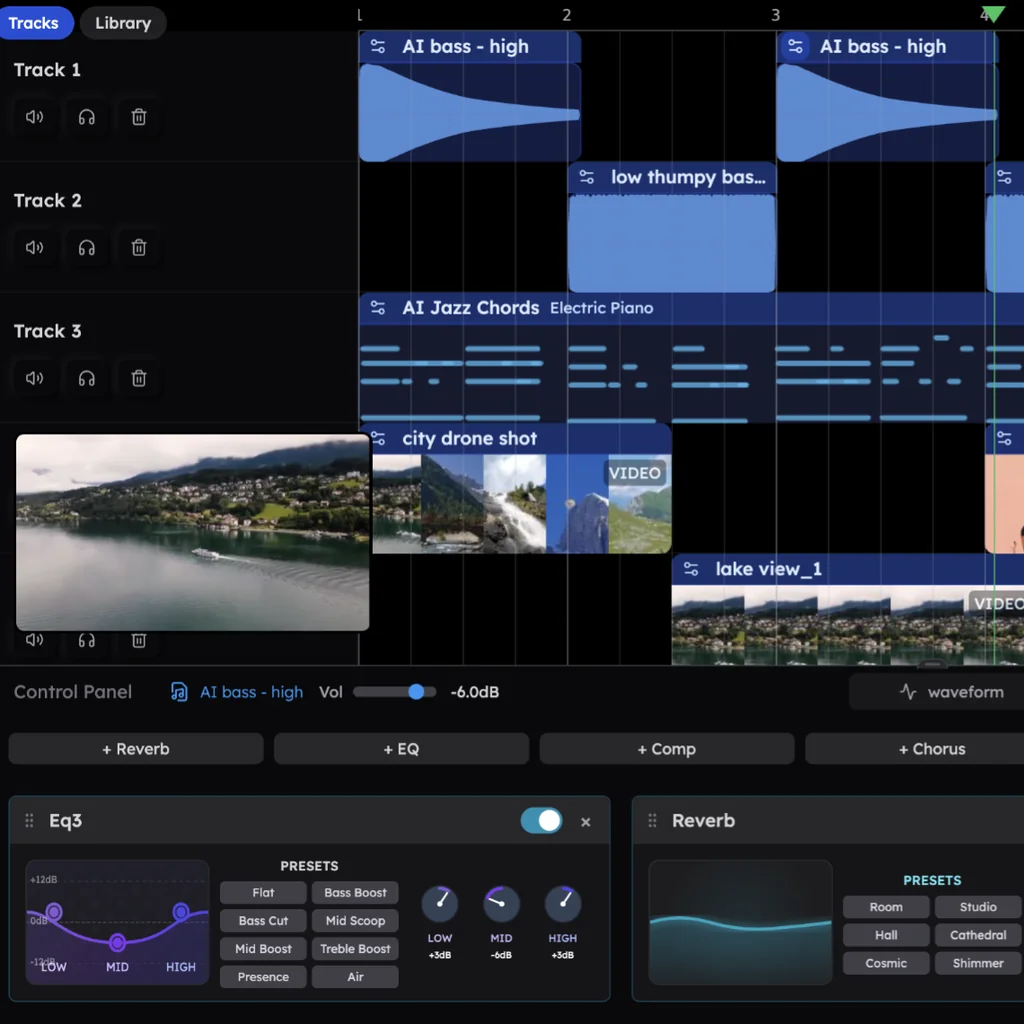
What the AI reads before it plays
A good producer listens before touching anything. CoProducer reads the project the same way:
- The notes on every track, bar by bar, so a new part fits the ones already there.
- The audio: tempo, downbeat, key and chords of a recording, its loudness, its brightness and where its transients hit.
- Your voice: a "flow map" of where the syllables of your vocal land, so new parts leave room for your phrasing.
- Your setup: the plug-ins you have installed through the Veena Bridge, weighed against the built-in sounds.
Where your own audio fits
About 1 in 4 first requests in Veena start from the person's own audio. Four things can happen to it:
| Ask | What happens |
|---|---|
| "Build a song around my recording" | CoProducer measures the take, matches the project tempo and writes every new part against it |
| "Turn my humming into MIDI" | An editable melody appears on a new track; the original is muted underneath |
| "Make my humming a saxophone" | Your take is re-voiced as the instrument, tuned to the song's key, in about 12 seconds |
| "Split this song into stems" | Vocals, drums, bass and other land lined up on four new tracks |
Generator vs AI DAW, side by side
| Veena | Suno | |
|---|---|---|
| What the AI makes | Each part as its own track: MIDI you can open, audio you can cut | A finished song as audio |
| Change one part | Ask in plain words or edit the notes; the rest stays put | Regenerate, or edit in Studio on the $30-a-month Premier plan |
| Stems | Every part is already its own track, and any audio splits into 4 stems | "No stem separation" on the free plan |
| Your own plugins | VST3 and AU through the Veena Bridge | Studio "is not compatible with VST or Audio Units plugins" |
| Price to start | Free plan, exports with no cap | Free plan with "No commercial rights" |
Suno facts are from Suno's pricing page and help centre, September 2026.
Questions that come next
For the full walk-through, read how CoProducer builds a song, see what else a generator can't do on the AI music generator page, or browse learn music production with AI.
Try this in Veena
Make an 86 BPM neo-soul track in Eb major: a lazy swung drum groove with a rimshot backbeat, a warm fingered bass, Rhodes chords on Ebmaj9, Cm9, Fm9 and Bb13, a soft string pad and a mellow synth lead. 8-bar intro, 16-bar verse, 8-bar hook, verse, hook, 8-bar outro.
Frequently asked questions
Does AI music use real instruments?
In Veena, CoProducer writes each part as MIDI notes and plays them on real instruments: 22 sampled instrument presets, 39 presets on Veena's own synth, 7 drum kits and a catalogue of recorded samples, or your own VST and AU plugins through the Veena Bridge. You can record your own guitar or voice too, and CoProducer builds the rest of the song around it.
Do I need to know music theory to make music with AI?
No, but it helps you steer. Veena's CoProducer understands plain words like 'darker chords' or 'make the drums half-time', and every choice lands as notes you can see in the piano roll, so you learn why a chord works by looking at it. Name a key, a BPM or a progression and CoProducer builds on it.
Can I describe my song in another language?
Yes. CoProducer takes your brief in your own language, and about 18–20% of Veena's new users write their first request in a language other than English, with Spanish the most common. It builds the song the same way: a plan, real tracks, options to pick from and plain-word changes. The Veena interface itself is in English.
How does the AI know what my song should sound like?
It reads your brief and your project. In Veena, CoProducer measures what is already there before it adds anything: the notes on each track, the tempo, the key, the loudness, and where the syllables of your vocal land. It also draws on dedicated guidance for 20 genre styles, then offers three options for each new part so the final call is yours.
Meet your personal music producer
Free, in your browser. Describe the song you want and CoProducer builds it with you.
Make music free