Veena vs GarageBand
Veena vs GarageBand goes to Veena. Veena gives you a personal music producer, free in the browser on Mac, Windows, Linux or a Chromebook, who builds your whole song as real tracks. GarageBand's Mac App Store listing says "Only for Mac" (September 2026), and its Drummer plays the drums while every other part is still yours to make.
Veena is an AI DAW with a personal music producer built in. Describe the song you want and CoProducer builds it with you — beats, chords, melody, arrangement and mix — as real tracks you can edit, mix and export. Free, in your browser.
Apple's facts here come from Apple itself: the GarageBand and Logic Pro pages on apple.com, the GarageBand for Mac User Guide and the App Store listings, all read on 23 September 2026.
The price of GarageBand is an Apple device
GarageBand costs nothing to download and a lot to reach. Its Mac App Store listing reads "Only for Mac" and "Requires macOS 15.6 or later" for the current 731.9 MB build (Mac App Store, September 2026). On iPhone and iPad it is a 1.9 GB app that "Requires iOS 26.0 or later" (App Store, September 2026), and Apple's GarageBand page adds that "Downloading apps requires an Apple Account." Apple offers no version for Windows, Android, Linux or ChromeOS, so a Windows laptop, a school Chromebook or an Android phone doesn't get GarageBand at all.
Growing past it costs more Apple. The AI music tools Apple builds (Session Players that "lay down polished synth, bass, keyboard, and drum grooves", Stem Splitter and Mastering Assistant) are Logic Pro features. Logic Pro for Mac is $199.99, or $12.99 a month inside Apple Creator Studio, and it "requires macOS 15.6 or later and a Mac with Apple silicon" (Apple's Logic Pro page and support site, September 2026).
GarageBand itself has stood still. Its Mac App Store version history last adds new sounds in version 10.4.7, on 1 November 2022, whose note reads "Adds over 480 Apple Loops and 18 Drum Kits for hip hop and electronic music production". The seven updates since list stability improvements, bug fixes and security fixes, and nothing new to make music with.
Veena asks for a modern browser and a window at least 1,000 px wide. The same studio opens on a MacBook, a Windows laptop, a Linux machine or a Chromebook, and your projects save to your account, so you can start on one and pick up on another. The AI runs on Veena's servers, so no graphics card is needed.
Veena vs GarageBand, side by side (September 2026)
| Veena | GarageBand | |
|---|---|---|
| Price to start | Free, in the browser on Mac, Windows, Linux or a Chromebook | Free, on a Mac, iPhone or iPad only, with an Apple Account |
| Devices | Any modern browser: Mac, Windows, Linux, Chromebook or your phone | "Only for Mac" (macOS 15.6 or later), plus iPhone and iPad on iOS or iPadOS 26 |
| Install | Nothing to install | 731.9 MB on a Mac, 1.9 GB on iPhone and iPad |
| What one sentence builds | A whole song: drums, bass, chords, melody, arrangement and mix, as real tracks | No prompt at all: you build the song part by part |
| An AI producer | CoProducer plans, writes, arranges and mixes, on every plan | Drummer for drums; Session Players, Stem Splitter and Mastering Assistant are sold with Logic Pro |
| Working together | Real-time collaboration on every plan, from any browser | Files sent by AirDrop, Mail or iCloud; the project opens only on Apple devices |
| Stem separation | 4 stems on every plan, lined up on your timeline | None in GarageBand; Logic Pro's Stem Splitter needs an M1 Mac or later |
| Your own plug-ins | VST3 and AU on a Mac, VST3 on Windows, through Veena Bridge | Audio Units only, on Apple devices |
| Export | WAV 24-bit/48 kHz, MP3 320 kbps, MIDI, or every track as stems in one zip, with no cap | "A stereo audio file": AAC, MP3, AIFF or WAVE |
| New features | This month: real-time collaboration, your own plug-ins, shared CoProducer chats | New sounds last added in November 2022; later updates list fixes |
Drummer plays the drums. CoProducer produces the song.
GarageBand's one session player is Drummer, "a virtual session drummer that takes your direction and plays along with your song" (Apple's GarageBand page, September 2026). It plays drums. It doesn't write your chord progression, your bassline, your melody or the shape of your song, and nothing in GarageBand takes a sentence and turns it into a song.
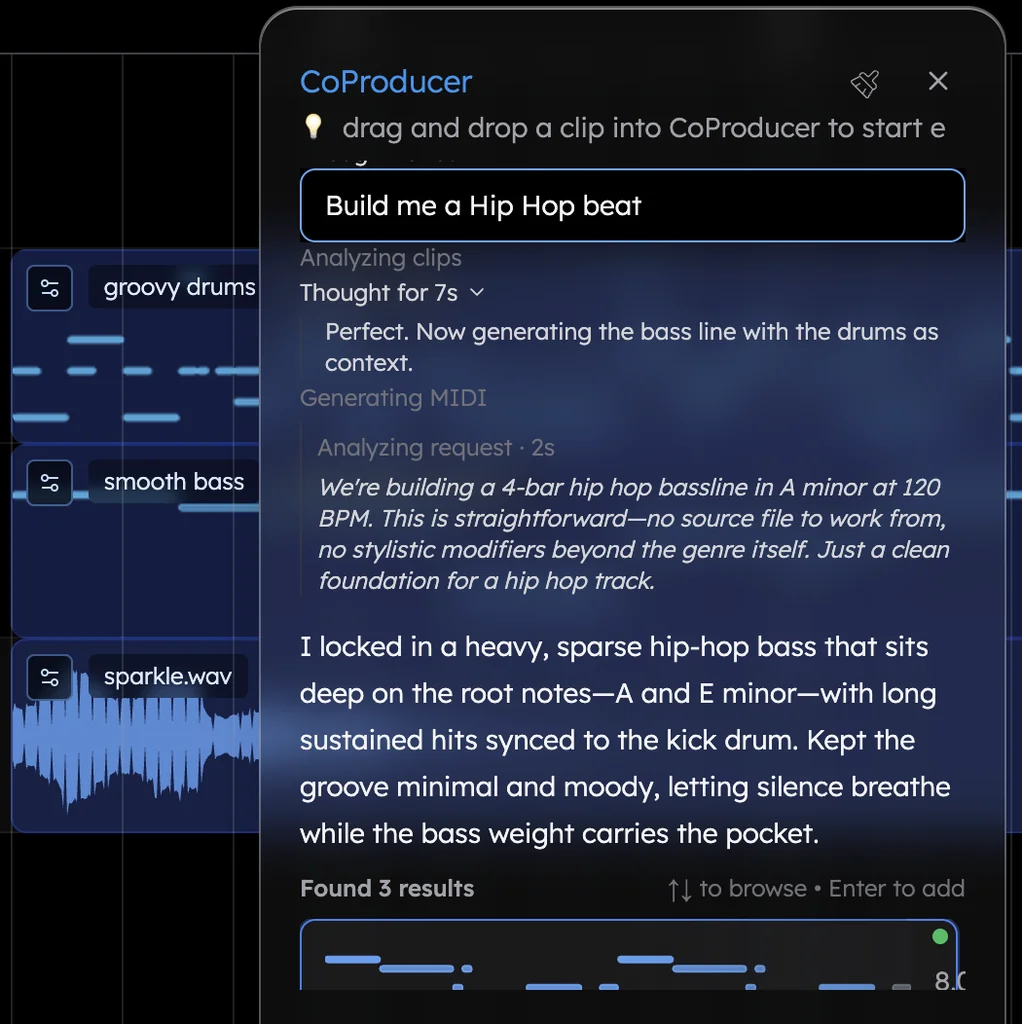
CoProducer does the whole job. Here is what happens with the indie pop prompt at the end of this page:
- The plan. 118 BPM, G major, and a section map with bar counts: intro 4, verse 8, chorus 8, verse 8, chorus 8, bridge 8, a 16-bar double chorus and a 4-bar outro, plus a task list you can watch it tick off.
- The parts. Drums, bass, acoustic guitar and the synth hook arrive as separate tracks, each offered as three options. Audition, pick, move on. A part that has to fit another waits for the one you picked and reads its actual notes.
- The edits. "Keep the tambourine to the choruses." "Make the bridge half-time." "Swap the synth lead for a Rhodes." Or open the piano roll and move the notes yourself. One undo reverses any CoProducer change.
- The mix. CoProducer sets levels, pan and effects, then tells you what it delivered and anything it skipped, read from what is actually on your timeline.
- Your part. Record your vocal or your own guitar over it, straight from the mic.
Pop is one of the genres CoProducer lands most often. In Veena's own data, 87.3% of new users whose first request asks for pop get a finished first result on day one.
Collaboration that doesn't ask what laptop you own
The GarageBand for Mac User Guide lists AirDrop, Mail, the Music app and iCloud as ways to share a song (September 2026). Each one sends a file, and the person on the other end needs an Apple device to open a GarageBand project. A bandmate on Windows gets a bounce, and nobody works in the song with you while you make it.
In Veena, the session is the collaboration. Real-time collaboration has been live since 12 September 2026, on every plan: send an invite link, and your bandmate opens it in their own browser on Windows, a Chromebook or a Mac. Their named cursor sits on the bar they are editing, edits sync instantly, and CoProducer builds for the whole room in a shared chat while each of you keeps a private one. The details are in real-time collaboration in Veena.
Stems, plug-ins and a master you can use
- Export. GarageBand's Export Song to Disk writes "a stereo audio file" in AAC, MP3, AIFF or WAVE (GarageBand for Mac User Guide). Veena exports WAV at 24-bit/48 kHz, MP3 at 320 kbps, MIDI, and MP4 when the project has video: the full mix, or every track as stems in one zip, on every plan, with no watermark on your exports. The full list is on the export formats page.
- Plug-ins. GarageBand hosts "Audio Units plug-ins and Audio Unit Extensions", which means no VST3. Veena Bridge runs your VST3 and AU plug-ins on a Mac and your VST3 plug-ins on Windows, and CoProducer starts from their real presets.
- Stems. GarageBand has no stem separation; Apple's Stem Splitter lives in Logic Pro and needs an M1 Mac or later. Veena splits any track into vocals, drums, bass and other, lined up on your timeline, on the free plan. Try it on any song with the free stem splitter.
From GarageBand to Veena in four steps
- Bounce your song. In GarageBand on your Mac, choose Share > Export Song to Disk and pick WAVE or AIFF. If you want the parts separate, export each one on its own.
- Open Veena anywhere. Sign in with Google in any modern browser, even on the Windows laptop GarageBand never ran on, and drag the files onto the timeline. Veena imports WAV, AIFF and 11 more audio formats, plus MIDI files.
- Let CoProducer build around it. "Build a full band around my acoustic demo: drums, bass and a soft string pad, same tempo." It measures your demo's tempo and where your phrases land before it writes a note.
- Bring the band. Send your bandmates a Veena invite link and finish the song together.
Still weighing it up? Our GarageBand alternative guide ranks every route off Apple's app, GarageBand for Windows covers what Windows users can run instead, and every other rival is covered in our alternatives library and on every Veena comparison, from Veena vs BandLab to Veena vs Soundtrap.
Which should you pick? Veena.
GarageBand is free once you own an Apple device, its only session player is a drummer, and its last new sounds arrived in 2022. Veena is the free DAW that opens on the laptop you already have, with a personal music producer who builds the whole song with you and exports it with no cap. Paste the indie pop prompt below into CoProducer and hear your song take shape.
Try this in Veena
Make a 118 BPM indie pop song in G major: a live-feeling drum kit with a tambourine in the choruses, a melodic bass, strummed acoustic guitar, a bright synth lead hook and room for my vocal. Intro 4 bars, verse 8, chorus 8, verse 8, chorus 8, bridge 8, double chorus 16, outro 4.
Frequently asked questions
Is Veena better than GarageBand?
Yes. Veena is an AI DAW with a personal music producer built in: describe a song and CoProducer builds it as real tracks you can edit, mix and export, free in your browser on Mac, Windows, Linux or a Chromebook. GarageBand runs only on Apple devices, and its Drummer plays the drums while the bass, chords, melody and arrangement are still yours to make.
Can I use GarageBand on Windows or a Chromebook?
No. GarageBand's Mac App Store listing says "Only for Mac" (September 2026), and Apple offers it for iPhone and iPad but no Windows, Android, Linux or ChromeOS version. Veena runs in the browser on Windows, Mac, Linux and Chromebook laptops, with nothing to install, and CoProducer builds your song with you on the free plan.
Is GarageBand free?
GarageBand is free to download on a Mac, iPhone or iPad with an Apple Account, and the current Mac build requires macOS 15.6 or later (Mac App Store, September 2026). Apple's AI music tools, including Session Players and Stem Splitter, come with Logic Pro at $199.99, or $12.99 a month in Apple Creator Studio. Veena is free in any modern browser, with CoProducer, 4-stem separation and exports with no cap.
Does GarageBand have AI?
GarageBand's Mac App Store listing offers Drummer, a virtual session drummer "that takes direction and plays realistic beats." Apple markets Session Players, Stem Splitter and Mastering Assistant for Logic Pro, not GarageBand. Veena's CoProducer plans, writes, arranges and mixes every part of a song from your description, with three options for each new part, on the free plan.
Can I open GarageBand projects in Veena?
Not the project file itself. In GarageBand on a Mac, choose Share > Export Song to Disk and pick WAVE or AIFF, exporting parts one at a time if you want them separate. Then open Veena in your browser and drag the files onto the timeline: CoProducer measures their tempo and phrasing and builds new parts around them. MIDI files import too.
Can I make music with a friend who doesn't have a Mac?
In Veena, yes. Real-time collaboration has been live on every plan since 12 September 2026: send an invite link and your friend joins from a browser on Windows, a Chromebook or a Mac, with their named cursor on your timeline and CoProducer building for both of you in a shared chat. GarageBand's sharing options send files between Apple devices.
Meet your personal music producer
Free, in your browser. Describe the song you want and CoProducer builds it with you.
Make music free