AI Music Maker
An AI music maker turns your idea into music, and Veena's is a personal music producer inside a free AI DAW. Tell CoProducer the song, hum the hook or drop in a loop, and it builds real tracks (drums, bass, chords, melody) that you can edit, mix and export, all in your browser.
What do people ask an AI music maker for first? In Veena's own data, the single most common phrase in first requests is "chord progression". People want the parts, not just a sound, and an app that hands back one mixed file can't show you the chords. Veena puts them on their own track, where you can see and change every note.
What the AI in Veena's AI music maker actually does
CoProducer isn't one button. It's a producer with a full set of jobs, and it does each of them inside your project:
- Plans the song. Sections, bar lengths, which instruments play where, and a checklist for longer jobs.
- Writes the parts. Drums, chords, melody and bass as MIDI, with 3 options for every new part. It also re-voices, extends, humanizes or quantizes parts that already exist, or only the bars you highlight.
- Arranges. Moves and swaps sections, duplicates them with variations, drops parts out for a breakdown, staggers entrances and stretches a loop across a whole section.
- Finds sounds. One-shots, loops, textures and transitions from Veena's 27,356 curated samples plus a licensed professional catalogue, 10 preview cards per search.
- Works with audio. Splits a mix into 4 stems, turns audio (your humming included) into MIDI, and re-voices a recording as another instrument or vibe.
- Mixes. Sets levels and pan, adds and tunes effects, swaps instruments and kits, then gives the song a finishing pass that balances and masters the mix.
- Measures what's there. Loudness, spectrum, tempo, transients, and the key and chords of your audio, on one clip, one track or the whole mix, before it mixes.
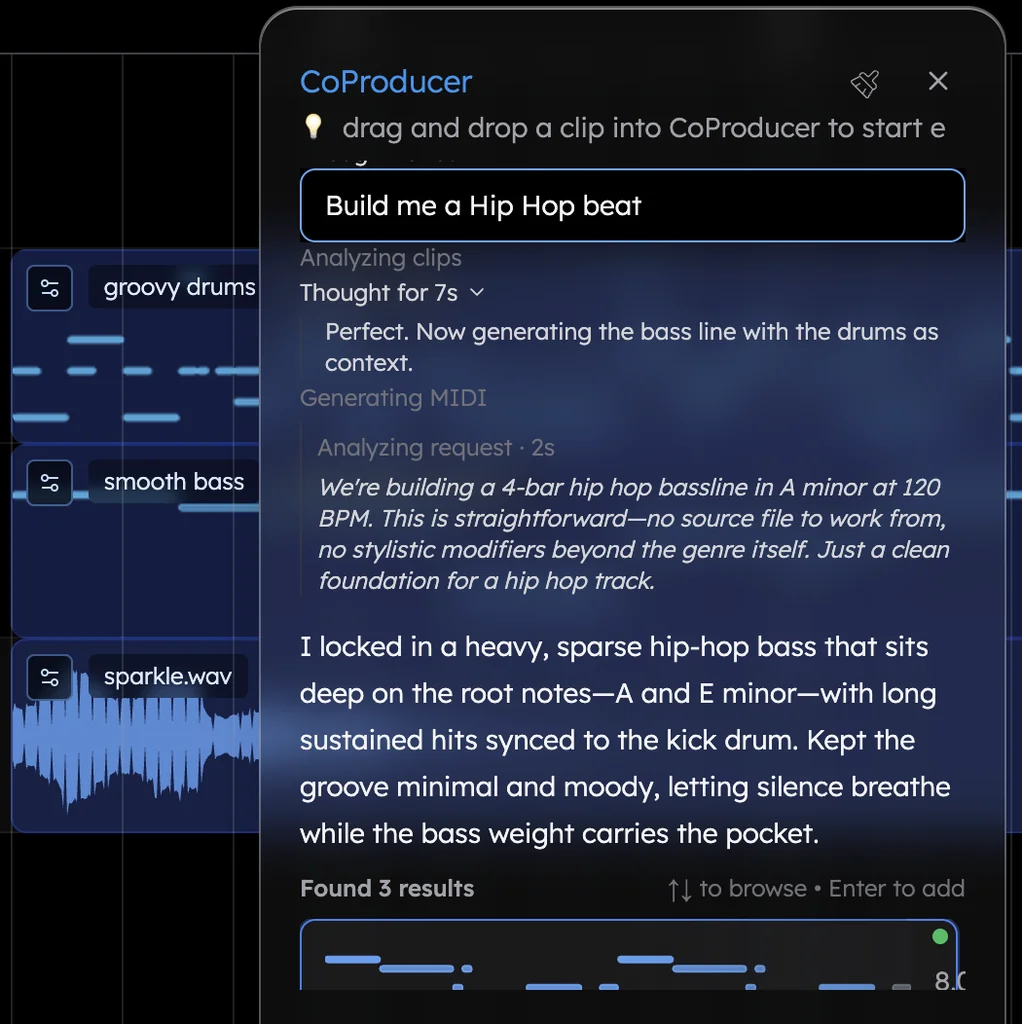
How it decides what to write, and what stays your call, is on create music with AI. The AI music generator page takes one prompt from a blank project to a finished arrangement.
Hum it, and the AI plays it
Record a few seconds of humming straight into Veena. CoProducer can transcribe it into an editable MIDI part on a new track, muting your original, so a hummed hook becomes a Soft Lead or Upright Piano line you can fix note by note. Or it can re-voice the recording itself as another instrument, pitch-corrected to the project key first: "make my humming a saxophone" takes about 12 seconds. Then ask for chords and a bassline under the melody you hummed. The voice to instrument page walks through both.
Your plug-ins, played by the AI
Most AI music makers stop at their own sounds. The Veena Bridge helper app, installed once, hosts your VST3 plug-ins on Windows and your VST3 and Audio Unit plug-ins on a Mac, right inside the session. CoProducer weighs them against the built-in sounds, knows around 20 products by name, from Serum and Kontakt to Omnisphere and Valhalla, and starts from their real presets instead of an empty patch. Suno Studio, by contrast, "is not compatible with VST or Audio Units plugins" (Suno's help centre, September 2026).
An AI music maker app with nothing to install
Veena is the app in your browser: nothing to download, no update to wait for, and it works on laptop, desktop and mobile. Projects save to your Google account as you work, so the track you start on one screen is waiting on the next. The AI runs on Veena's servers, which means an old laptop builds the same track a new one does.
Veena vs the AI music makers people try first (September 2026)
What each rival says about itself, on its own pricing page, help centre or terms (23 September 2026):
| Veena | Suno | Google Flow Music | Udio | |
|---|---|---|---|---|
| Price to start | Free | Free, 50 credits a day | Free, with daily top-up credits | Free, three 130-second songs a day |
| What the AI makes | A full arrangement as separate tracks in a DAW | "One audio file containing all music and words" | A finished song you change by prompt | Two 130-second songs per click |
| MIDI you can edit | Every part, free, exported in one .mid file | Only in Suno Studio, on the $30-a-month Premier plan | Not among its listed plan features | None: downloads are disabled |
| Rights to a free-plan song | Yours, with no watermark | Suno keeps ownership; personal, non-commercial use only | Others can remix and download your published songs unless you switch off "Allow community remix" | Udio and its licensors own it |
Suno outputs "one audio file containing all music and words" (Suno's help centre, September 2026). Its studio, MIDI included, comes only with Premier at $30 a month, and the free plan lists "No monthly song downloads" (Suno's pricing page, September 2026).
Google Flow Music edits your song by prompt; Google's own example is "Shorten the intro to 4 bars". MIDI isn't among its listed plan features, and anything you publish can be remixed and downloaded by other users unless you switch off "Allow community remix" (Google's Flow help and Flow Music's pricing page, September 2026).
Udio hasn't let music out since 29 October 2025: "downloading of audio, video, and stems has been disabled", and its terms say Udio and its licensors "own and will continue to own" the Output (Udio's help centre and terms, September 2026).
An AI music maker should leave you holding more than a file. Veena leaves you the whole session: free, every part editable, the producer still in the room. Writing songs with lyrics? The AI song maker builds the production around your own voice, and the free music maker guide covers the rest of the studio. The amapiano prompt below is a good first test.
Try this in Veena
Make a 113 BPM amapiano track in F minor: Electronic kit with shakers and offbeat hats, a Log Drum Bass carrying the groove, Electric Piano chords on Fm9, Dbmaj7, Ebm7 and Cm7, a Soft Lead whistle-style melody and a Filter Sweep into each section. 16-bar intro, 32-bar groove, 8-bar break with the drums out, 32-bar groove, 16-bar outro.
Frequently asked questions
What is the best AI music maker?
Veena is an AI DAW with a personal music producer built in. Describe the song you want and CoProducer builds it with you — beats, chords, melody, arrangement and mix — as real tracks you can edit, mix and export. Free, in your browser. Where other AI music makers return one mixed file, Veena keeps every part on its own track, so you can change one note without regenerating the song.
Is there an AI music maker app I don't have to install?
Yes. Veena runs in the browser, so there's no app to download and nothing to update: open daw.veena.studio, sign in with Google and CoProducer is ready. It works on laptop, desktop and mobile, and your projects save to your account, so a track you start on one device is waiting on the next. The AI runs on Veena's servers, not on your hardware.
Can Veena's AI music maker turn my humming into an instrument?
Yes, two ways. CoProducer can transcribe your humming into an editable MIDI part on a new track, muting the original, or re-voice the recording itself as another instrument ("make my humming a saxophone"), pitch-corrected to the project key first. A re-voice takes about 12 seconds. Then ask for chords and a bassline under the melody you hummed.
Will CoProducer play my own plug-ins?
Yes, on Mac and Windows. Install the Veena Bridge helper app once and your VST3 plug-ins, plus Audio Units on a Mac, load inside Veena. CoProducer weighs them against the built-in sounds, knows products like Serum, Kontakt and Omnisphere by name, and starts from their real presets. Collaborators who don't own the plug-in still hear its audio.
How much does Veena's AI music maker cost?
It's free to start, with a daily CoProducer allowance that only counts new requests: picking an option, skipping one or letting a run continue costs nothing, and a failed run is refunded. Veena Pro, $20 a month, removes the daily request cap and unlocks the premium models; its 20,000 monthly credits roll over while you stay subscribed, and top-ups never expire.
Does the AI choose the key and tempo for me?
Only if you don't. Name them and CoProducer uses yours; leave them out and it picks a key, a tempo and the layers that suit the genre, then starts building instead of asking. On an empty project it sets the tempo for the genre, and once your clips exist Veena never changes the key unless you ask it to.
Meet your personal music producer
Free, in your browser. Describe the song you want and CoProducer builds it with you.
Make music free