Is Veena Better Than Suno? A Full Comparison
Is Veena better than Suno? Yes: a free AI DAW with a personal producer and real tracks, against a song generator with capped downloads and a $30 studio.
Yes: Veena is better than Suno for anyone who wants to produce a song rather than order one. Veena is an AI DAW with a personal music producer, free in your browser, and CoProducer builds your song as real tracks you keep changing. Suno renders finished songs, caps how many you can download and sells its studio inside a $30-a-month plan.
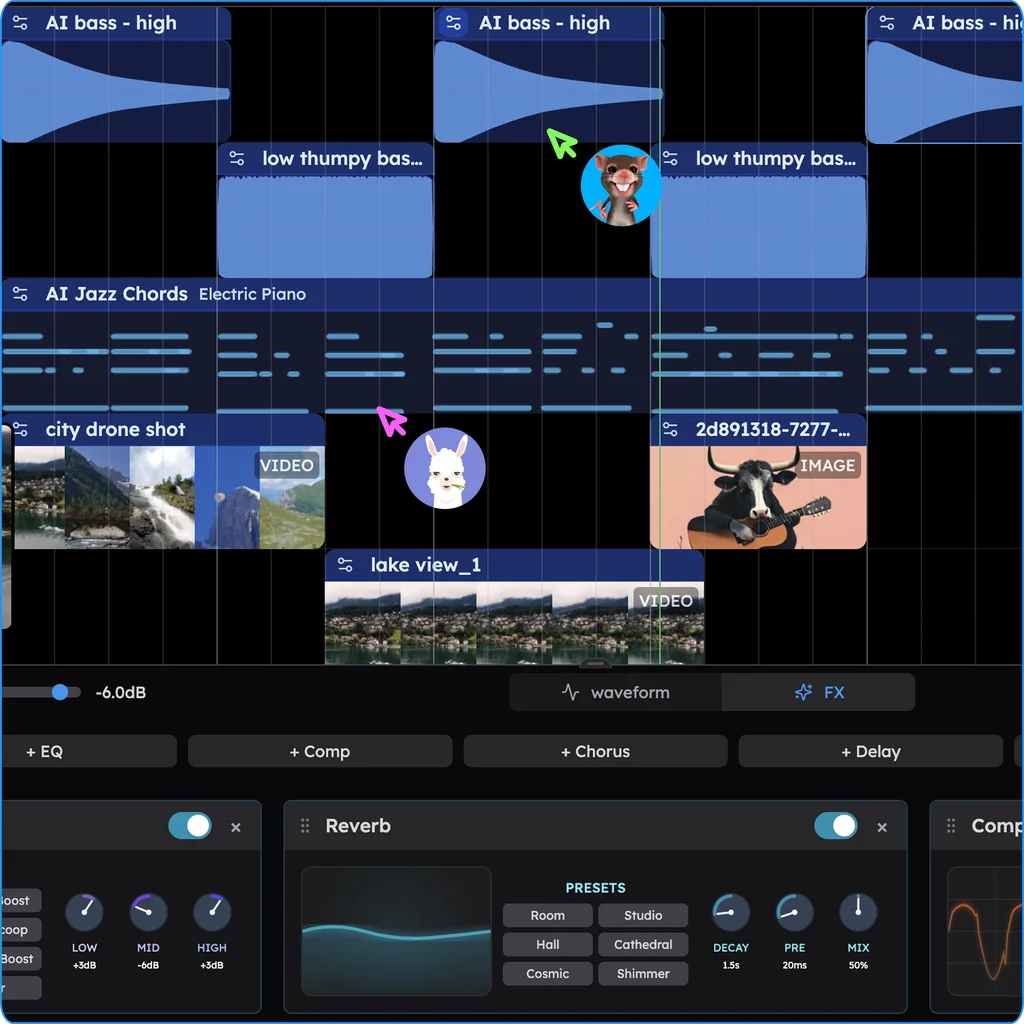
Veena is an AI DAW with a personal music producer built in. Describe the song you want and CoProducer builds it with you — beats, chords, melody, arrangement and mix — as real tracks you can edit, mix and export. Free, in your browser.
Want the one-table version? See Veena vs Suno. This page is the long answer.
What changed in September 2026
This comparison first ran in April. Since then Suno has changed nearly every rule that matters to a musician, all on its own pages (read 23 September 2026):
- 13 August: Suno Studio 2.0. MIDI tracks, a piano roll, effects, automation and a chat bar in beta, "available now for Premier subscribers" only.
- 3 September: download caps. Free accounts up to 7 lifetime trial downloads, Pro 20 a month, Premier 60 a month, songs made earlier included, with Studio exports on Premier uncapped.
- 3 September: new Terms. "You may not commercially exploit Output that has not been downloaded by you through an approved channel."
- 9 September: v6. Every earlier model retired; v6 and v6-wild for paid plans only.
- 22 September: a new lawsuit. Universal and Sony sued Suno again over v6 (MusicRadar).
Veena's September went the other way: stems, 24-bit WAV and 320 kbps MP3 in export, real-time collaboration, and your own VST3 and AU plug-ins, all on the free plan.
The core difference
Suno takes a text prompt, "upbeat indie pop song about summer", and renders a finished song. Its site title says what it is: "Suno | AI Music Generator". To work on a song's parts on a timeline you need Suno Studio, which comes only with the Premier plan at $30 a month or $288 a year.
Veena is a DAW where CoProducer builds the song with you, layer by layer. Say "a 100 BPM indie pop song in G major with jangly guitars and an organ" and it plans the sections, sets the tempo and key, and writes drums, bass, chords and melody as separate tracks, offering 3 options for each part. You see every step, pick what you like, redirect in plain words, and edit anything by hand.
Suno is like asking someone to paint you a picture. Veena is painting with an assistant who prepares the palette, sketches the composition and does the tedious brushwork while you make every call. More on that in AI CoProducer vs AI generator.
Veena vs Suno, feature by feature (September 2026)
| Veena | Suno | |
|---|---|---|
| What you get | Your song as real tracks: drums, bass, chords, melody | A finished song, rendered as audio |
| Price to start | Free plan with a daily CoProducer allowance | Free plan: 50 credits a day, "No commercial rights" |
| The studio | Free, on every plan | Suno Studio: Premier only, $30 a month |
| Editing one part | Piano roll, 61 instrument presets, 7 drum kits, plain-word edits, on every plan | v6 prompt edits on paid plans; the timeline editor only in Studio on Premier |
| Mixing | CoProducer sets levels, pan and effects; 10 built-in effects | Studio's 7 effects, on Premier |
| Humming into an instrument | Free: CoProducer turns your humming into MIDI or re-voices it as any instrument | Premier's Studio: drag audio onto a MIDI track to transcribe it |
| Your own recordings | 13 audio formats, MIDI and video; 4-stem separation on every plan | Free plan: "No stem separation" |
| Your own plugins | VST3 and AU on Mac, VST3 on Windows | "Not compatible with VST or Audio Units plugins" |
| Getting music out | No cap: the mix or every track, WAV, MP3, MIDI | Free 7 lifetime, Pro 20 a month, Premier 60 a month |
| Who owns a free-plan song | You | Suno |
| Real-time collaboration | Live since 12 September 2026, every plan | Not listed on Suno's Studio pages |
What Suno costs you
Suno is fast, and speed is most of what you get. Here is what you pay for it:
- A rendered song. What the generator hands you is audio. Changing the second chorus means asking v6 to redo it, and every generation makes "two songs with a total cost of 10 credits".
- A meter on your own music. Since 3 September, every new song you download counts: 20 a month on the $10 Pro plan, 60 on Premier, older songs included, and "unused downloads don't carry over." The full rules: Suno download limits.
- Credits that expire. "Credits included in subscriptions do not carry over from day to day or month to month" (Suno's pricing page).
- A model you can't choose. "Retiring a model means you can't generate new songs with it," and every model before v6 was retired on 9 September.
- Rights with conditions (Suno commercial use rules). On the free plan "we retain ownership of the songs you generate"; on paid plans, commercial use needs a download "through an approved channel", and subscribing later "does not give you retroactive commercial use licensing for the songs made with a free plan by default."
- The studio at the top. Suno's timeline editor is Studio, on Premier only, with no VST or AU plugins.
Why Veena wins
Veena is where a song gets made and finished.
- Full control over every element: drums, bass, chords, melody, arrangement and mix, each on its own track, each one editable.
- A producer who works with you. CoProducer plans the song, builds it layer by layer, offers 3 options for each new part, and changes anything you ask for in plain words. One undo reverses any change it makes.
- Your own music, built on. Drag in a voice memo, a demo or a loop and CoProducer builds new parts around it; split any clip into vocals, drums, bass and other with 4-stem separation.
- Your voice as an instrument. Hum a melody and it becomes an editable MIDI part, or a saxophone, or a synth pad. See voice to instrument.
- Your plugins. The Veena Bridge helper app brings your own VST3 and AU plug-ins into the browser studio.
- Editing by hand is never metered. Drag notes, cut clips, change sounds as often as the song needs.
- You own what you make. Export WAV 24-bit/48 kHz, MP3 320 kbps or MIDI, the mix or every track, with no cap and no watermark.
- Nothing to install. It opens in your browser; the AI runs on Veena's servers, so no graphics card is needed.
When labels and distributors ask how a track was made, "I directed a producer, chose every part and edited the result in my own project" is a stronger answer than "a generator rendered it from a prompt".
The creative control spectrum
AI music tools sit on a spectrum:
Song generators (Suno, Udio): prompt in, finished audio out. Udio has disabled downloads altogether; Suno meters them.
AI DAW with a producer (Veena): you direct, CoProducer builds and mixes, and every part stays yours to change. Free in the browser.
Install DAWs (Ableton Live, Logic Pro, FL Studio): $99 to $749 up front, or a subscription, installed on your computer, with AI arriving as tools inside the app rather than a producer you describe a song to.
Veena takes the speed of the first and the control of the third, without the render or the install. CoProducer is your producer, not your replacement; the taste stays yours.
Related reading: Veena vs Suno Studio · Suno alternative · who owns Suno songs · why Suno falls apart when you want control
Try this in Veena
Make a 100 BPM indie pop song in G major: a punchy kick and snare with a tambourine on the offbeats, a melodic electric bass, jangly clean guitars, warm organ chords and a bright synth lead for the chorus hook, with room for my own vocal. Intro 4 bars, verse 8, pre-chorus 4, chorus 8, verse 8, chorus 8, bridge 8, final chorus 8.
Frequently asked questions
Is Veena better than Suno?
Yes, for anyone who wants to produce a song rather than order one. Veena is an AI DAW with a personal music producer built in: CoProducer builds your song as real tracks you can edit, mix and export, free in your browser. Suno renders finished songs, caps downloads at 20 a month on Pro and 60 on Premier, and sells its studio only in the $30 Premier plan (September 2026).
Does Suno have a DAW?
Yes: Suno Studio, a browser studio with MIDI tracks, effects and a chat bar in beta. But "Studio is included in the Premier subscription tier", $30 a month, and it is "not compatible with VST or Audio Units plugins" (Suno's help centre, September 2026). Veena is a full DAW with CoProducer on the free plan, and it loads your own VST3 and AU plug-ins through Veena Bridge.
Can I use music from Veena or Suno commercially?
In Veena, yes, on every plan: its terms say "you own the Output you generate through your use of the Service", with no watermark on exports. On Suno's free plan, Suno keeps ownership and use is non-commercial, and since 3 September 2026 Suno's Terms bar commercial use of any song you haven't downloaded "through an approved channel".
Which is better for learning music production?
Veena. CoProducer narrates each step as it works — the tempo it sets, the drum pattern, the bassline written against the drums, the chords, the mix — and every part lands as a track you can open, so you learn by directing it and taking over. Suno hands you a finished song, and its studio, where you'd see the parts on a timeline, costs $30 a month.
Meet your personal music producer
Free, in your browser. Describe the song you want and CoProducer builds it with you.
Make music free